Social Login for PrestaShop: Google, Apple, Facebook and Microsoft

With this social login, your customers sign in with Google, Apple, Facebook or Microsoft in one click, and buy without creating another password.

You test each network with your own account before anyone sees it, and if something fails the module tells you what to do in plain words. The buttons show on the sign-in page, at account creation, at checkout and in My account, with your theme as it is.

What’s included

  • Google
  • Apple
  • Facebook
  • Microsoft
  • PayPal, Amazon, LinkedIn and X
  • Work accounts detected by themselves
  • Email code and passkeys
  • Sales per network
$89.99
Option

Got a question before you buy? Tell us about your shop and we'll reply within 24 hours.

Ask us
PrestaShop 1.7.5–1.7.8 · 8 · 9
SSL Secure
Instant Download
Developer support
Licensed
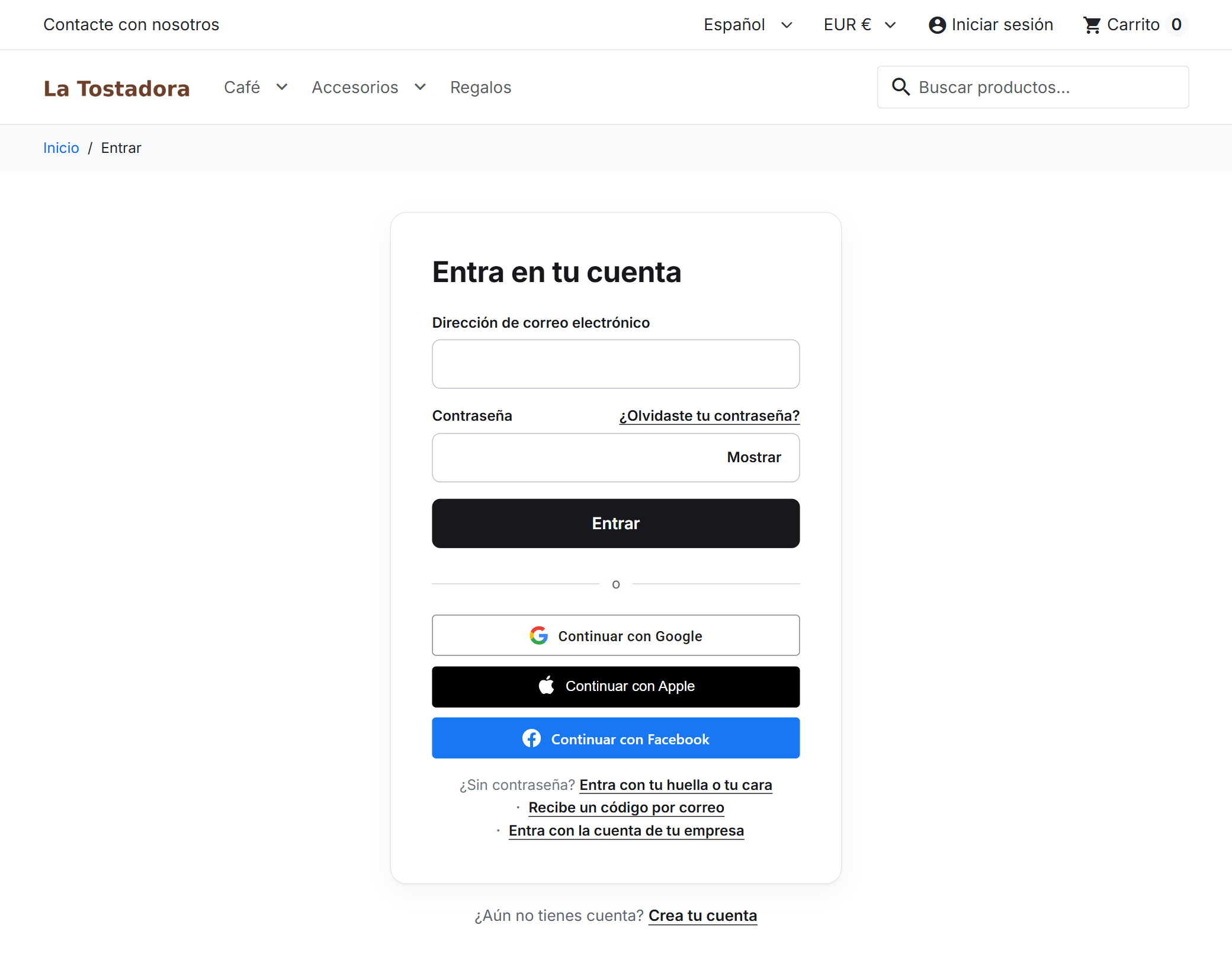
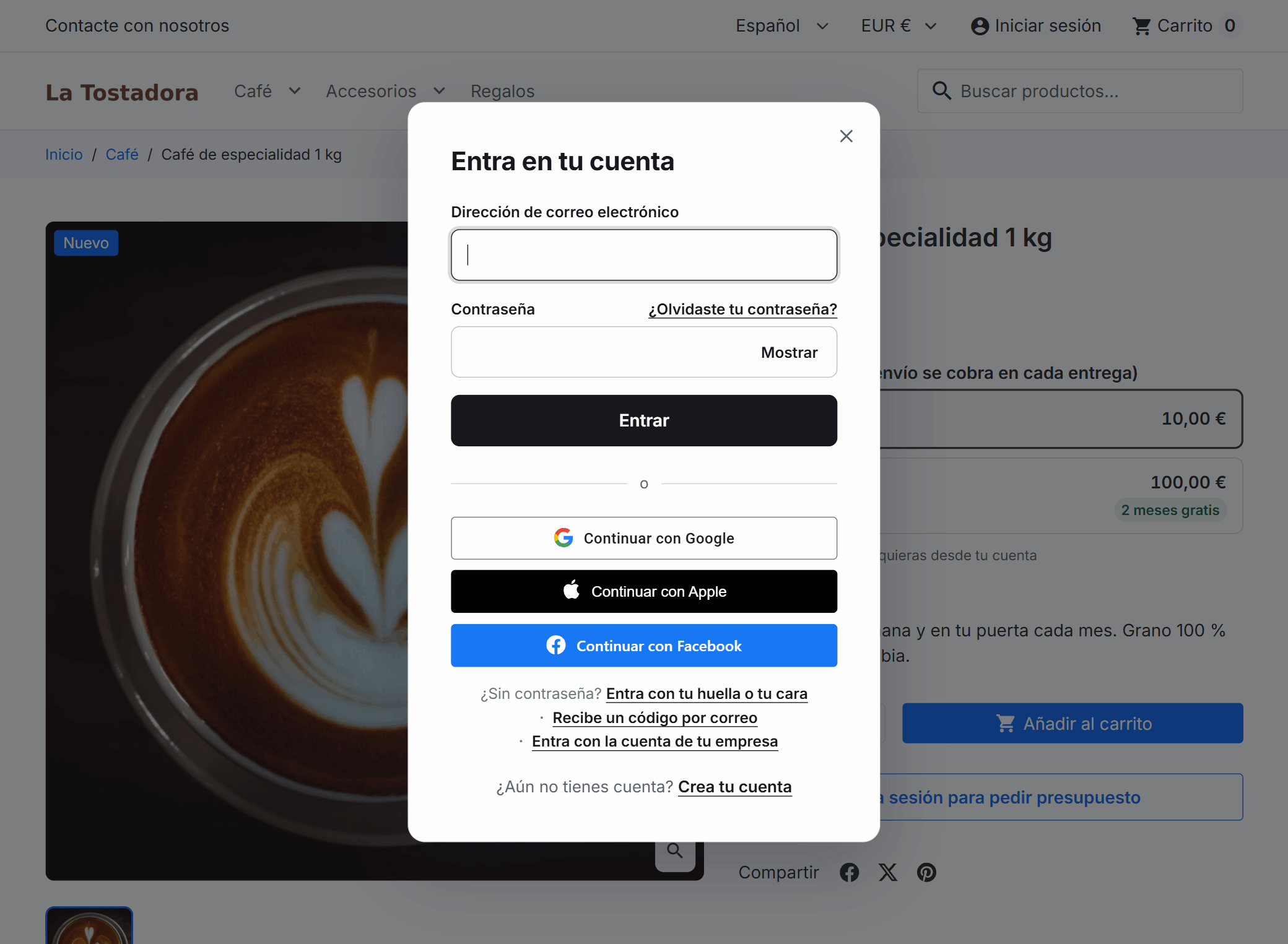
Social login for PrestaShop: Sign in with Google, Apple, Facebook and Microsoft buttons on the sign-in page
Social Login for PrestaShop: Google, Apple, Facebook and Microsoft
Selected:
$89.99
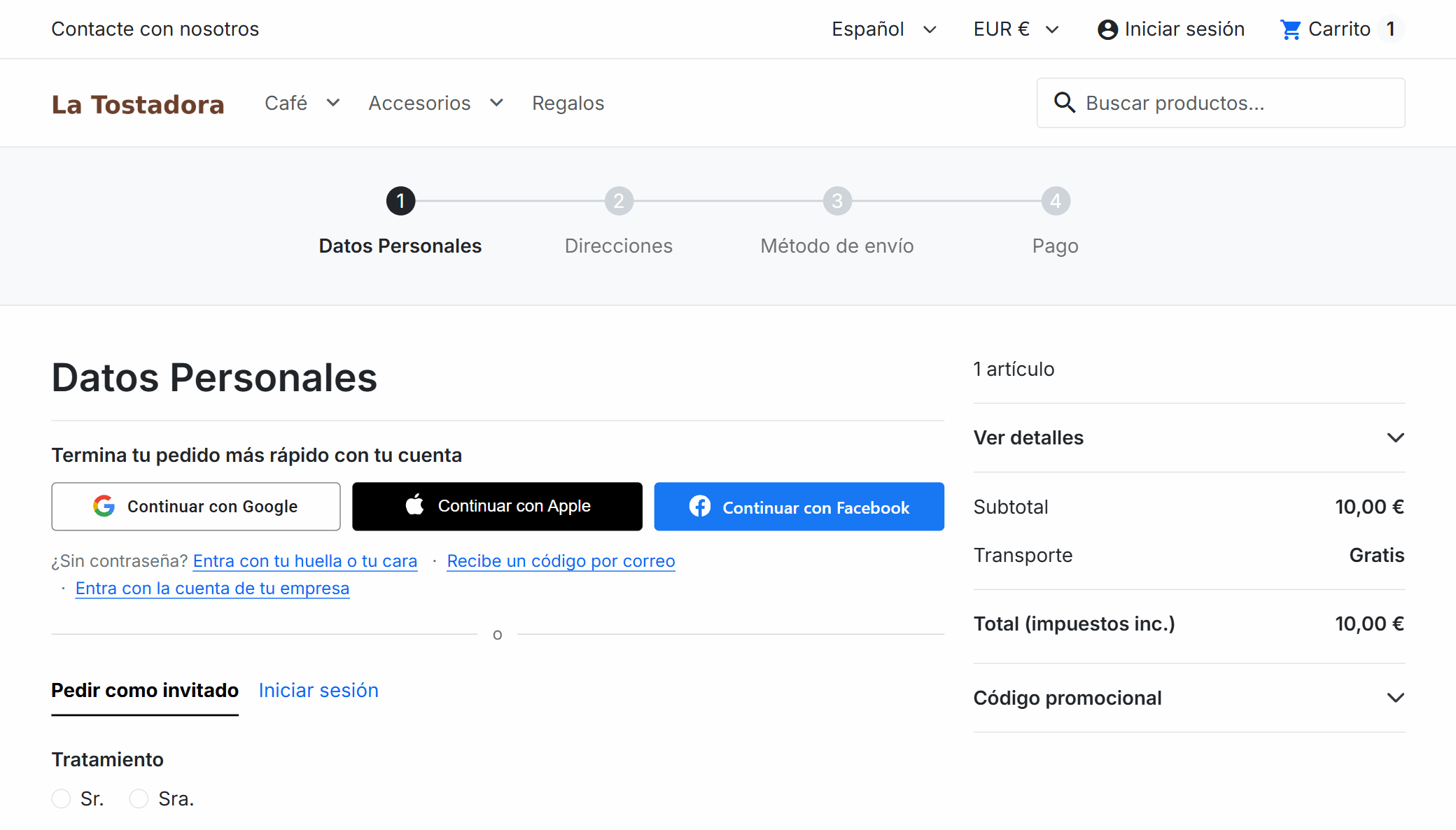
Social login at PrestaShop checkout: Google, Apple and Facebook buttons above the personal details form

At checkout, your customer taps their account and carries on with their cart, with no form to fill in and no password to make up.

What happens on your sign-in page today

Asking for a new password in the middle of an order makes some of your customers leave it for another day. And setting up social login usually brings its own problems.

Without the module

  • Your customer has to create yet another password to buy, and many give up halfway.
  • Whoever forgot it asks for a link, waits for the email and sometimes never comes back.
  • To offer Apple, other modules make you build by hand a key that expires every six months.
  • When a network stops working, you find out from a customer's complaint.

With the module

  • They sign in with the Google, Apple, Facebook or Microsoft account they already use, in one click.
  • They come back to checkout with their cart and already signed in.
  • For Apple you upload one file once and the module handles the rest.
  • Every network is tested with your own account before it goes live, and the module warns you if it fails or is about to expire.

What your customer sees

Real screens of the module in a PrestaShop 9 shop with the Hummingbird theme.

1. On the sign-in page, the buttons sit under the form, all the same size and with each network's official look. Customers who'd rather not use a network get a code by email or sign in with their fingerprint or face (passkey), with no password.

PrestaShop sign-in page with social login: Sign in with Google, Apple and Facebook buttons, email code and passkey

Next: At checkout

2. At checkout, above the personal details: “Check out faster with your account”. Your customer signs in with their network and comes back to the same step, with their cart.

PrestaShop checkout with social login: sign in with Google, Apple or Facebook before filling in the details

Next: On mobile

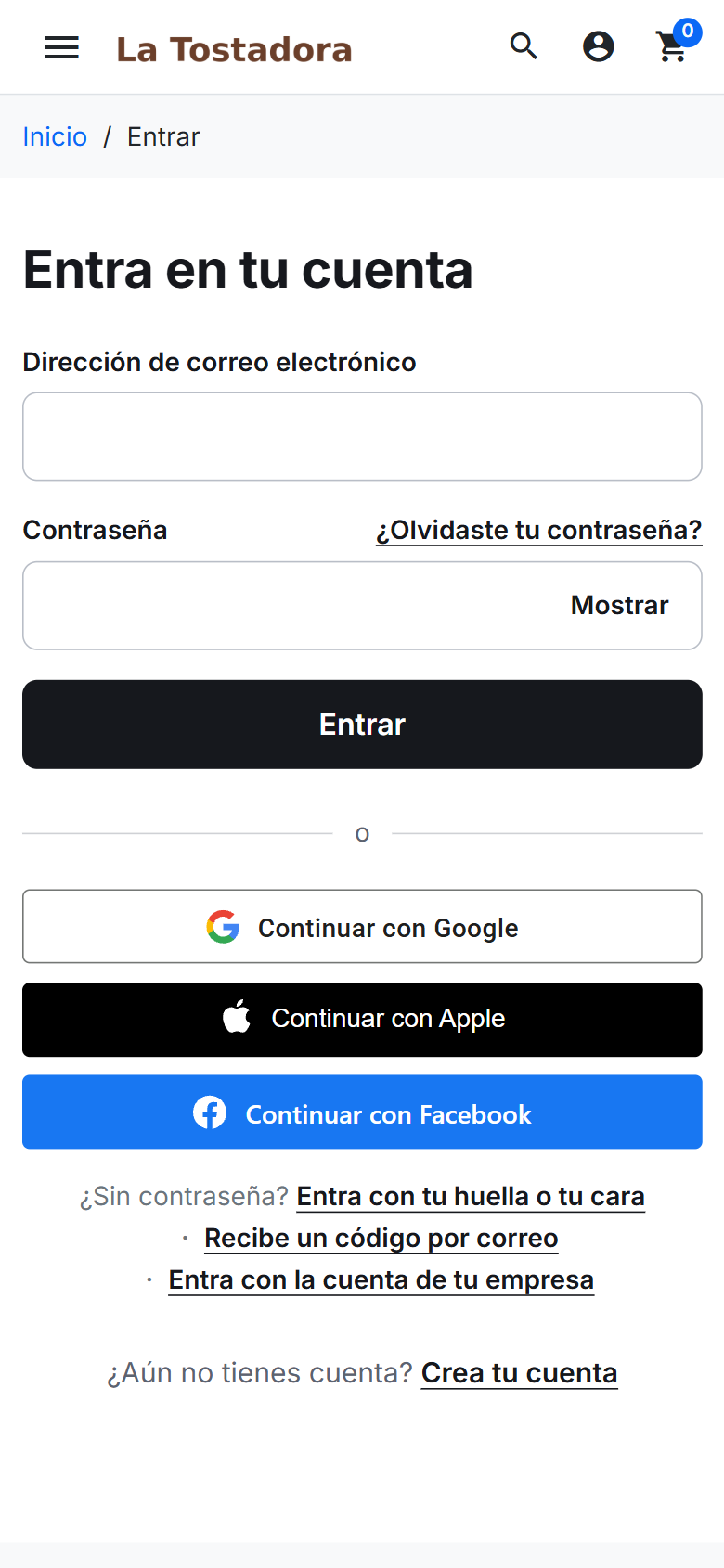
3. On mobile, the buttons take the full width and are easy to tap. This is where it shows most: nobody wants to type a new password on a phone keyboard.

PrestaShop social login on mobile: full-width Google, Apple and Facebook buttons

Next: In their account

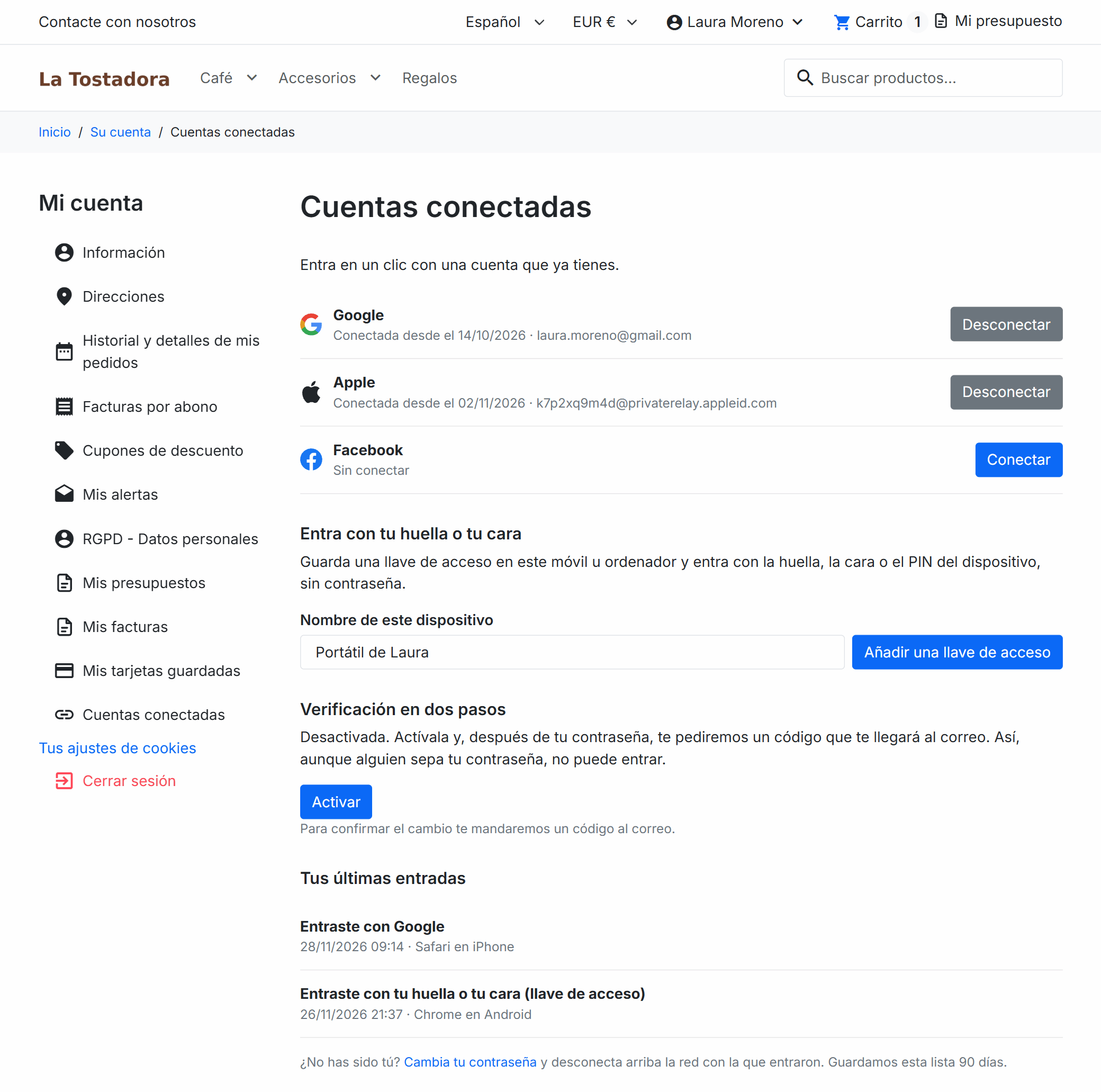
4. In My account, “Connected accounts”: your customer connects or disconnects their networks, saves a passkey on their phone, turns on two-step verification if they want it and sees their recent sign-ins. They can only remove a network if another way to sign in is left.

Connected accounts in PrestaShop My account: Google and Apple connected, passkey, two-step verification and recent sign-ins

Each network tested before anyone sees it

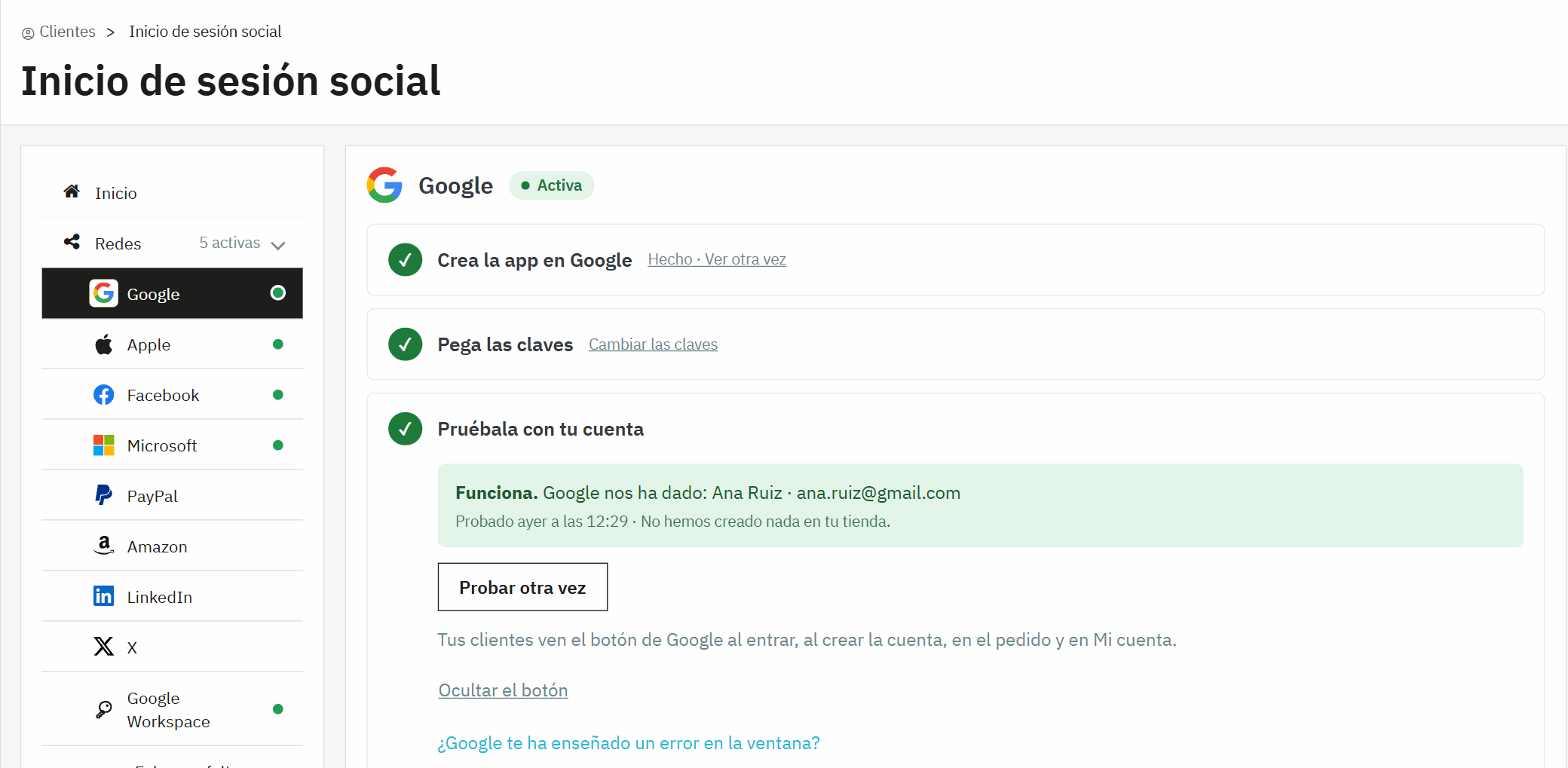
A network goes live in three steps: you create its app with the module's guide, paste the keys and click “Test with my account”. The button doesn't appear in your shop until that test passes.

  • Every value the network's console asks for, with its own copy button.
  • For Google you drop in the file you download from Google Cloud and the keys fill themselves in. About 10 minutes.
  • The test shows you what data the network sends, and nothing is created in your shop.
  • If you change the keys of a network that already works, your customers keep signing in with the old ones until the new ones pass their test.
Google settings in the PrestaShop social login back office: three steps and the test with your account passed

Sign in with Apple, no certificates

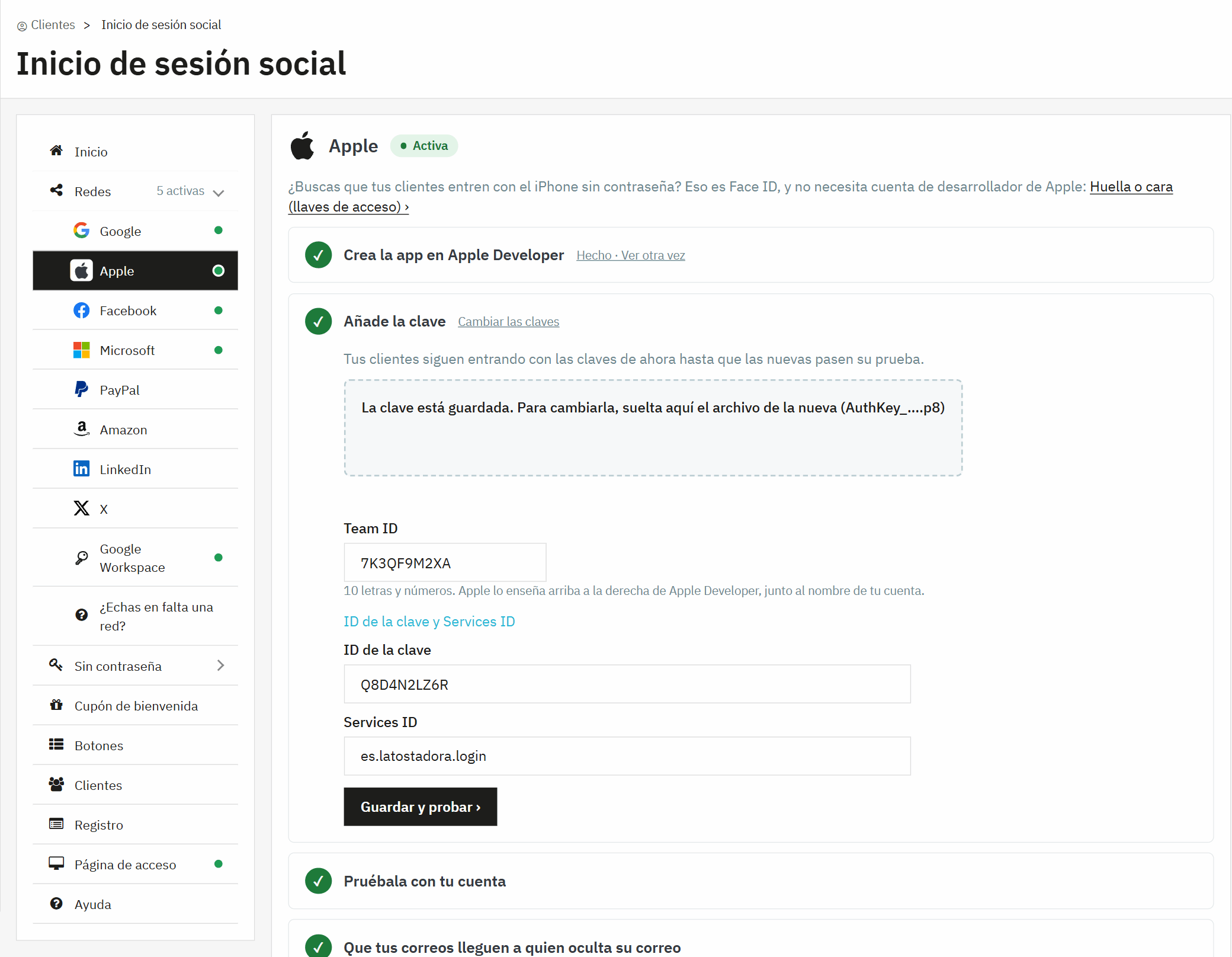
Apple asks for a signed key that expires every six months, and almost every module makes you build and renew it by hand. Here you upload the key file Apple gives you once, type your Team ID and the module signs that key itself at every sign-in. There's nothing to renew.

  • Drop in the .p8 file and the key ID is read from its name.
  • The key is stored encrypted in your shop.
  • Customers who hide their email with Apple still get your order confirmations: the module checks your domain and sends a test email to that hidden address.
  • It tells you if a customer stops receiving your emails because they turned off forwarding at Apple.
Sign in with Apple on PrestaShop: upload the .p8 key file and Team ID, no client secret generated by hand

When something fails, it tells you what to do

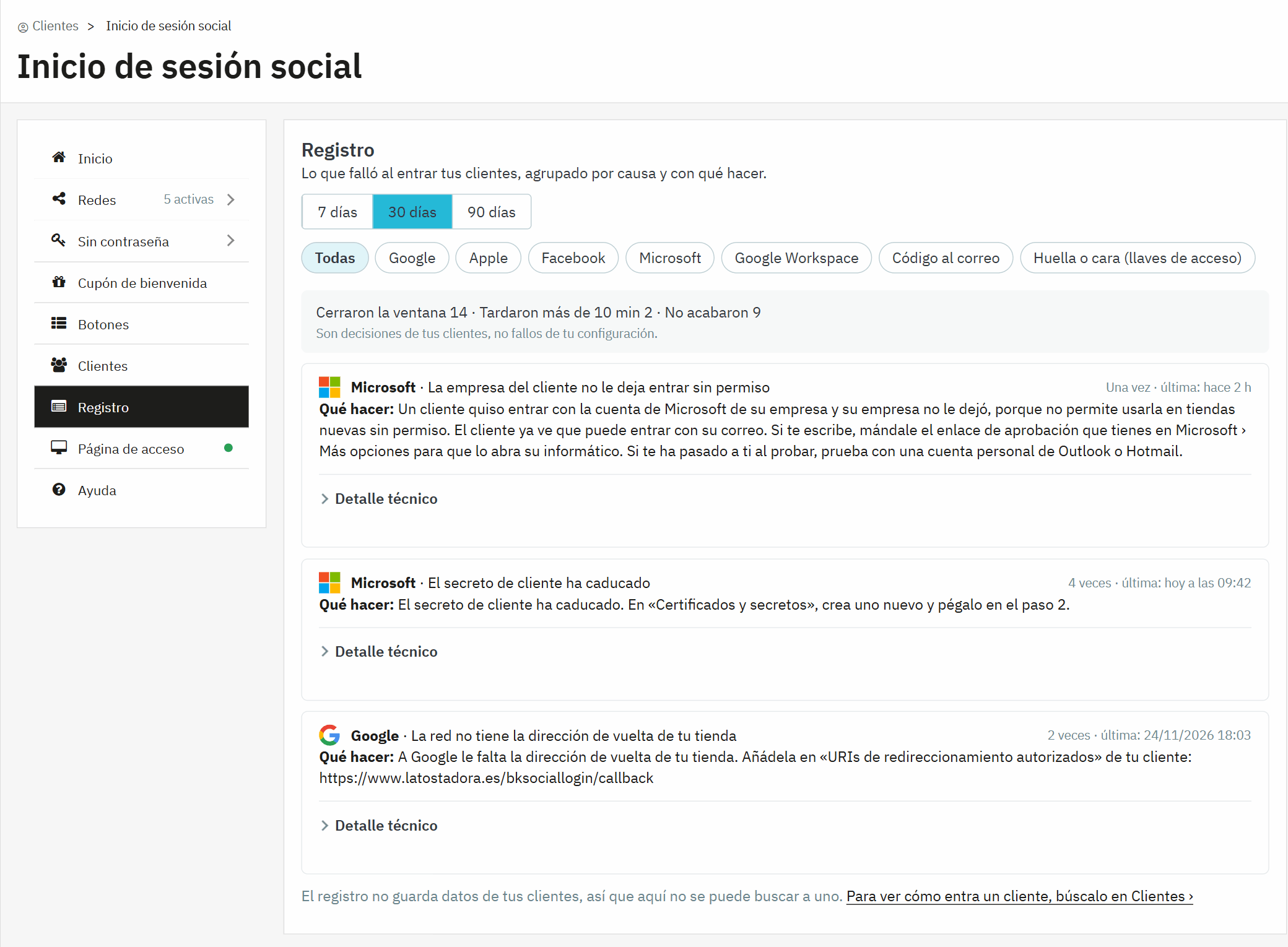
The log groups failures by cause and explains them in plain words: what happened, how many times and what to change at the network. The technical detail stays folded away for whoever runs your shop.

  • Setup failures kept apart from customers who closed the window or changed their mind.
  • A warning on the module's home page when a network fails more than it should.
  • A reminder 30 days before your Microsoft secret expires.
  • If a customer's company won't let them use Microsoft without permission, the log tells you which link to send so their IT person can approve your shop.
  • No customer data: the log keeps causes and figures, not people.
PrestaShop social login error log: each failure with its cause and what to do

What each network sells

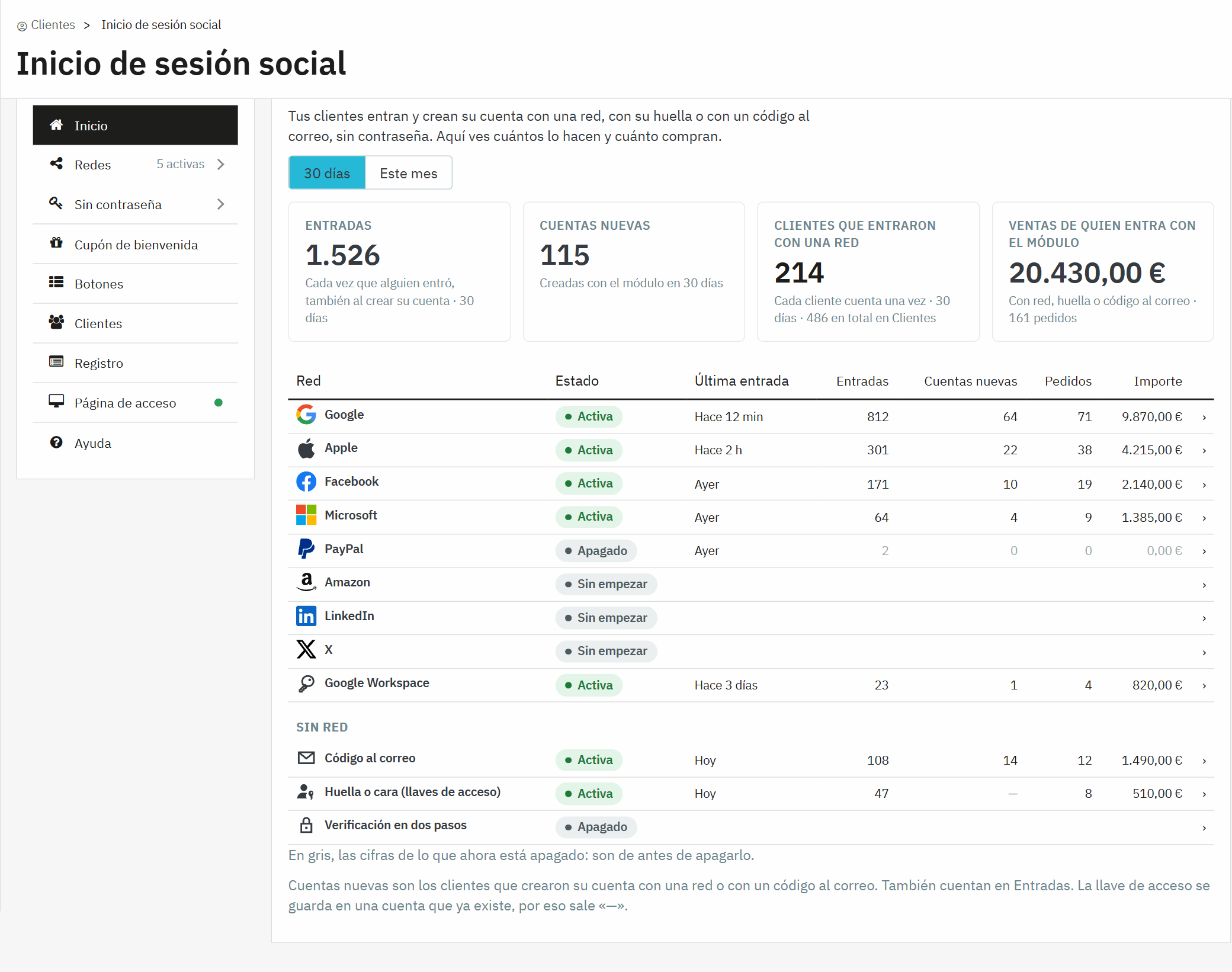
The module's home page shows you, network by network, how often your customers sign in, how many new accounts are created and how many orders and how much revenue they bring. So you know which buttons are worth keeping in sight.

  • Sign-ins, new accounts, orders and revenue per network, for the last 30 days or this month.
  • Email codes and passkeys, with their own figures.
  • A welcome coupon for every new account if you want one: a code of their own for each customer, and you see how many end up in an order.
  • Each network's status at a glance: live, failing or waiting for its test.
  • In Customers, who signs in with which network, since when and the last time.
Sales per network for social login in the PrestaShop back office: sign-ins, new accounts, orders and revenue

With your shop's look

The buttons appear by themselves in Classic, Hummingbird and the themes built on them, without touching templates. And if your sign-in page has aged, the module brings a new one you turn on with a switch.

  • Full buttons or logos only, in the order you drag them into.
  • On the sign-in page, at account creation, at checkout and in My account: you choose where.
  • Its own page to sign in, create an account and reset the password, with PrestaShop's forms and checks.
  • “Sign in” in the header opens a window, so your customer signs in without leaving the page they were on.
PrestaShop sign-in window opened from the header over a product page, with social login

For your business customers

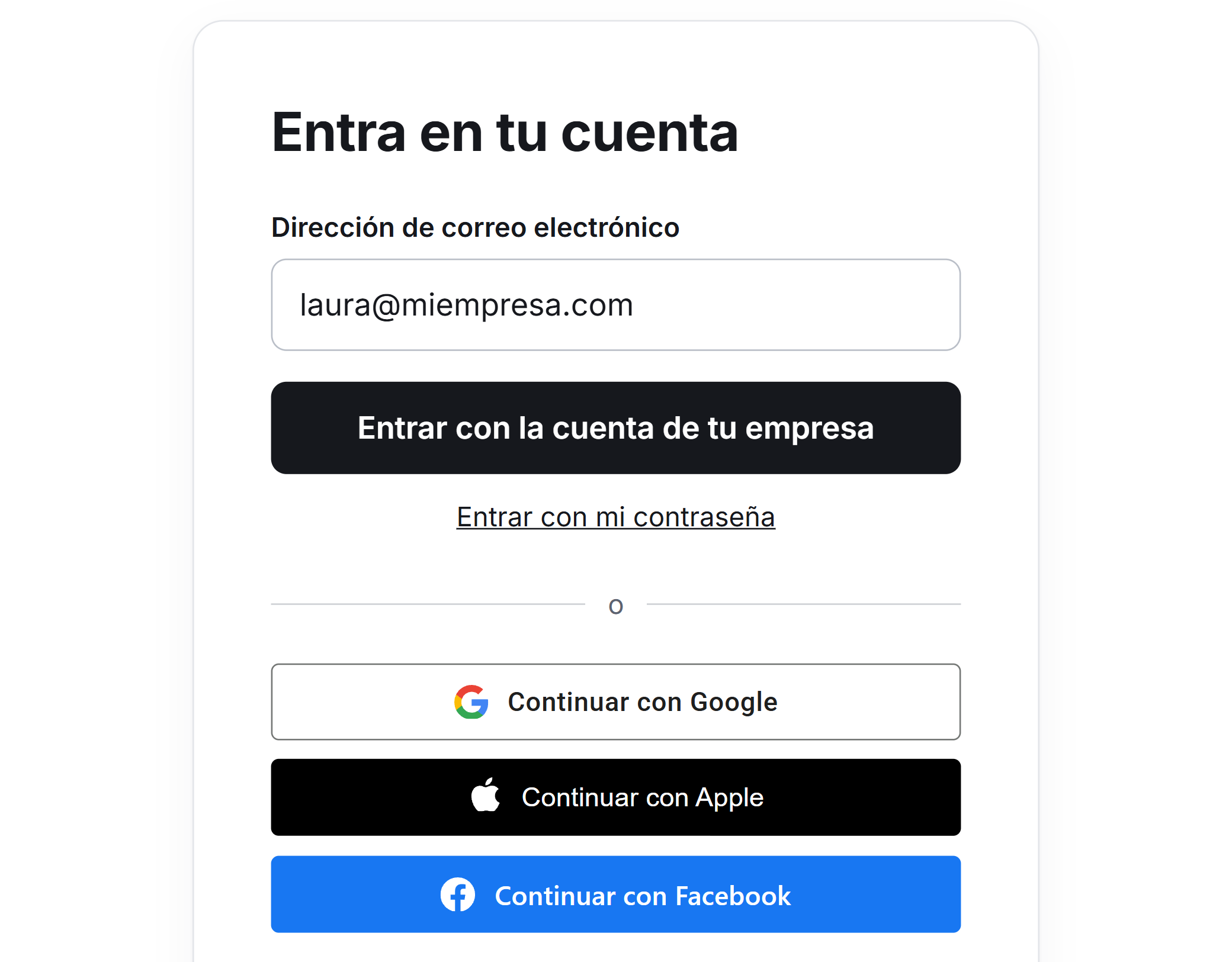
Your customer types their work email and, if their company uses Microsoft 365 or Google Workspace, the module notices by itself and offers “Sign in with your work account”. You don't have to enter any domain.

  • They sign in with the account they use at work, with no extra password. Gmail, Outlook and similar addresses keep the usual form.
  • With Okta, Auth0 or any OpenID provider, you enter that company's domains and, if you want, its staff can only sign in that way.
  • If their company doesn't allow Microsoft in new shops without permission, you give their IT person a link and they approve your shop once for the whole team.
  • With the B2B registration with VIES validation, the new account waits for your approval before buying.
Business social login on PrestaShop: typing a work email shows Sign in with your work account

One account per customer, no surprises

The network only helps them sign in. Who your customer is and what they can do in your shop is still up to PrestaShop.

  • Your customer can sign in with Google one day and Apple the next: it's still the same account, with their orders.
  • A network joins an existing account only if it vouches for the email. If not, it asks for a code sent to that account's email.
  • If Facebook doesn't share the email, we ask your customer for it and confirm it with a code. An address is never made up.
  • A disabled account, or one waiting for approval, can't get in through a network, just as it couldn't with its password.
  • No password and no network: a 6-digit code by email or a passkey. After a password sign-in, the module offers to save one on that device, never in the cart or at checkout.
  • Two-step verification for password sign-ins: for everyone, or for each customer who turns it on in My account.
  • Google One Tap only loads once your customer accepts cookies, and the data deletion Facebook asks for works from day one.

PrestaShop social login modules compared

Feature by feature, with what each module says on its own PrestaShop Addons page. Where another one is ahead, we mark it.

BK Social Login compared with the social login modules by BusinessTech, PrestaHero and Línea Gráfica
FeatureBK Social LoginBusinessTechPrestaHeroLínea Gráfica
Networks included8 + OpenID630+4
AppleYes——Yes
MicrosoftYes—YesYes
Google One TapYes——Yes
Detects the work account by itself, no domains to enterYes———
SSO by email domainYes———
Microsoft approval for the whole company, with its linkYes———
Your own OpenID providerYes———
Passkey: fingerprint or faceYes———
Email code, no passwordYes——Yes
Two-step verificationYes——Yes
Links the network to the existing accountYesYes—Yes
Asks for the email if Facebook doesn't send itYes——Yes
Network stays hidden until it passes your testYes——Test mode
Checks Apple's hidden emailYes———
Orders and revenue per networkYes———
Error logYes——Yes
Sign-in window from the headerYes—Yes—
PrestaShop1.7.5 to 9.28.0 to 9.21.5 to 9.21.7.8 to 9.2

Source: each module's page on PrestaShop Addons (BusinessTech & PrestaModule 8204, PrestaHero 39733 and Línea Gráfica 99710), checked on 28-11-2026. “—” means their page doesn't mention it.

Questions about social login in PrestaShop

How do I add “Sign in with Google” to PrestaShop?

Install the module, open the Google settings and follow its three steps: create the app in Google Cloud with the guide, drop in the key file and test it with your account. In about 10 minutes the button shows on the sign-in page, at account creation, at checkout and in My account.

Can I offer Sign in with Apple without generating the client secret by hand?

Yes. You upload the .p8 file Apple gives you once, type your Team ID and the module signs the key itself every time someone signs in, so it never expires. You need an Apple Developer Program account, which Apple charges for separately ($99 a year).

Does it work on PrestaShop 8 and 9? And on 1.7?

Yes: from PrestaShop 1.7.5 to 9.x, with PHP 7.1 to 8.4, in Classic, Hummingbird and the themes built on them. Multistore too, with each network's keys per shop.

Which networks can I add?

Google (with One Tap), Apple, Facebook, Microsoft, PayPal, Amazon, LinkedIn and X, plus any company OpenID provider you add, such as Okta, Auth0 or Keycloak. You turn them on one by one and each passes its test before going live.

What if my customer already had an account with the same email?

With Google and Apple, which vouch for the email, the network joins their account and they're told on screen and by email. With networks that don't, they first confirm the account is theirs with their password or a code. Their orders stay in the same account.

Do customers who hide their email with Apple get the order emails?

Yes, if your shop sends from your own domain and you register it with Apple. The module tells you what to register, checks your domain's SPF and DKIM for you and sends a test email to a real hidden address.

Do I have to edit my theme's templates?

No. The buttons appear by themselves on the sign-in page, at account creation, at checkout and in My account. If your theme is very different, you can place them wherever you like with one line in its template.

Does it work for a B2B or private shop?

Yes. If your customer's company uses Microsoft 365 or Google Workspace, typing their email brings up “Sign in with your work account”, with nothing for you to set up. With our trade registration active, anyone arriving through a network goes through your approval before buying, and an account waiting for approval can't sign in until you approve it.

Is it GDPR compliant?

It's ready for it. Your customer accepts your terms when creating the account, One Tap waits for cookie consent, Facebook's data deletion and Apple's notices come ready, and the module gives you the text for your privacy policy. To detect the work account it only checks the email's domain, never the full address.

How many shops can I use the licence on?

One shop, plus its separate staging copy. The licence is yours forever and includes three months of updates and support. With the Continuity Plan you get the installation, the first year and the yearly renewal.

Technical details: compatibility and installation

Compatibility

PrestaShop1.7.5 to 9.xMultistore included, with each network's keys per shop.
PHP7.1 to 8.4No overrides and no external libraries.
ThemesClassic, Hummingbird and child themesButtons with their own styling, the same in any theme.
NetworksGoogle, Apple, Facebook, Microsoft, PayPal, Amazon, LinkedIn, X and OpenIDGoogle, Facebook and Microsoft are free. Apple needs the Apple Developer Program.
PasswordlessEmail code and passkeysTwo-step verification for password sign-ins, for everyone or at each customer's choice.
Languages7: English, Spanish, French, German, Italian, Polish and CzechIn the shop, in the back office and in the emails.

How to install it

Upload the module

From PrestaShop's module manager, like any other. It appears under Customers › Social login.

Set up your first network

Google in about 10 minutes, with the guide and the test with your account.

Choose where the buttons go

Sign-in, account creation, checkout and My account, in the order and with the look you want.

Your next customer, signed in with one click.

The licence is yours forever and each network goes live as soon as it passes its test.

Choose your licence

Tell us what your business needs

A module, an app, a server that is giving you trouble or something urgent. We answer within 24 hours, with a fixed quote with a price and a date.