B2B Quotes for PrestaShop

Answer every quote request with your prices and get the order paid in your own shop.

Your customer builds a quote with the products and quantities they need and sends it with a message, files and the price they would like to pay; you reply with your price per line, a discount and a validity date. They accept it and pay in your usual checkout, at the agreed price, only them and only in that cart.

  • PrestaShop 1.7.6 to 9.x
  • PHP 7.1 to 8.4
  • No overrides
  • Works with Odoo
  1. Your customer asks
  2. You make an offer
  3. They accept it
  4. They pay the agreed price
$119.00
Option

Try it before you buy Live demo with the module installed

PS 1.7+, 8.x, 9.x
SSL Secure
Instant Download
Official Support
Licensed
B2B quotes module for PrestaShop: quote request, offer and purchase at the agreed price
B2B Quotes for PrestaShop
Selected:
$119.00
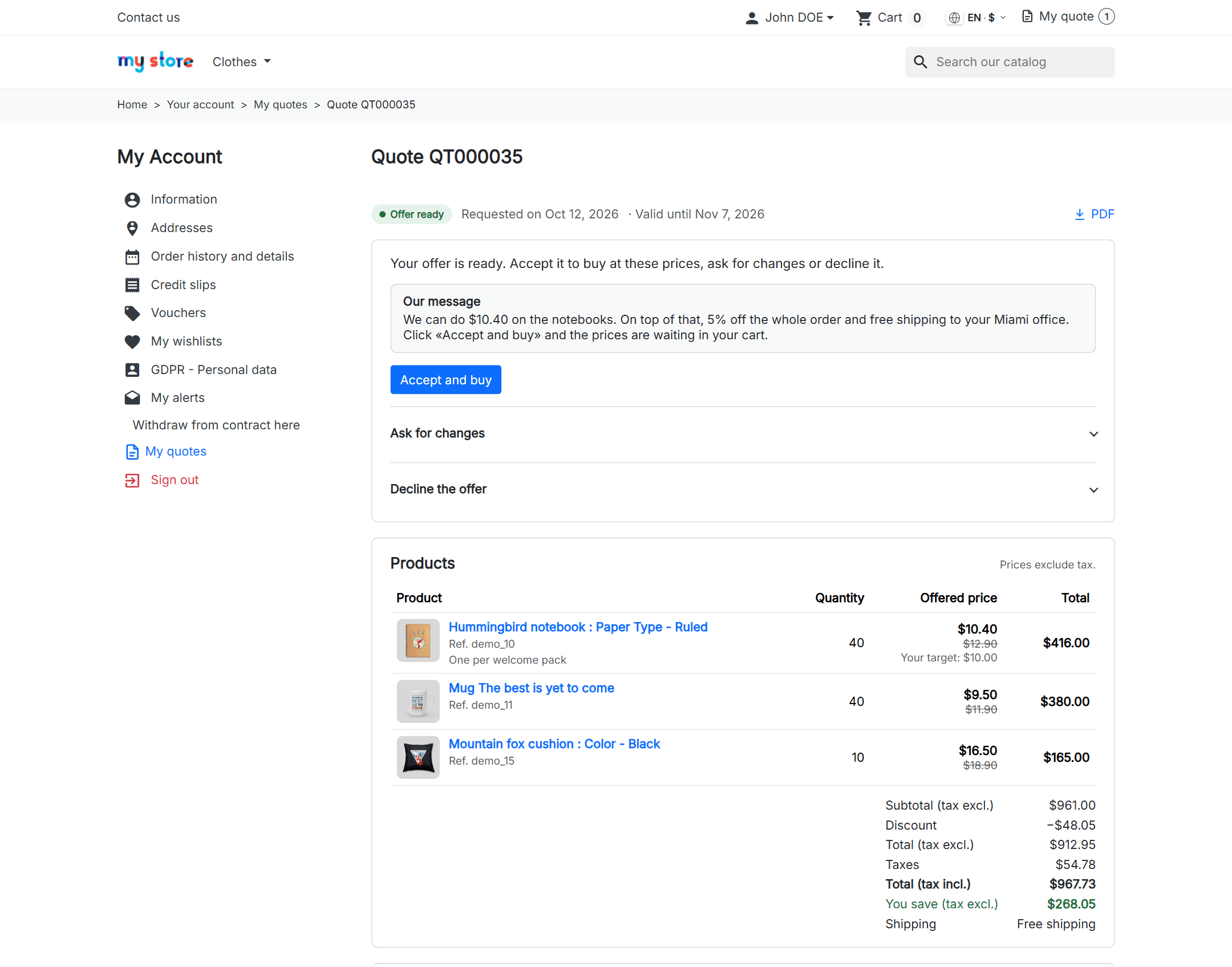
B2B quote offer in the customer account of a PrestaShop shop: agreed prices per line, discount and an Accept and buy button

The offer, in your customer’s account: your price on every line, what they save and one button to buy it.

What changes when you sell on quotes

What eats your day today in emails and spreadsheets, and how it works with the module.

Without the module

  • Your customer emails you a list of products and you copy it into a spreadsheet by hand.
  • You send a PDF with your prices and, to get paid, you create a voucher or place the order yourself from the back office.
  • Every “what if I take six?” is another email, another version and another doubt about which one is current.
  • You don’t know how many quotes are open or how many end up as orders.

With the module

  • Your customer builds the quote in your shop, with products, quantities, a message, files and the price they would like to pay.
  • You reply with your price per line, a discount, free shipping and a validity date.
  • They accept it and pay in your usual checkout, at the agreed price, only them and only in that cart.
  • Every offer stays in the history, and the list shows what is pending, what is live and how much you convert.

A quote, from request to order

Real screens of the module in a PrestaShop 9 shop: from the product page to the cart with the agreed prices.

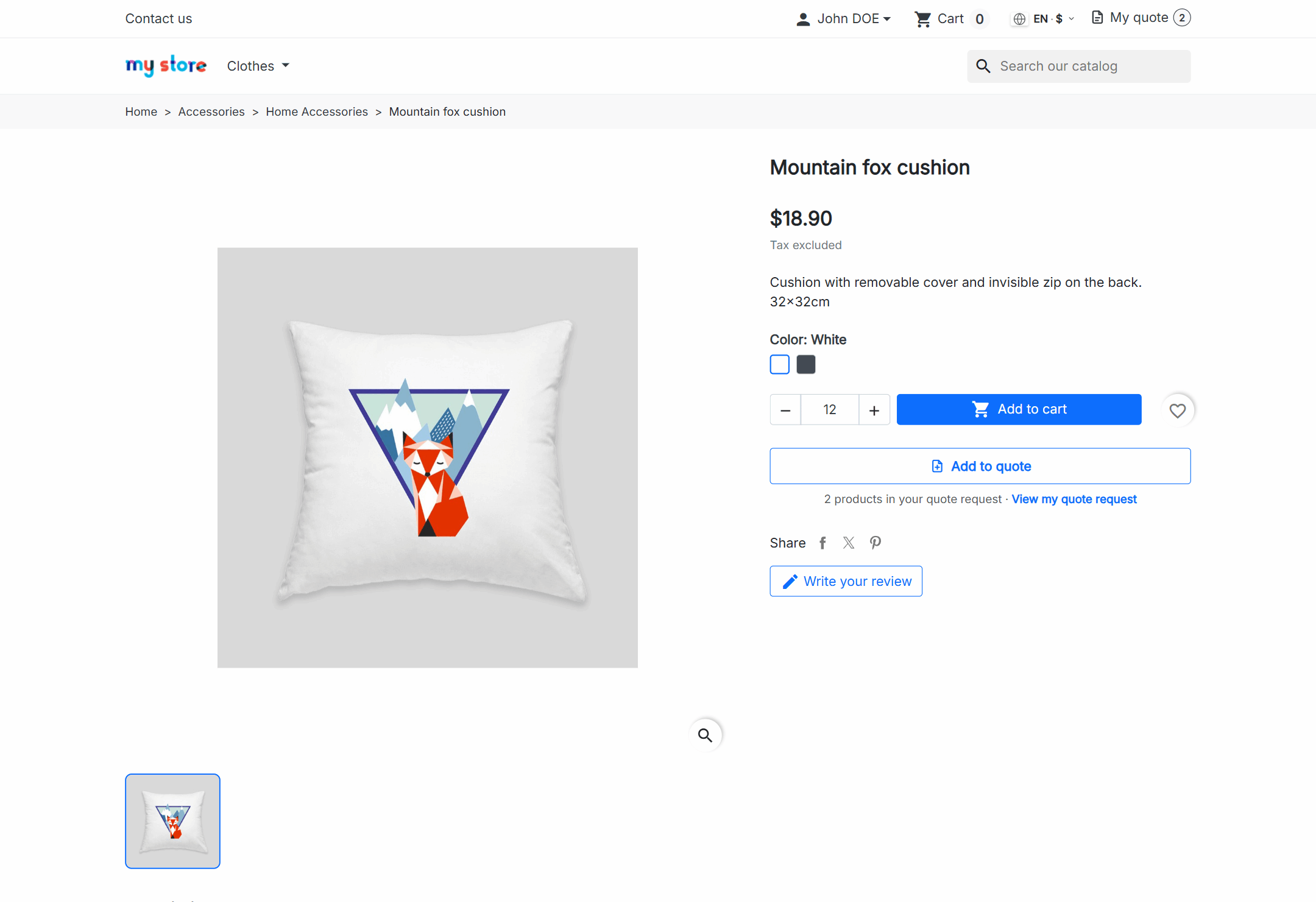
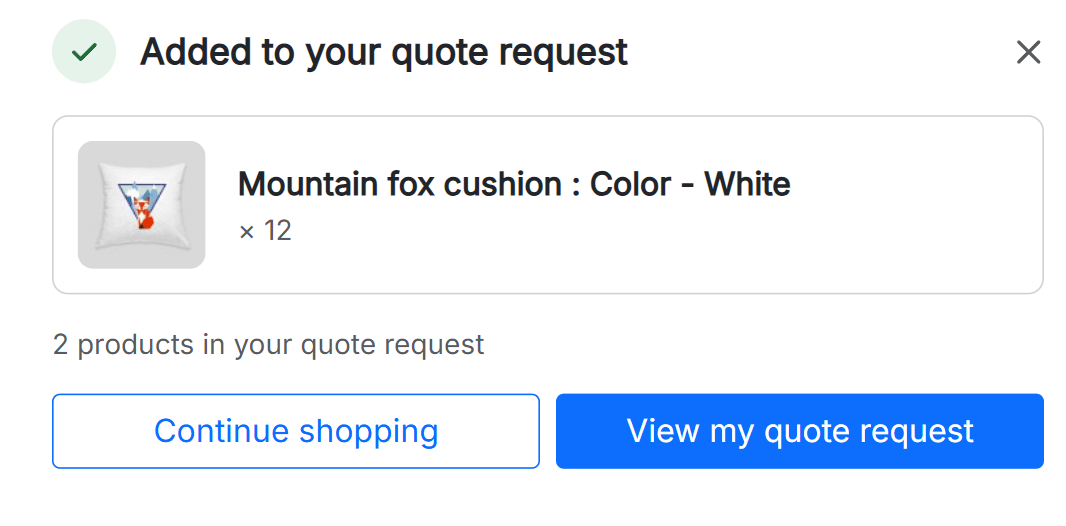
1. Next to the buy button, “Add to quote”, with the quantity and combination they picked. A notice confirms it and takes them to their list. They can also turn their whole cart into a quote in one click.

PrestaShop product page with the Add to quote button below the purchase block Notice on a PrestaShop product page after Add to quote: the product added, its quantity, how many products the quote request holds and the link to it

Next: Their request

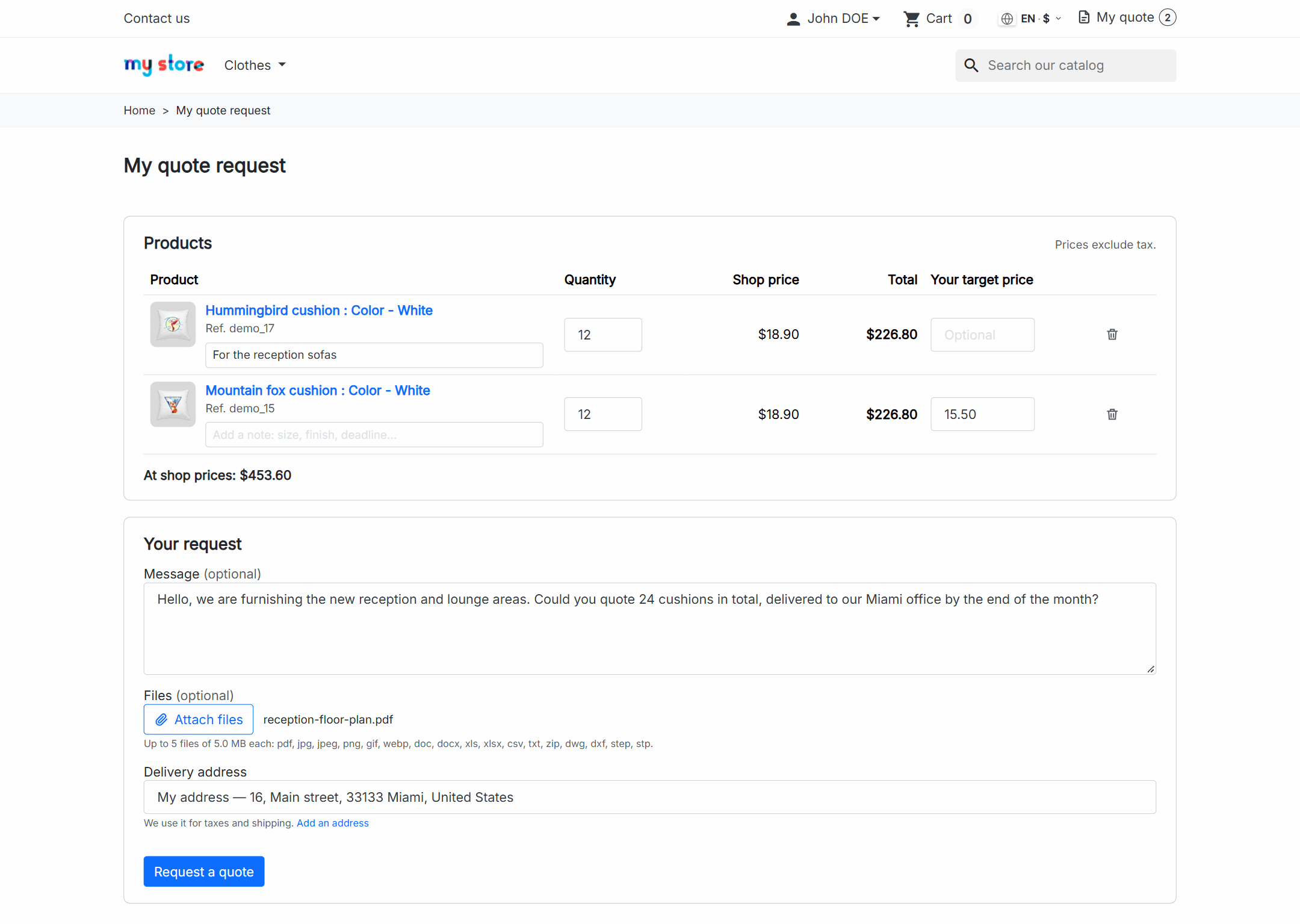
2. In “My quote request” they adjust quantities, leave a note per line and, if you allow it, the price they would like to pay. They add their message and files and send it.

PrestaShop My quote request page with products, quantities, target price, message and files

Next: Your offer

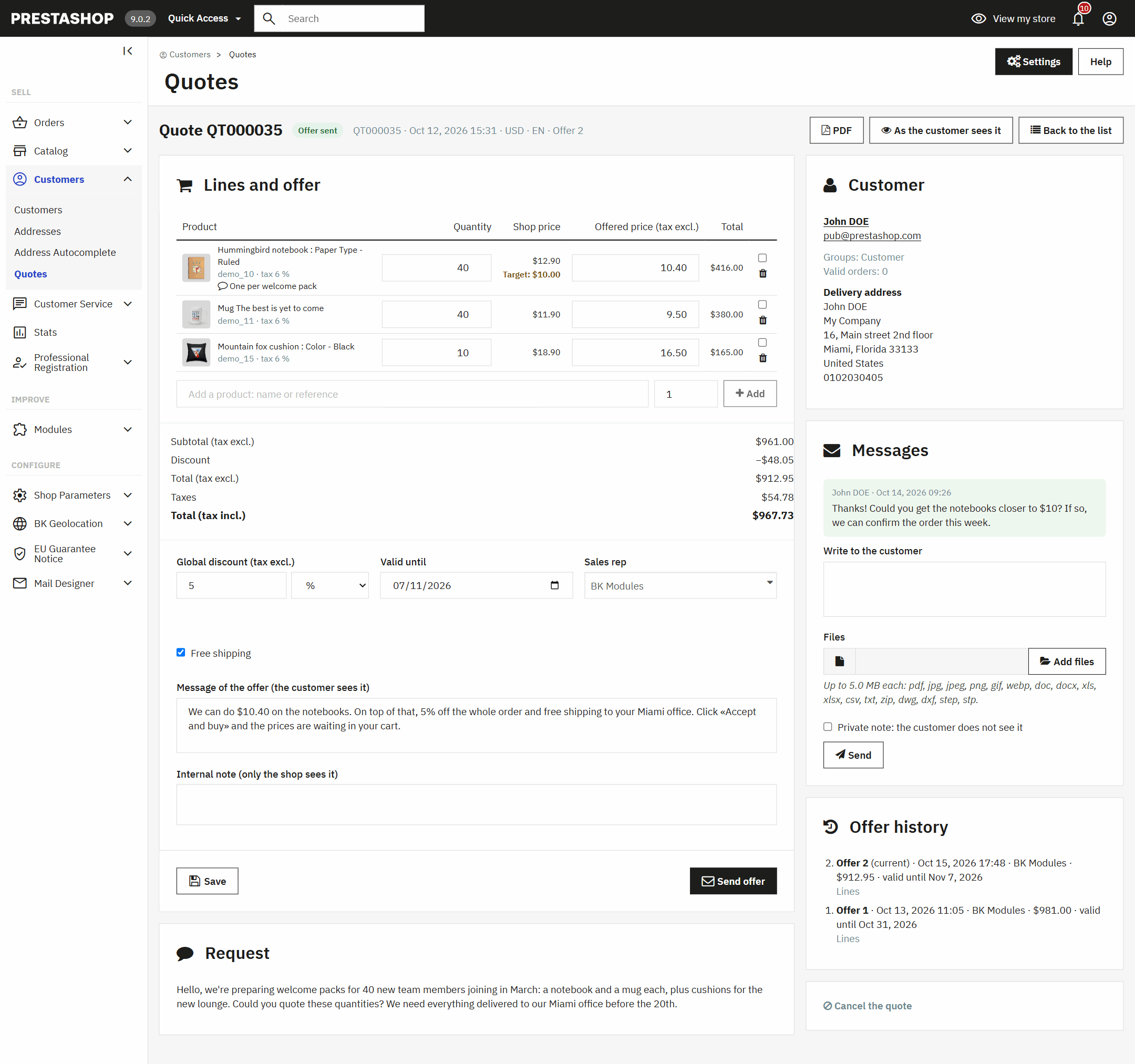
3. In your back office you see what they asked for and the price they propose. You set your price on each line, change quantities or add products, and choose discount, free shipping and validity. “Send offer” emails it to them with the PDF.

Quote page in the PrestaShop back office: lines with shop price, target price and offered price, discount, validity and offer history

Next: Their answer

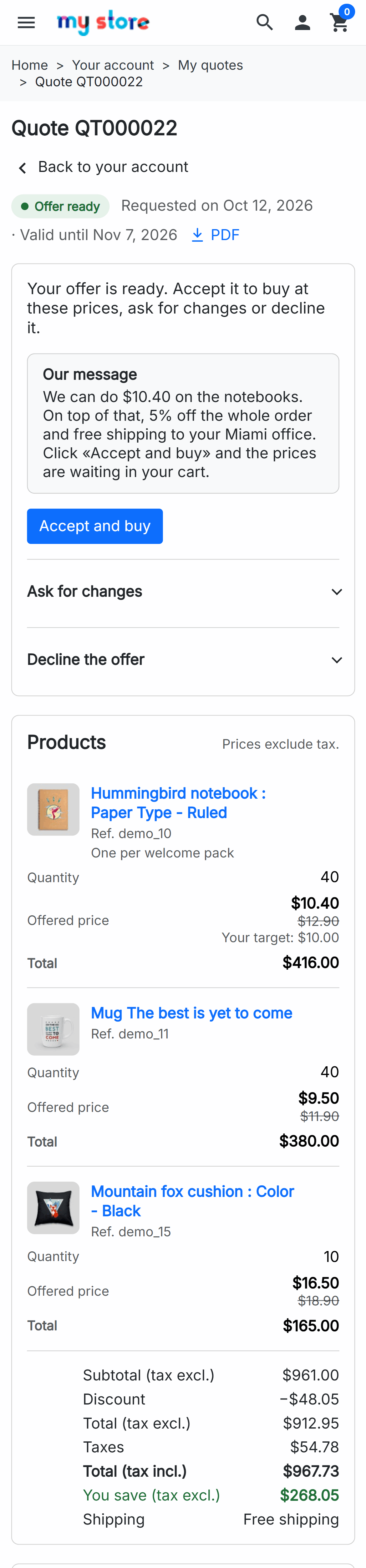
4. Your customer opens the offer in their account, or from the link in the email, and decides: they accept it, ask for changes with their target price, or decline it and tell you why.

Quote offer in PrestaShop My quotes with Accept and buy, Ask for changes and Decline

Next: The purchase

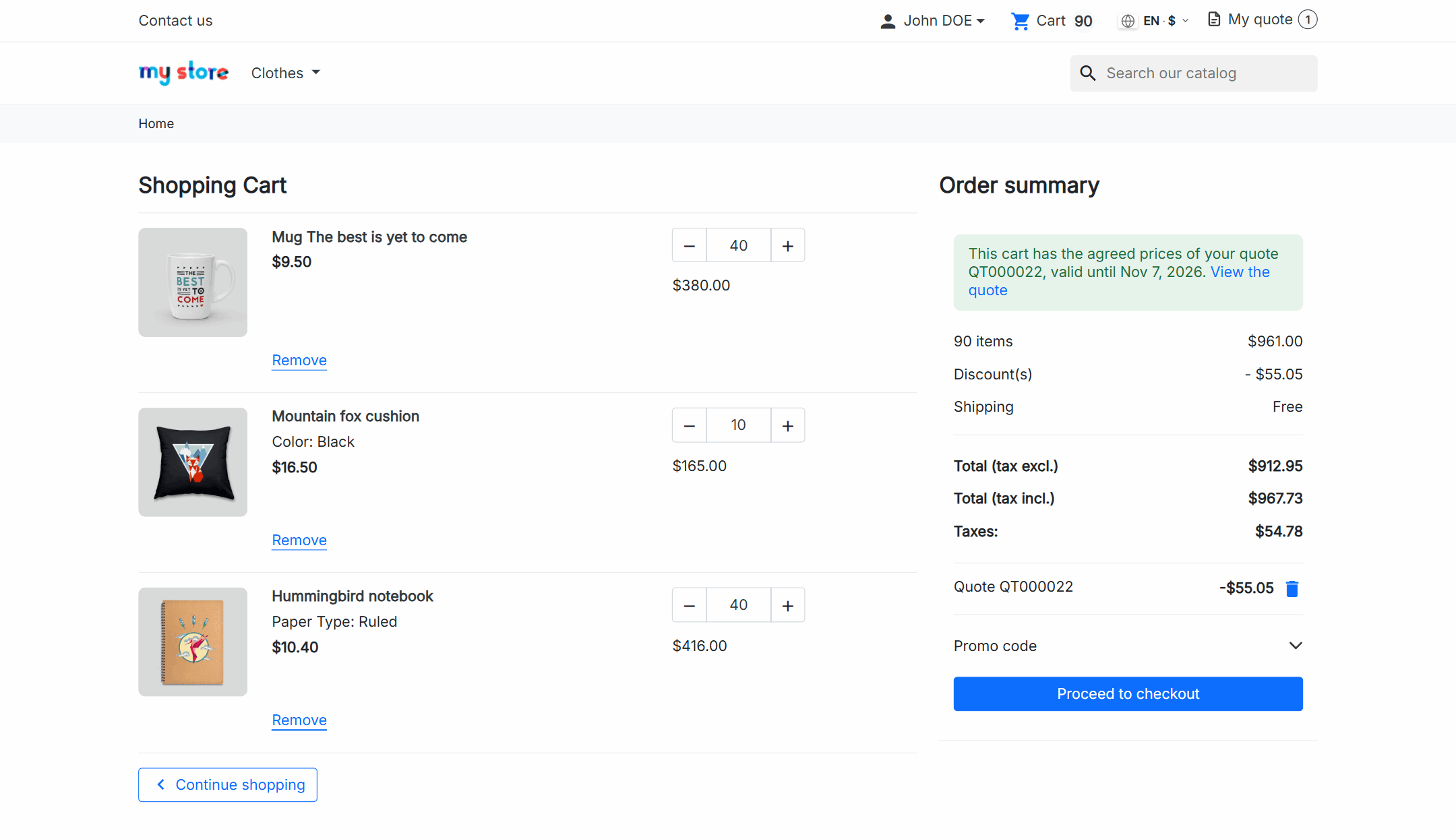
5. When they accept, their cart fills up with those lines at the agreed prices and they pay like any other purchase. The order stays linked to its quote.

PrestaShop cart with the agreed prices of a quote, its discount and its validity

Want to see how it fits your catalogue? Tell us about your shop and we’ll show you.

The agreed price, only for them

The price in your offer is not a voucher anyone can share, nor a rule that applies to everybody. It is for that customer, in their quote’s cart, and it lasts as long as you decide.

  • It lasts until the end of the validity day you set in the offer, not a fixed number of hours.
  • Nobody else sees it: not other customers, not the same customer in another cart.
  • If they remove lines from the cart, the quote discount stops applying.
  • A new offer, a cancellation or the expiry date remove the previous prices.
  • A few days before it expires, your customer gets a reminder.
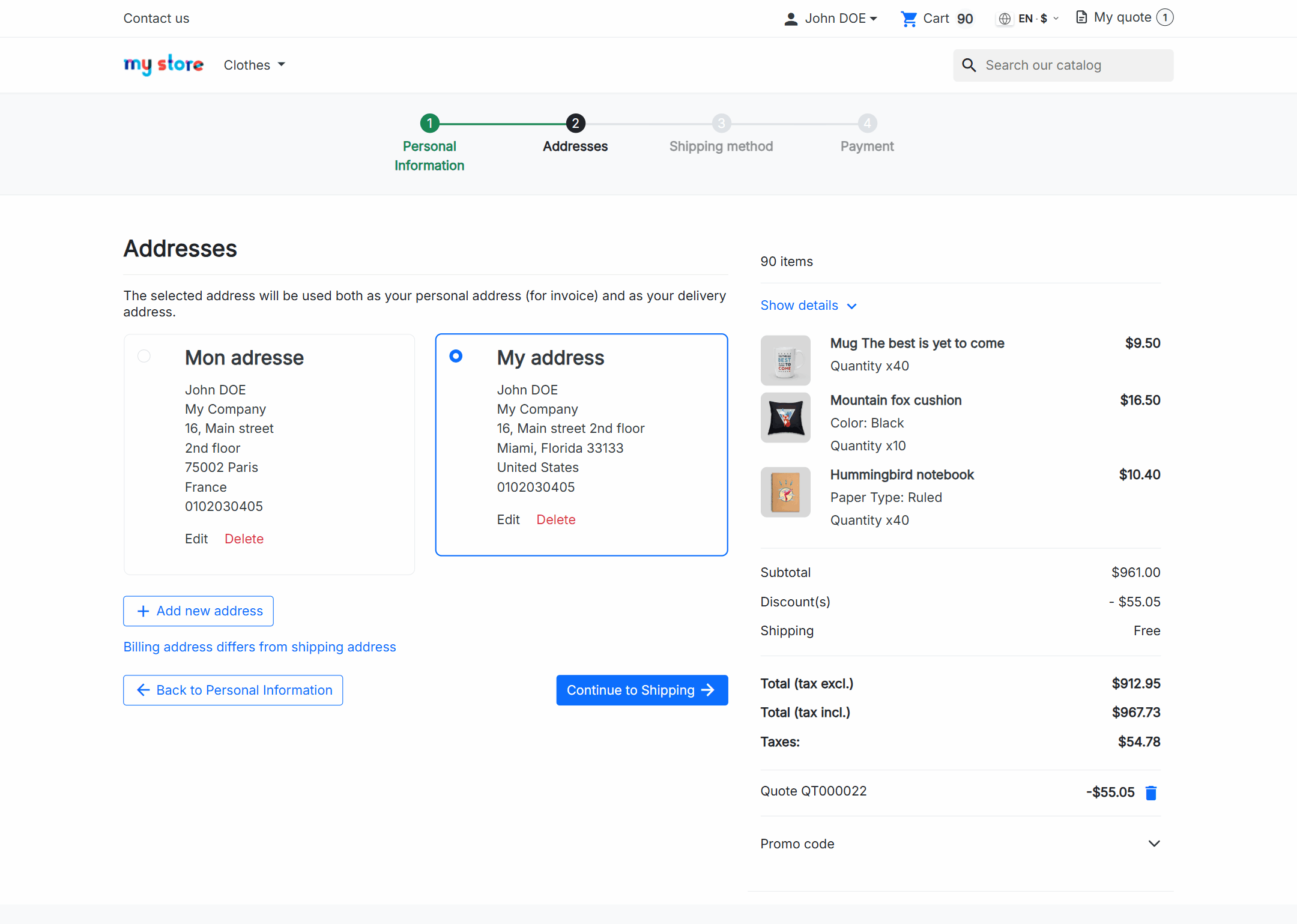
PrestaShop checkout with the agreed prices of a quote and its discount applied

Negotiate without losing track

Everything about a quote lives in one place: what they asked for, every offer you sent and every message. On a phone, too.

  • Each offer you send is kept as a version, with its prices, its total and its validity.
  • Your customer asks for changes and proposes a price per line; the quote goes back to “pending reply”.
  • If they decline, they tell you why, and they can ask again later.
  • Messages with files both ways, and internal notes the customer never sees.
  • Every notice reaches them by email, in the language of their quote.
PrestaShop quote on the customer’s phone, with the offer, the lines and what they save

You decide what gets quoted

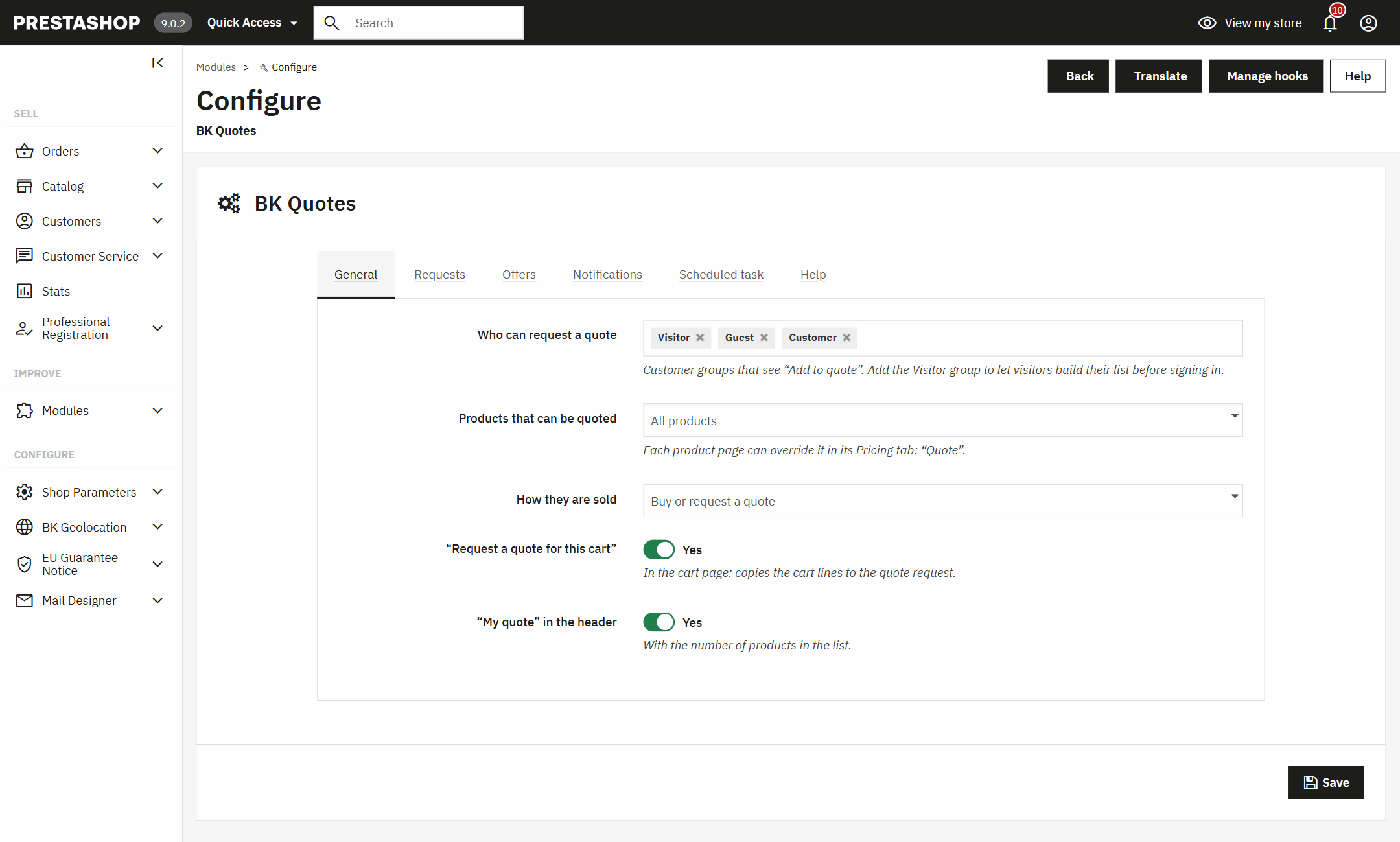
Some products are bought straight away and others are only sold on quote. You choose per shop, per category or on each product page.

  • Quote only: the price and the buy button are hidden and “Add to quote” remains.
  • Or both: whoever wants to buys now, and whoever buys in volume asks for a price.
  • Per customer group: only your trade customers, or visitors too, who build their list and sign in when they send it.
  • Minimum amount, required message, file types and size, default validity and reference prefix.
  • Quotes you create yourself for a customer from the back office, even if they didn’t ask.
Quote module settings in the PrestaShop back office: customer groups, quotable products and sales mode

And if you work with Odoo

With our Odoo PrestaShop connector, every request from your shop becomes an Odoo quotation: your sales rep works on it there, with the customer, the products and the history.

  • The offer goes back to the shop with the Odoo number and PDF.
  • Your customer accepts it and buys in your shop as usual.
  • The order confirms that same quotation in Odoo, with nothing duplicated.
  • Their messages and answers reach Odoo as notes and activities for your sales rep.
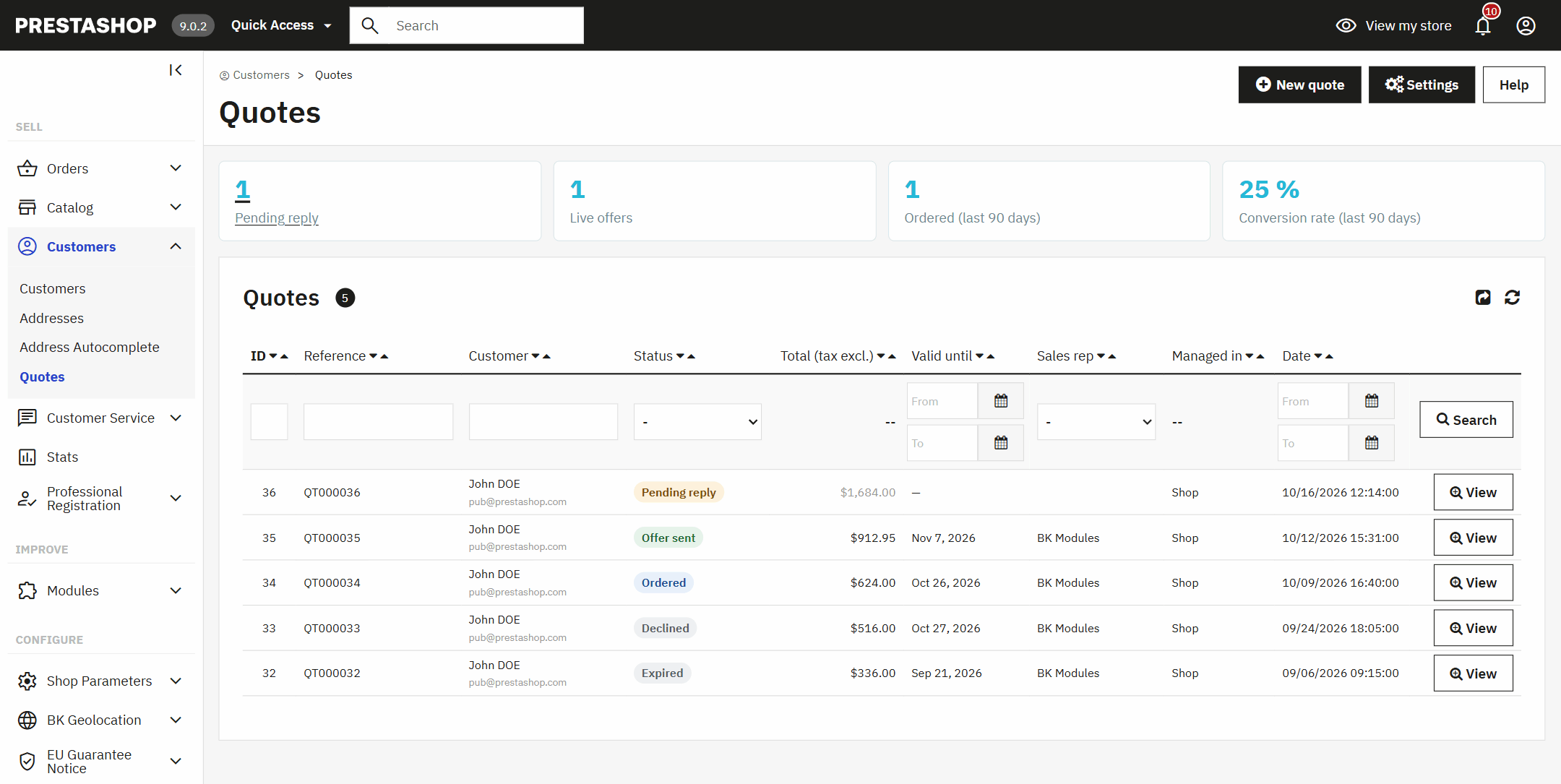
Quote list in the PrestaShop back office with pending replies, live offers, conversion rate and where each quote is managed: the shop or Odoo

It adds to your shop, it doesn’t change it

Your checkout, your payment methods and your theme stay as they are. The quote only sets the prices you agreed.

  • No overrides: it rewrites no PrestaShop class, so it doesn’t clash with other modules or break on updates.
  • Each quote is only visible to its customer, or to whoever has the secure link from their email.
  • Files are stored out of the web’s reach and downloaded with a signed link.
  • A list with filters and CSV export, a PDF for every offer and an assigned sales rep.
  • Pending replies, live offers and conversion rate over the last 90 days, at a glance.
  • Multistore and multicurrency, in English, Spanish, French, Italian and German.

Questions about quotes in PrestaShop

How do I add a “Request a quote” button in PrestaShop?

Install the module and choose which customer groups can request one and which products can be quoted. From then on “Add to quote” appears on those product pages, next to the buy button, and “Request a quote for this cart” in the cart.

Does it work on PrestaShop 8 and 9? And 1.7?

Yes: from PrestaShop 1.7.6 to 9.x, with PHP 7.1 to 8.4, multistore included, with the Classic and Hummingbird themes and those based on them.

How long does the price I offer my customer last?

As long as your offer says: until the end of the validity day you set. A few days before, they get a reminder and, if the date passes without an order, the quote expires and the prices are removed. If they still need it, they ask for a new offer from their account.

Can another customer use the price from a quote?

No. The agreed price only applies to that customer and only in their quote’s cart. The overall discount is not a code that can be shared either: it is tied to that cart and that amount.

Can I sell products on quote only, with no price on display?

Yes. Mark the whole shop, some categories or single products as “quote only”: the price and the buy button are hidden and “Add to quote” remains. Those products only go into the cart of their quote.

Does my customer pay with my usual payment methods?

Yes. When they accept the offer they buy in your normal checkout, with your carriers and your payment methods, and the order is just another order in your shop, linked to its quote.

Can someone request a quote without an account?

If you allow the visitor group, they build their list without signing up and, when they send it, they sign in or create their account without losing anything. Otherwise they see “Sign in to request a quote”.

Can I create a quote for a customer myself?

Yes, from the back office: find the customer, add the products with your prices and send the offer. It reaches them by email with the PDF and they accept it from their account like any other.

Does it integrate with Odoo?

Yes, with our Odoo PrestaShop connector: every request becomes an Odoo quotation, the offer goes back to the shop with its number and PDF, and the order confirms that same quotation. Without the connector, everything is done from the shop’s back office.

How many shops can I use the licence on?

On one shop, plus its separate test copy. The licence is yours forever and comes with three months of updates and support; with the Continuity Plan you get the installation, the first year and a yearly renewal.

Technical details: compatibility, installation and developers

Compatibility

PrestaShop1.7.6 to 9.xMultistore included, with both the classic and the new product page.
PHP7.1 to 8.4No overrides and no core changes.
ThemesClassic, Hummingbird and child themesUses the PrestaShop cart and checkout; on a theme that doesn’t render the product page hook, the button goes below the purchase block.
CurrenciesAll the ones in your shopEach quote is in the customer’s currency.
EmailsIn the language of the quoteWith the look of your emails if you use our Email Designer.
Languagesen, es, fr, it, deIn the shop, the back office and the emails.

How to install it

Upload the module

From the PrestaShop module manager, like any other. It appears under Customers › Quotes.

Choose what gets quoted

The groups that can request quotes, the products, and whether they can also be bought or are quote only.

Answer the first one

Requests arrive in the list and in your inbox. Set your prices and send the offer.

For developers

The module announces every status change and every message with its own hooks, and offers a public API so another module (an ERP, a CRM) can claim a quote, send its offer with its PDF or close it. It is the same API the Odoo connector uses.

Your next quote, paid in your shop.

The licence is yours forever, it is up and running in an afternoon and we help you set it up for your catalogue.

See prices

Tell us what your business needs

A module, an app, a server that is giving you trouble or something urgent. We answer within 24 hours, with a fixed quote with a price and a date.