Subscriptions with Stripe for PrestaShop

Sell subscriptions and let every renewal arrive on its own as an order.

Monthly boxes, refills, services or software with a fee: your customer subscribes in your checkout, with a card, Apple Pay, Google Pay or SEPA Direct Debit, in the same payment as the rest of the cart. Stripe charges each period and retries failed payments; you get a regular order on every renewal and your customer manages theirs from their account.

  • PrestaShop 1.7.6 to 9.x
  • PHP 7.1 or later
  • Classic and Hummingbird themes
  • Billed by Stripe Billing
  1. Your customer subscribes
  2. Pays in your checkout
  3. Stripe charges each period
  4. Every charge, an order
$209.99
Option
PS 1.7+, 8.x, 9.x
SSL Secure
Instant Download
Official Support
Licensed
Subscriptions with Stripe module for PrestaShop: recurring payments and renewals as orders
Subscriptions with Stripe for PrestaShop
Selected:
$209.99
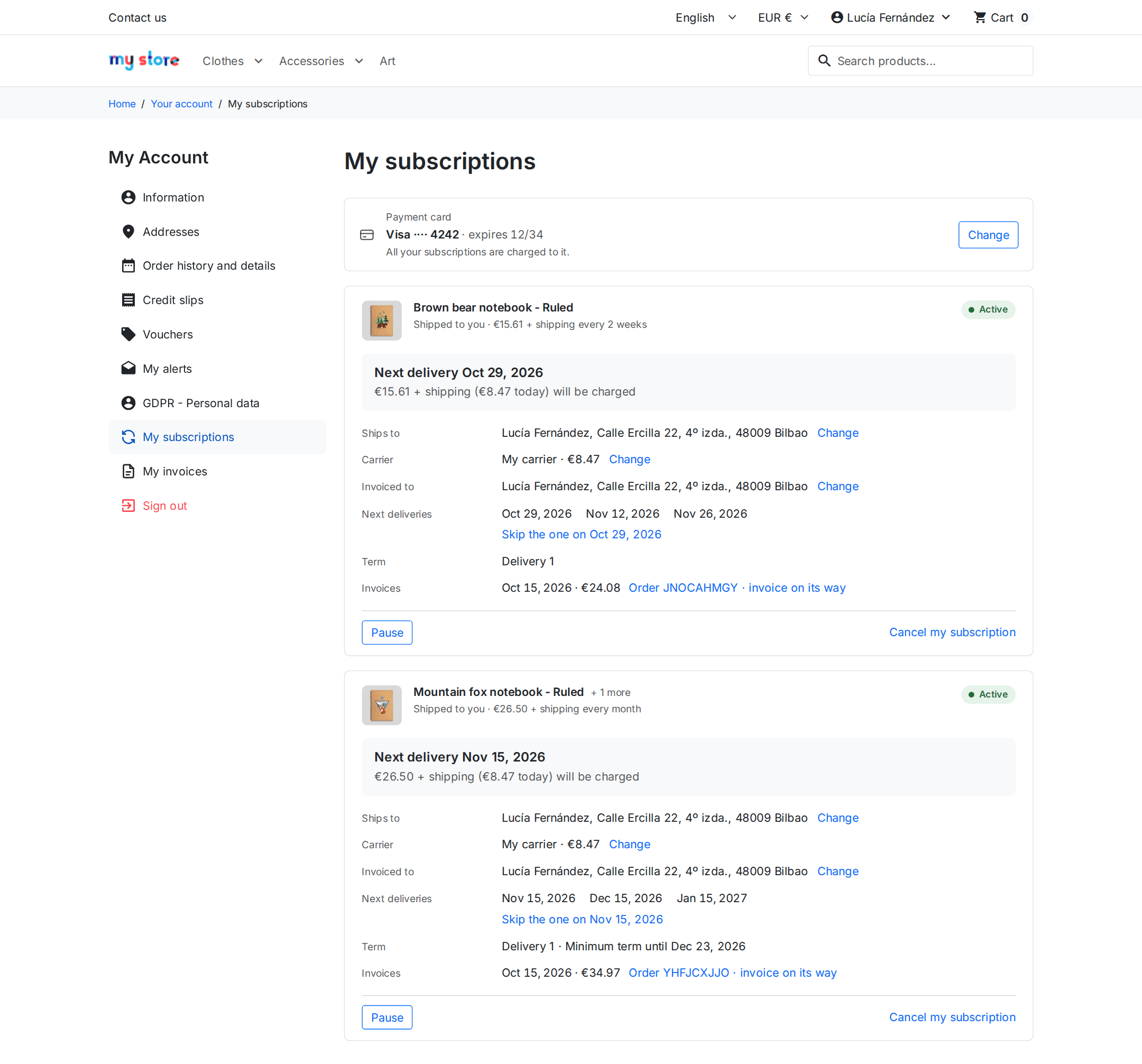
My subscriptions page of a PrestaShop shop with the Hummingbird theme: next delivery, payment card, pause and cancel

“My subscriptions” in a PrestaShop shop with the Hummingbird theme: your customer sees what arrives and when, and changes it themselves.

What changes when you sell subscriptions

What you do by hand every month today, and how it works with the module.

Without the module

  • You charge every month by hand, or send a payment link and wait for the customer to remember.
  • You find out a payment failed when the customer already has the product.
  • Every pause, change of address or cancellation is an email you answer yourself.
  • Renewals are not orders: neither your warehouse nor your accounting sees them.

With the module

  • Your customer pays once in your checkout and Stripe charges each period to their saved card, with 3D Secure when their bank asks for it.
  • A declined payment is retried on its own and shows up under “Needs attention”, with the date of the next attempt.
  • Your customer pauses, skips a delivery, changes their address or card, or cancels from their account.
  • Every renewal is an order in your shop, with its shipping, its invoice and its status.

A subscription, from start to finish

Real screens of the module in a PrestaShop 9 shop with the Hummingbird theme: from the product page to your back office.

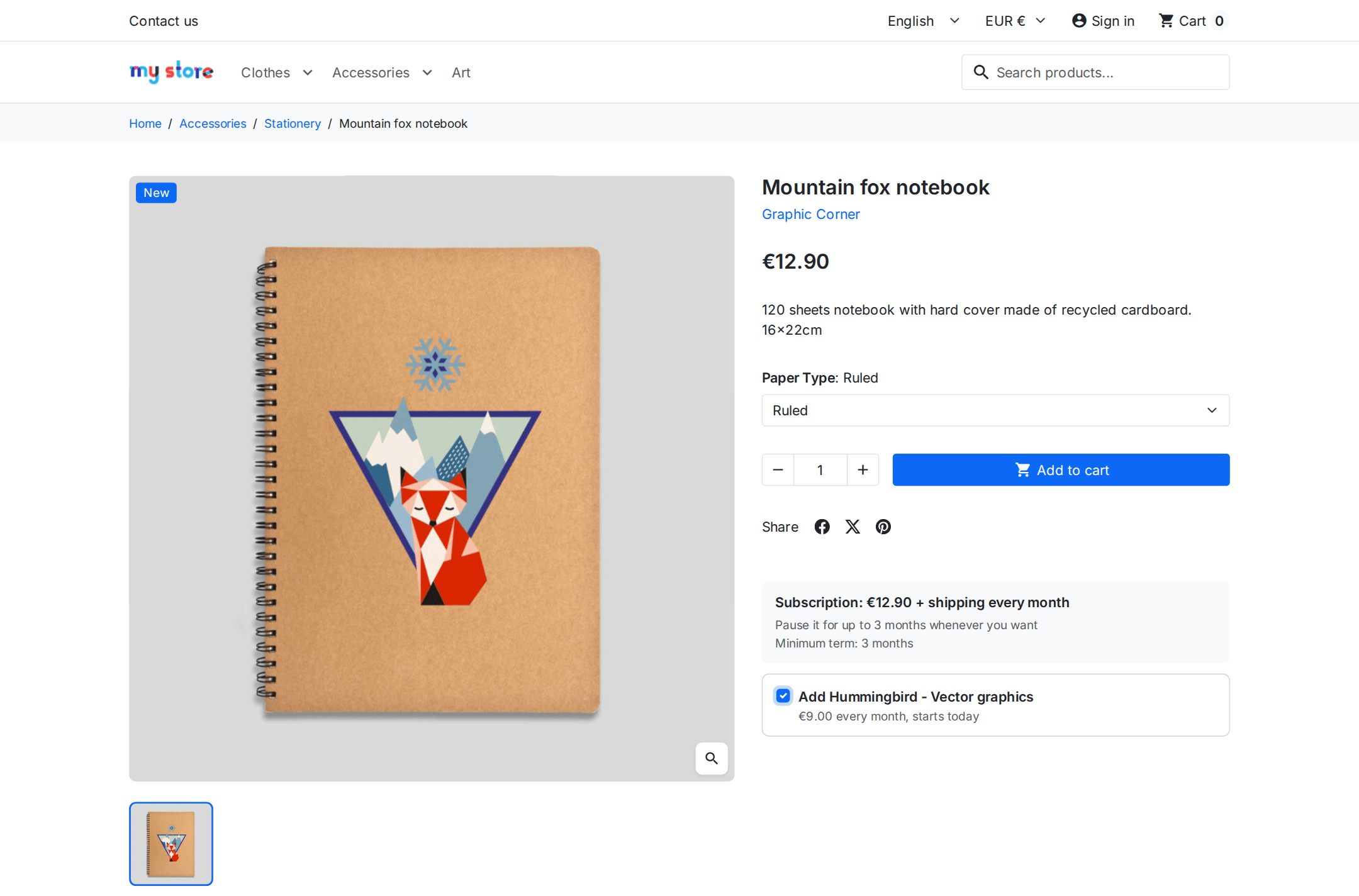
1. On the product page, your customer sees how often it renews and what they will pay afterwards. If you offer an add-on, they add it with a checkbox.

PrestaShop product page with a monthly subscription and a recurring add-on to tick

Next: Cart

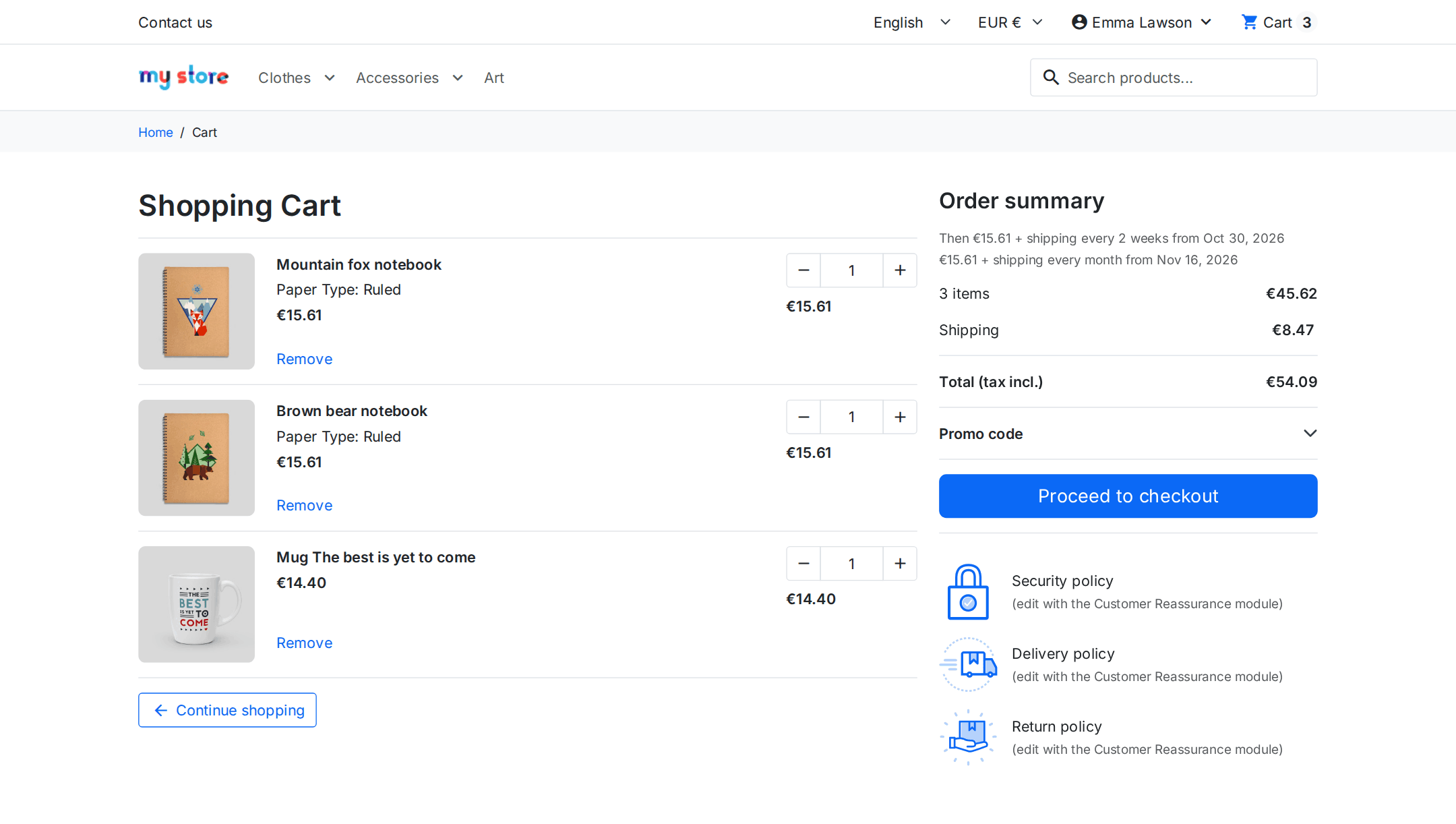
2. One cart holds regular purchases and subscriptions with different periods. The total is what they pay today; below it, what will be charged later.

PrestaShop cart with a regular purchase and a subscription, showing what is paid today and what is charged later

Next: Payment

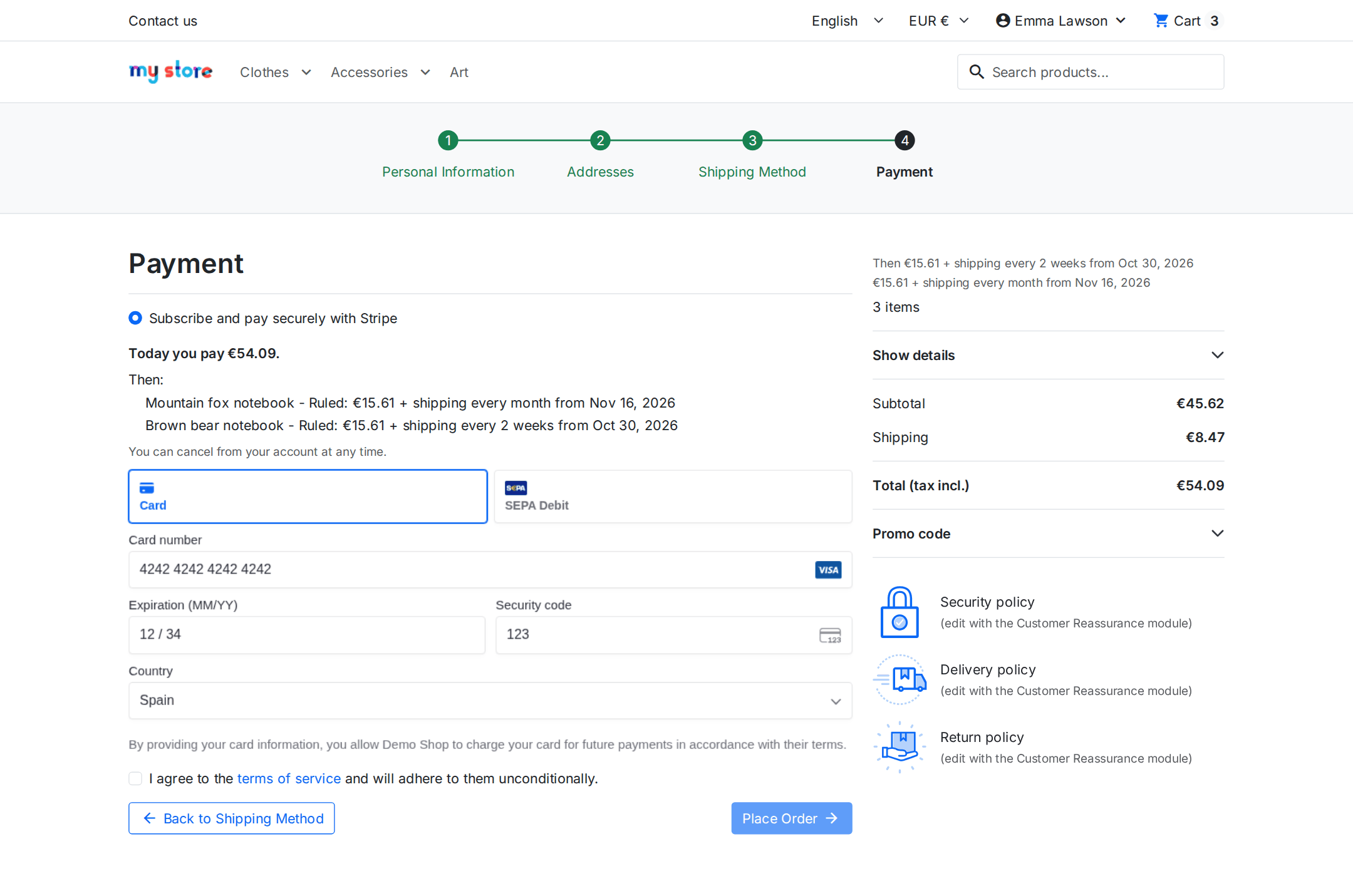
3. They pay without leaving your shop, in the usual payment step: card, Apple Pay, Google Pay or bank debit.

PrestaShop checkout payment step with the embedded Stripe form to pay for a subscription

Next: Their account

4. In “My subscriptions” they see the next delivery and the next charge, and change anything without writing to you.

My subscriptions in PrestaShop: active subscription with upcoming deliveries, address, carrier and invoices

Next: Your back office

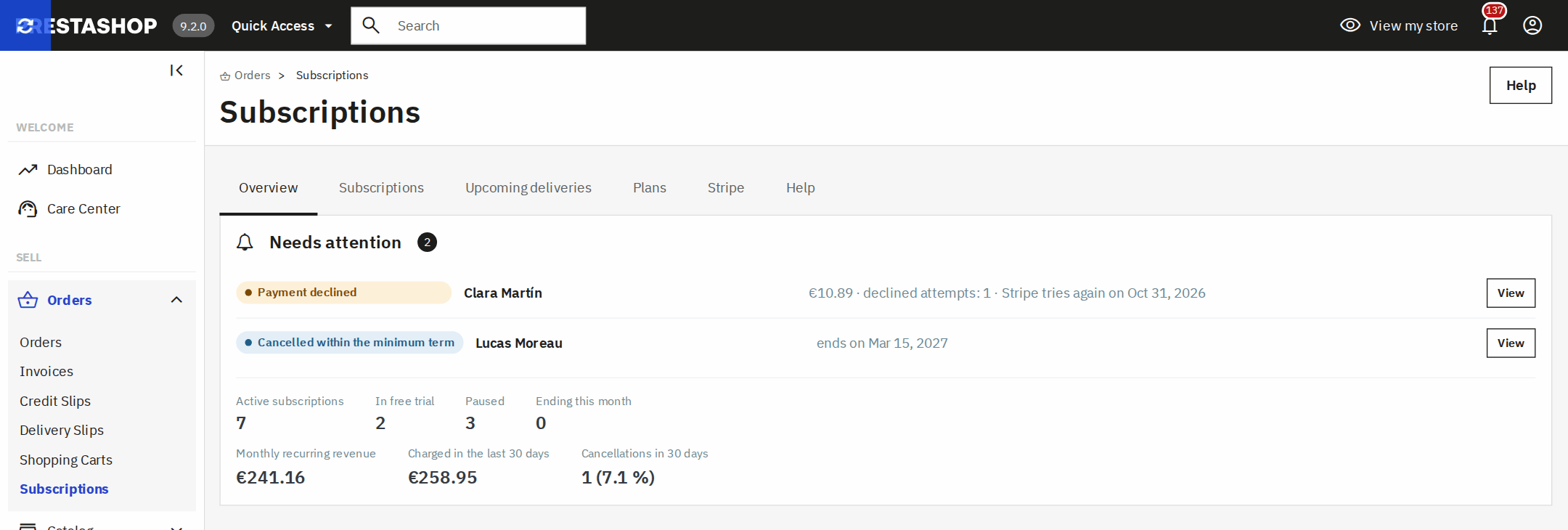
5. You see at a glance what needs attention (a declined payment, a cancellation within the minimum term), how many are active, on trial and paused, what comes in every month and what you have charged, and open each subscription with a click.

Subscriptions overview in the PrestaShop back office: what needs attention, active subscriptions, monthly recurring revenue and what was charged in the last 30 days

Not sure it fits what you sell? Tell us about your case and we will tell you how to set it up.

Any product, with its own rules

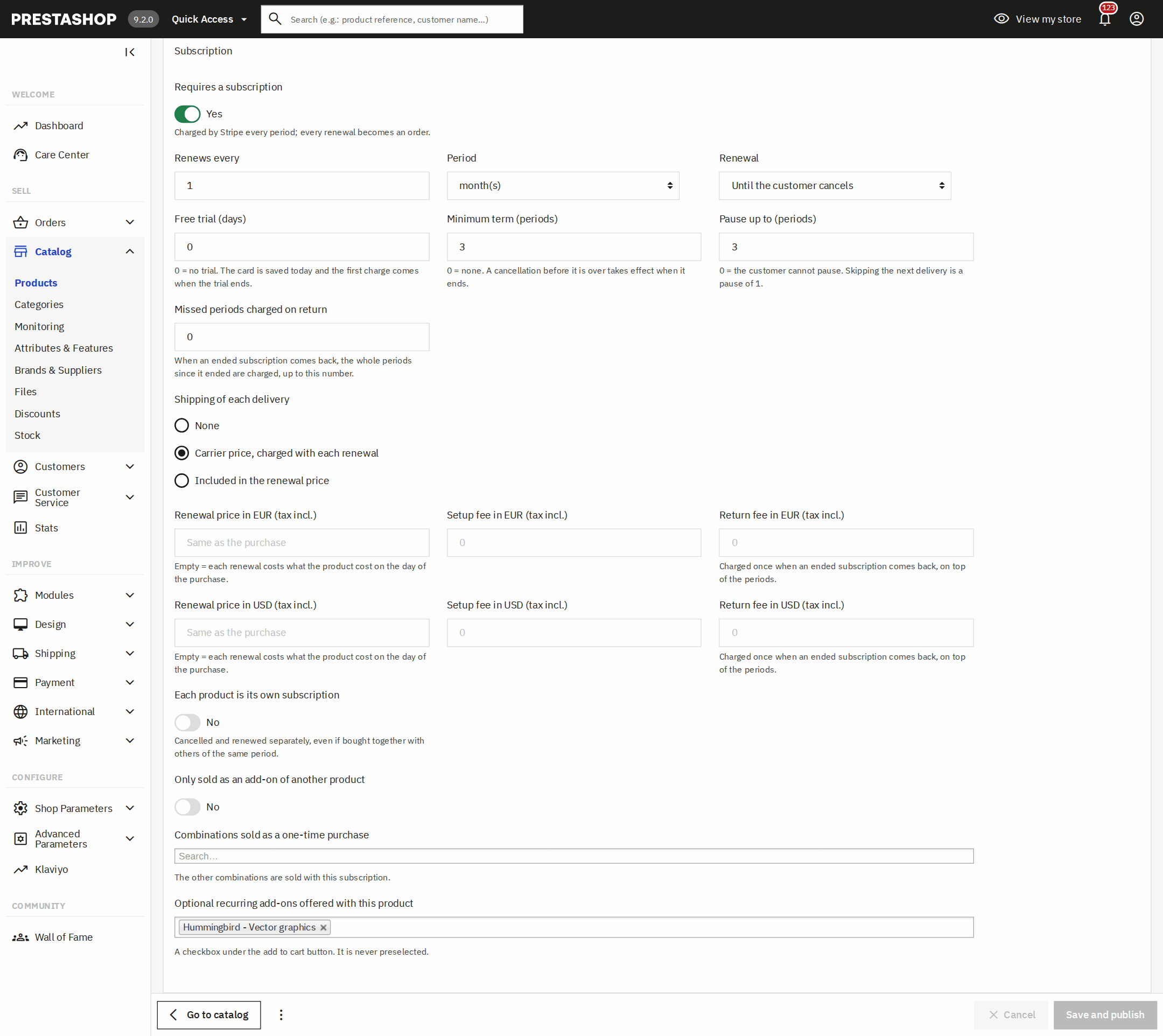
You tick “Requires a subscription” on the product page, or on a single combination, and decide how it renews:

  • Every week, month or year, or every few weeks or months.
  • Free trial days: today the card is saved and the first charge comes when the trial ends.
  • A setup fee, and a renewal price different from the first purchase, in each currency.
  • Minimum term: an early cancellation is scheduled for the end of it.
  • A fixed number of periods, like a six-month course, that ends on its own.
  • Digital, or shipped on every delivery at the carrier’s price or included in the fee.
Requires a subscription block on the PrestaShop 9 back office product page

Your customers manage it themselves

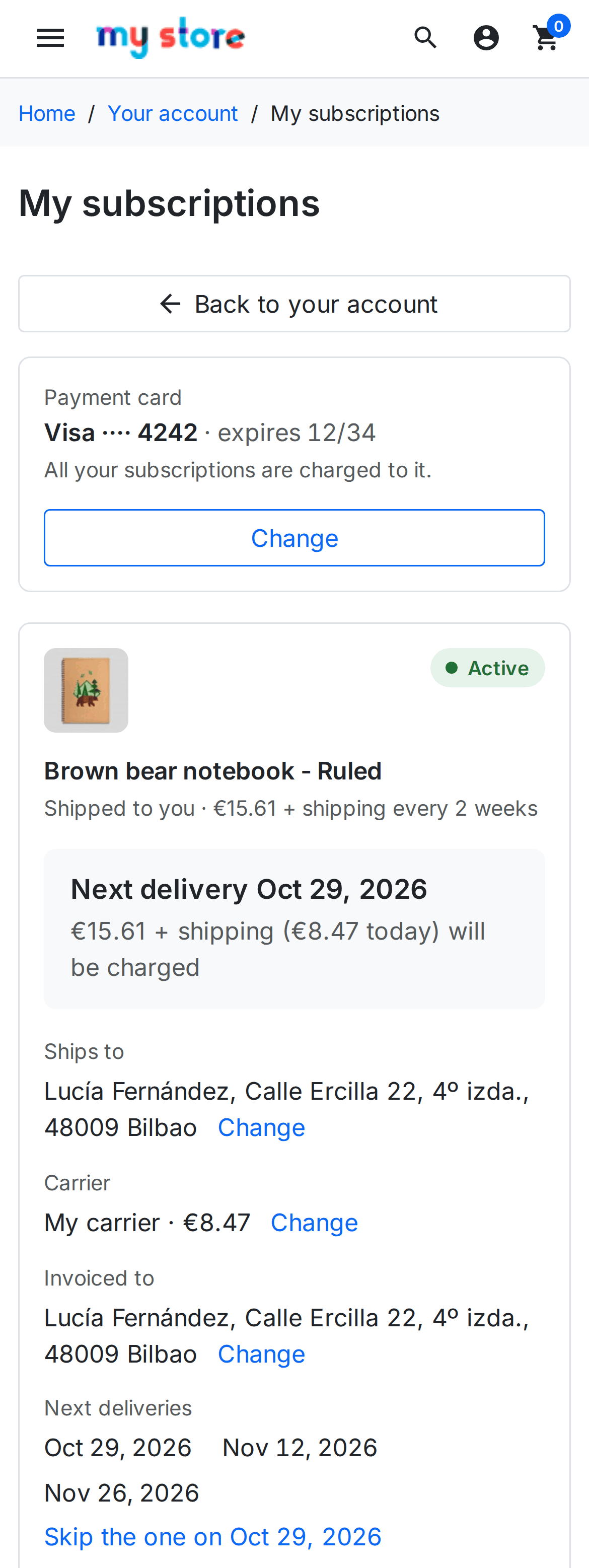
“My subscriptions” lives in the customer account, with the look of your theme, and works just as well on a phone.

  • Pause for a few months or skip the next delivery, and undo it.
  • Change the address, the carrier or the card, with 3D Secure inside your shop.
  • Download the invoice of every renewal, your shop’s own.
  • Cancel without hunting for how, seeing the real end date and the option to pause instead of leaving.
  • Come back whenever they like, paying the periods they missed if you decide so.
PrestaShop My subscriptions on a phone, with the next delivery and the customer’s actions

Failed payments, without chasing anyone

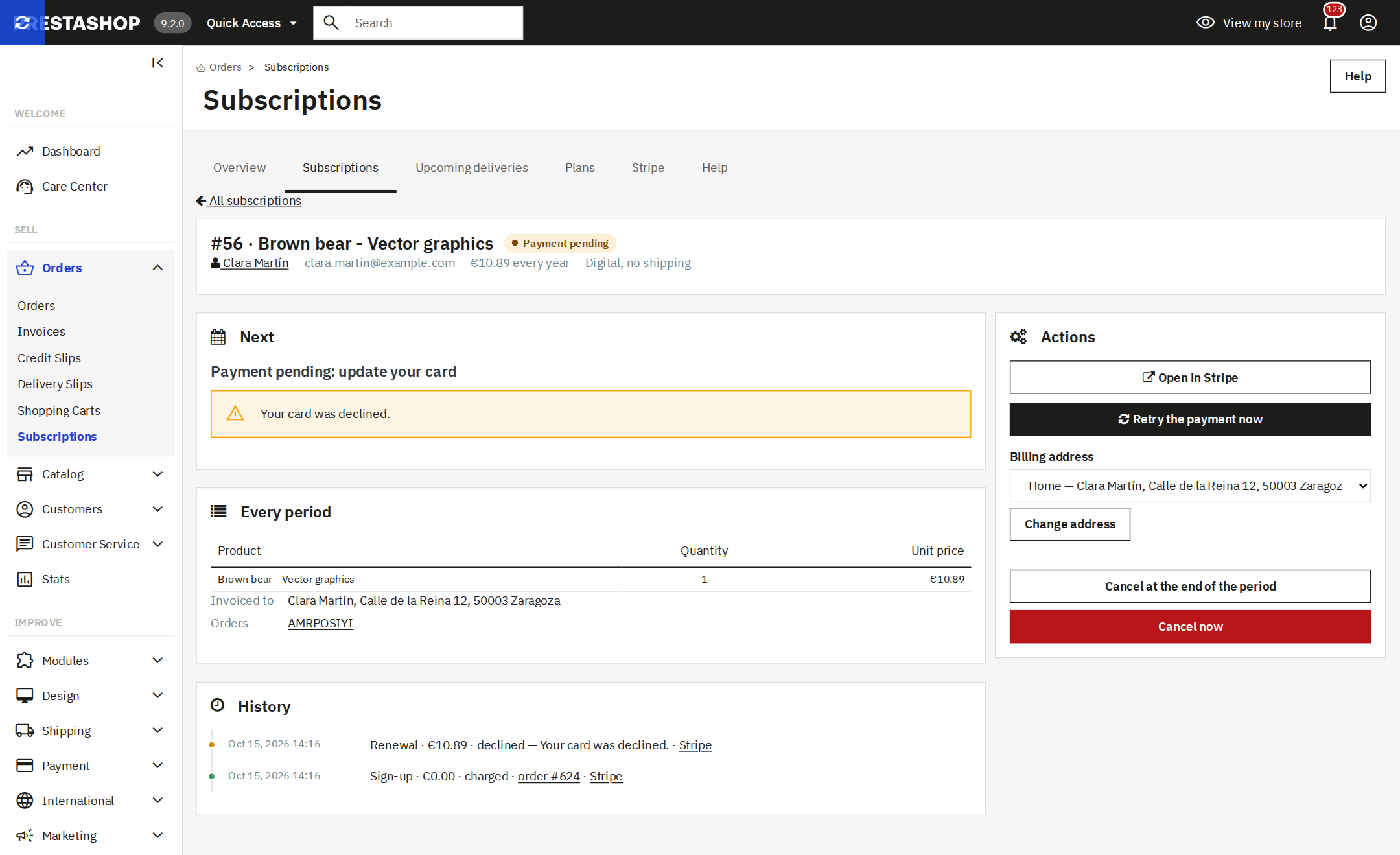
Stripe Billing retries the charge and lets your customer know. You see it in the overview with its next attempt, and you can retry it straight away from the subscription page.

  • Everything that needs attention, together: failed payments, deliveries without a carrier, pauses ending this week and cancellations within the minimum term.
  • Active, trialing and paused, monthly recurring revenue per currency and cancellations in the last 30 days.
  • The history of each subscription: every charge with its order, the pauses, the changes and who made them.
  • Deliveries for the next 30 days, as a CSV to prepare the warehouse.
Subscription page in the PrestaShop back office with its charge history and actions

It adds to your shop, it does not replace it

Your payment methods, your theme and your other modules stay as they are. The module only steps in when the cart holds a subscription.

  • Works alongside the official Stripe module and any other gateway: each one charges its own.
  • No commission from us and no platform in between: the money goes to your Stripe account, at Stripe’s rates.
  • Multistore and multicurrency, with a price per currency, in English, Spanish, French, Italian and German.
  • Every renewal is a regular order, so your ERP or connector invoices it like any other.
  • With the Odoo PrestaShop connector, your subscriptions also show in Odoo and payments arrive net of fees.
  • Hooks for sign-up, renewal, failed payment and cancellation, so another module can grant or remove a service on time.

Questions about PrestaShop subscriptions

How do I sell subscriptions in PrestaShop?

You install the module, paste your Stripe keys, create the webhook with one button and tick “Requires a subscription” on the products you want to sell that way. From then on they are bought from the product page like any other product. Step by step, in the module manual.

Does it work on PrestaShop 8 and 9? And on 1.7?

Yes: from PrestaShop 1.7.6 to 9.x, with PHP 7.1 or later, multistore included. We test it end to end in ten shops, one per version, with the Classic and Hummingbird themes and with both the classic and the new product page.

Do I need the official Stripe module?

No, and if you already have it you can keep it. This module only charges carts that hold a subscription; regular purchases go through your usual gateway.

Which payment methods does it accept?

Cards with 3D Secure, Apple Pay and Google Pay, SEPA Direct Debit in euros and ACH in US dollars. You choose whether customers pay inside your checkout or on the Stripe Checkout page.

Can I sell regular products and subscriptions in the same order?

Yes, even subscriptions with different periods, such as a monthly and a yearly one. The customer pays everything at once and each subscription then renews on its own.

Does it work for physical products with shipping?

Yes. Each delivery goes to the current address with the chosen carrier, and shipping is charged at the carrier’s price or included in the fee. Your customer can skip a delivery or change address, and you get the upcoming deliveries in an exportable list.

What happens if a payment fails?

Stripe retries it and lets the customer know, and the shop marks it as pending with the date of the next attempt. If the customer changes their card from their account, the pending charge is retried straight away with the new card. Once it is paid, the order arrives.

Can I offer a free trial or charge a setup fee?

Both, and also a minimum term, a fixed number of periods and a fee for coming back after cancelling. Everything is set on each product page.

Does it integrate with my ERP or with Odoo?

Every renewal comes in as a regular PrestaShop order, so any ERP or connector that reads orders invoices it. With our Odoo PrestaShop connector you also see each subscription in Odoo with its status, and Stripe payments arrive net of fees.

Do you take a cut of each subscription?

No. You pay for the licence once and it is yours forever. Payments go straight to your Stripe account, which applies its own rates; we charge no commission.

How many shops can I use the licence on?

On one shop, plus its separate test copy. The licence comes with three months of updates and support; with the Continuity Plan you get the first year and a yearly renewal, if you would rather not think about versions.

Technical details: compatibility, installation and developers

Compatibility

PrestaShop1.7.6 to 9.xMultistore included, with both the classic and the new product page.
PHP7.1 or laterTested up to PHP 8.4.
ThemesClassic, Hummingbird and child themesIt uses the PrestaShop checkout, so it works with the themes that keep it.
StripeAccount with Stripe BillingSecret (or restricted) and publishable keys; the module creates the webhook.
CurrenciesAll those Stripe supportsRenewal price per currency. SEPA in euros, ACH in US dollars.
Languagesen, es, fr, it, deIn the shop and in the back office.

How it is installed

Upload the module

From the PrestaShop module manager, like any other. It appears under Orders › Subscriptions.

Connect Stripe

Paste your keys and click “Create the webhook in Stripe”: the module registers it in Stripe with everything it needs.

Mark your products

On each product page, “Requires a subscription” and how it renews. It can be bought straight away.

For developers

The module tells other modules about every sign-up, renewal, failed payment, pause, address change and cancellation through its own hooks, and lets them subscribe a customer linked to one of their objects (a licence, a seat, a service) with a public API whose signatures do not change. It is all in the hooks and API reference.

The full setup is in the module manual: connecting Stripe, creating a plan, what your customer sees and what to do with each notice.


Your first subscription, charged this week.

The licence is yours forever, it is up and running in an afternoon and we help you set up your first plan.

See prices

Tell us what your business needs

A module, an app, a server that is giving you trouble or something urgent. We answer within 24 hours, with a fixed quote with a price and a date.