Anti-Bot Protection for PrestaShop: Faceted Search Shield & Rate Limiting

For shops where bots crawl every filter combination and the hosting company warns about 100 % CPU. Answers before the database to combinations that make no sense, limits expensive searches per address and per network, and challenges whoever goes over with a check the browser solves by itself. Verified Google gets in; your customers notice nothing.

$149.99
License
PS 1.7+, 8.x, 9.x
SSL Secure
Instant Download
Official Support
14-Day Refund
Licensed
Anti-Bot Protection for PrestaShop: Faceted Search Shield & Rate Limiting
Selected:
$149.99

What your customer sees

The same filters as always. The protection is invisible.

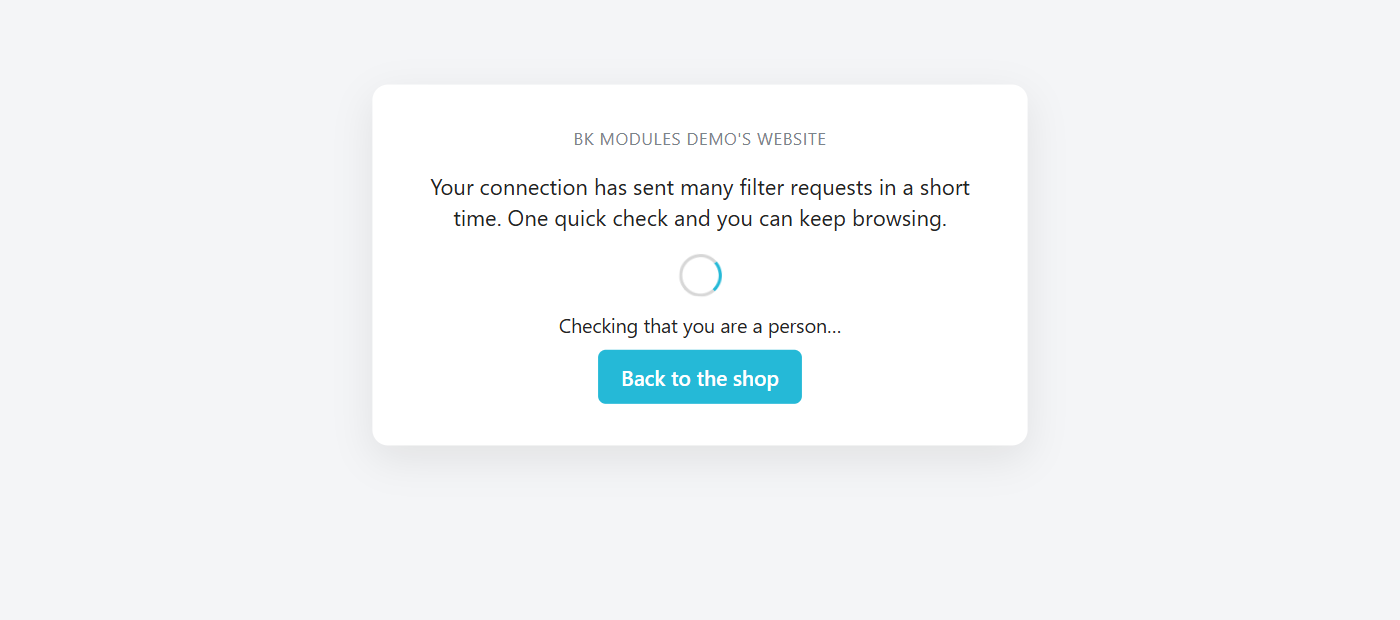
Your customer keeps filtering by size, colour, brand or price exactly as today: the module removes no filters, changes nothing in your theme and shows no notice in the shop. It works before the shop starts searching, and only steps in when one connection asks for more searches per minute than a person makes. Then it shows this screen for a second, solves the check by itself and returns to the listing that was requested. Someone who is actually shopping never gets to see it.

Check screen of the PrestaShop anti-bot module, which solves itself and returns to the listing

What happens on your server

How many expensive searches you served and how many stayed at the door.

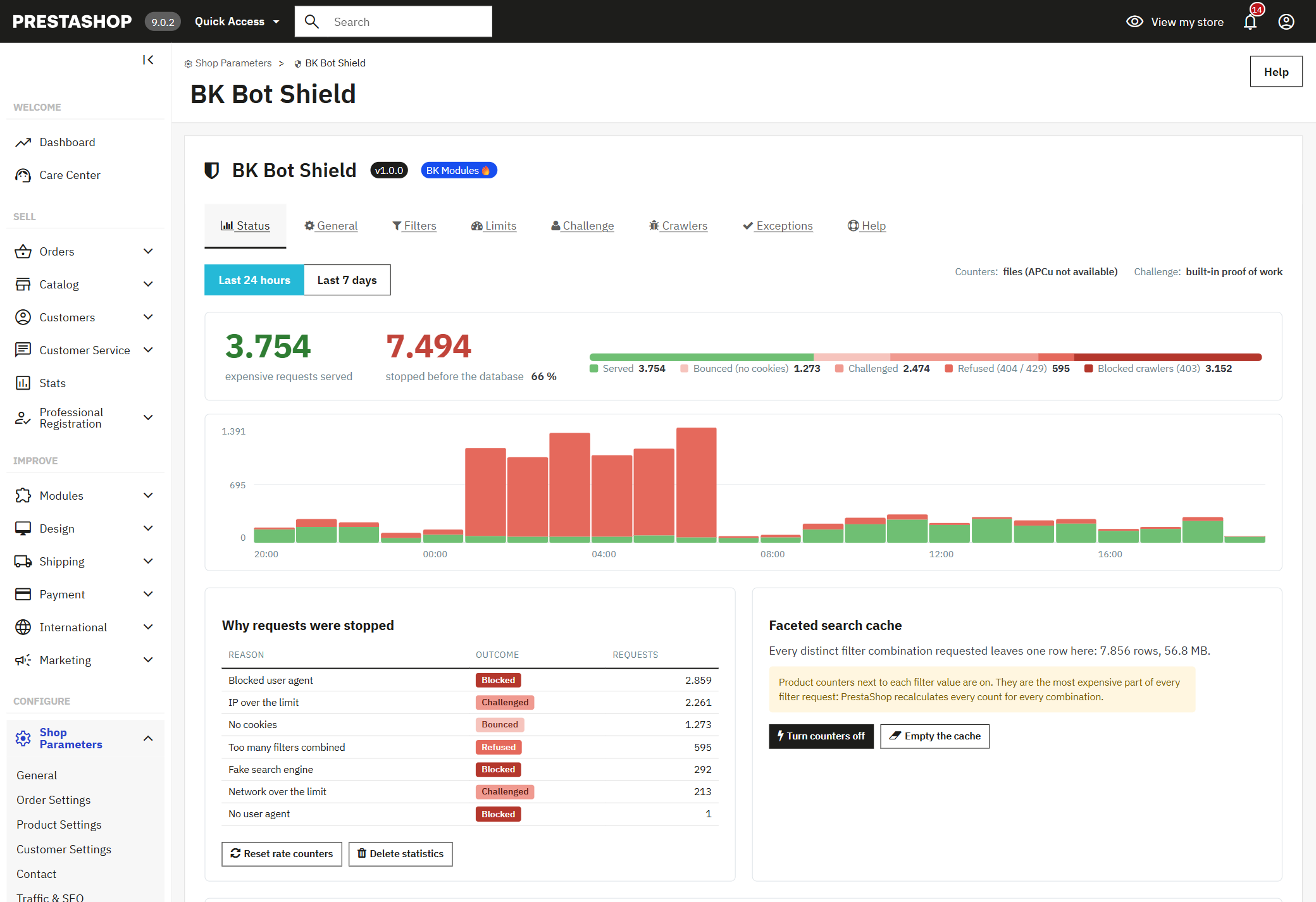
The status panel tells you what your shop never did: how many filter requests arrived in the last 24 hours or the last week, how many were served and how many were stopped before touching the database, with the reason for each one. The hourly chart shows the overnight wave you used to see only on the hosting bill.

Status panel of the anti-bot module in the PrestaShop back office with the hourly request chart

And the size of the faceted search cache

Every filter combination ever requested leaves a row in the cache of PrestaShop's faceted search module. The panel tells you how many rows there are and how much they weigh, and lets you empty it and switch off the product counters next to each filter value — the most expensive part of every request — without leaving the page.

How it decides

Three layers, from the cheapest to the most expensive, and the first one that decides ends the request.

1. Which combinations exist

Of all the URLs your shop could produce, only the ones combining a few filters, a few values per filter and reachable pages make sense. A request outside those limits — eight filters at once, page 400 — gets an immediate "not found", with no query, and stops being a URL worth crawling. The playing field shrinks from millions of combinations to a few thousand.

2. How many expensive requests each origin gets

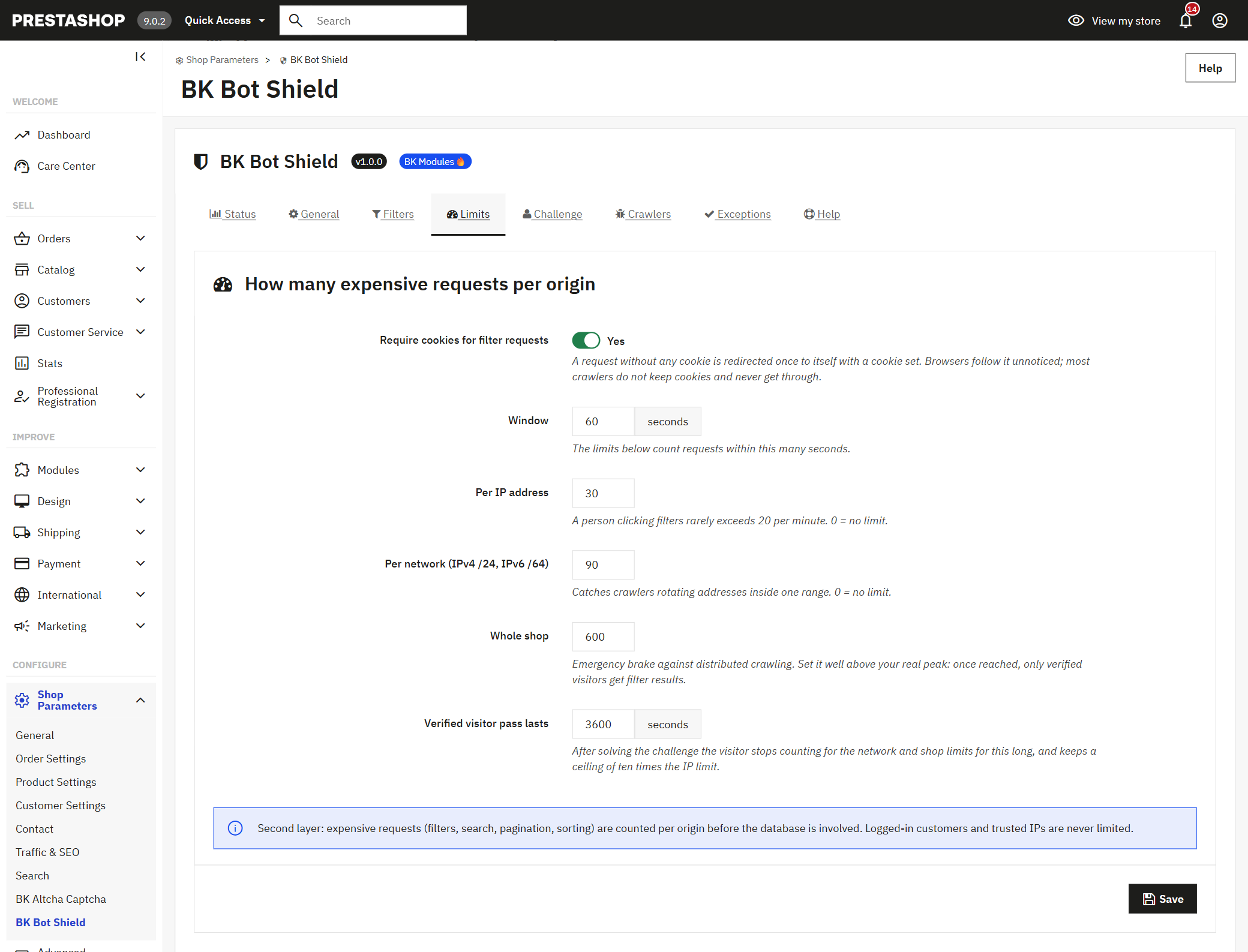
Filtered searches, the search box, pagination and sorting are counted per address, per network and for the whole shop. A customer makes twenty in a minute; whoever makes three hundred is not a customer, whatever they call themselves. Before that, an invisible bounce discards crawlers that keep no cookies: a browser follows it without noticing and the bot keeps going round at no cost.

3. A challenge for whoever goes over

Whoever exceeds the limit is not slammed out: they get a check that a browser solves on its own in milliseconds, with no puzzles or checkboxes, and a one-hour pass. The pass never exempts completely: solving a challenge is cheap for a script, so whoever carries one still has a ceiling per address.

Limits tab per IP, per network and per shop of the PrestaShop anti-bot module

Google still gets in

A real search engine is recognised; one that only claims to be, is not.

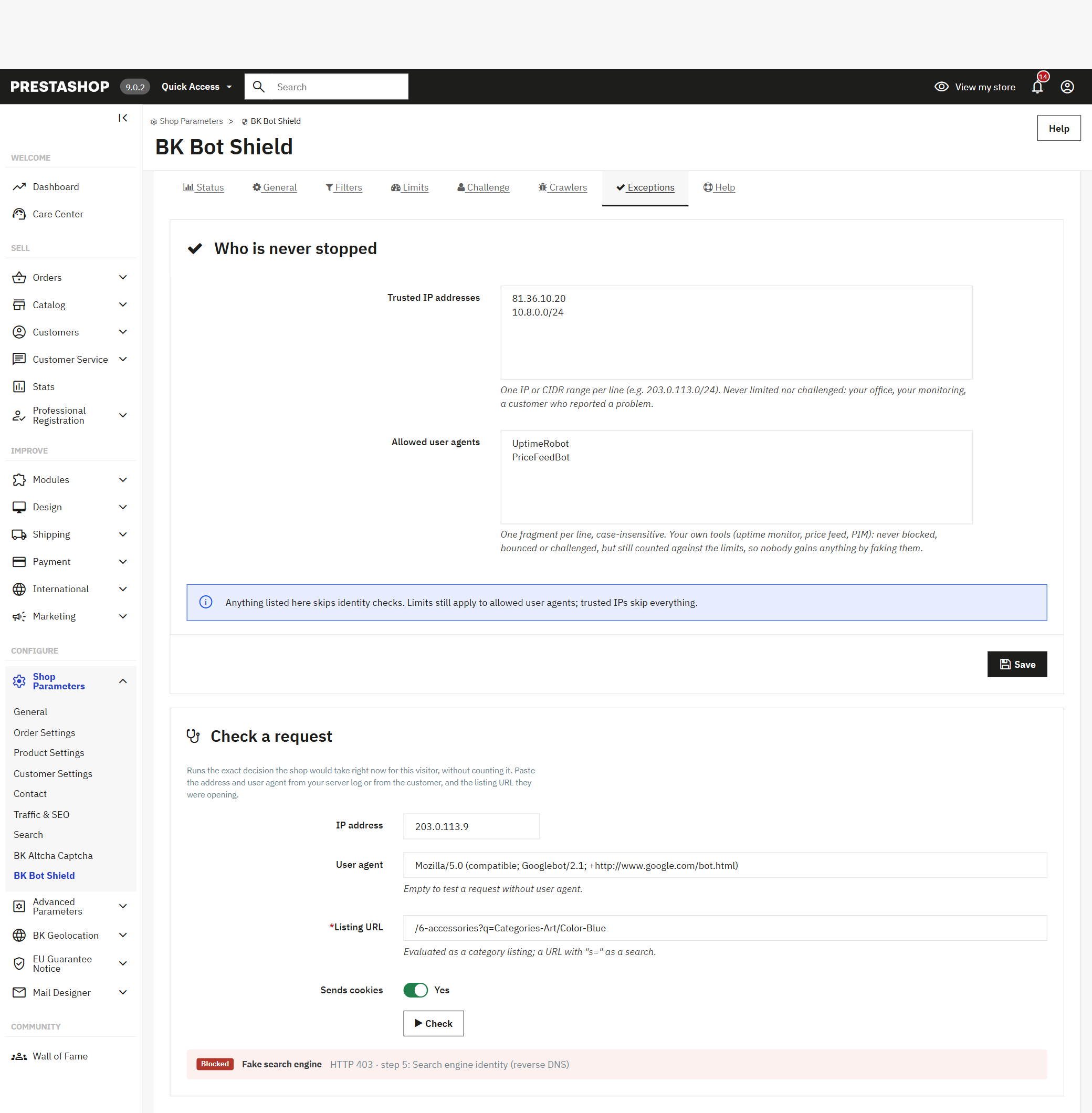
Verified by reverse DNS, with their own quota

Googlebot, Bingbot, AdsBot, Applebot, DuckDuckGo and Yandex are checked by asking their network, not by reading what they claim to be. Verified crawlers come in with their own quota and receive filter URLs marked as not indexable, so they spend their time on the pages you care about. Whoever shows up as Googlebot from an address that is not Google's stays out.

Logged-in customers

Anyone signed in to your shop is never limited or challenged.

Link previews

WhatsApp, Facebook, Telegram or Slack keep building the card for a link a customer shares.

Your own tools

Your uptime monitor, price comparison feed or ERP go on the allowed list and are never challenged.

The ones that never buy

SEO tools, AI training crawlers and scripting libraries come blocked out of the box, and the list is yours.

Nobody extra is left out

Every stopped origin, with its reason and an action next to it.

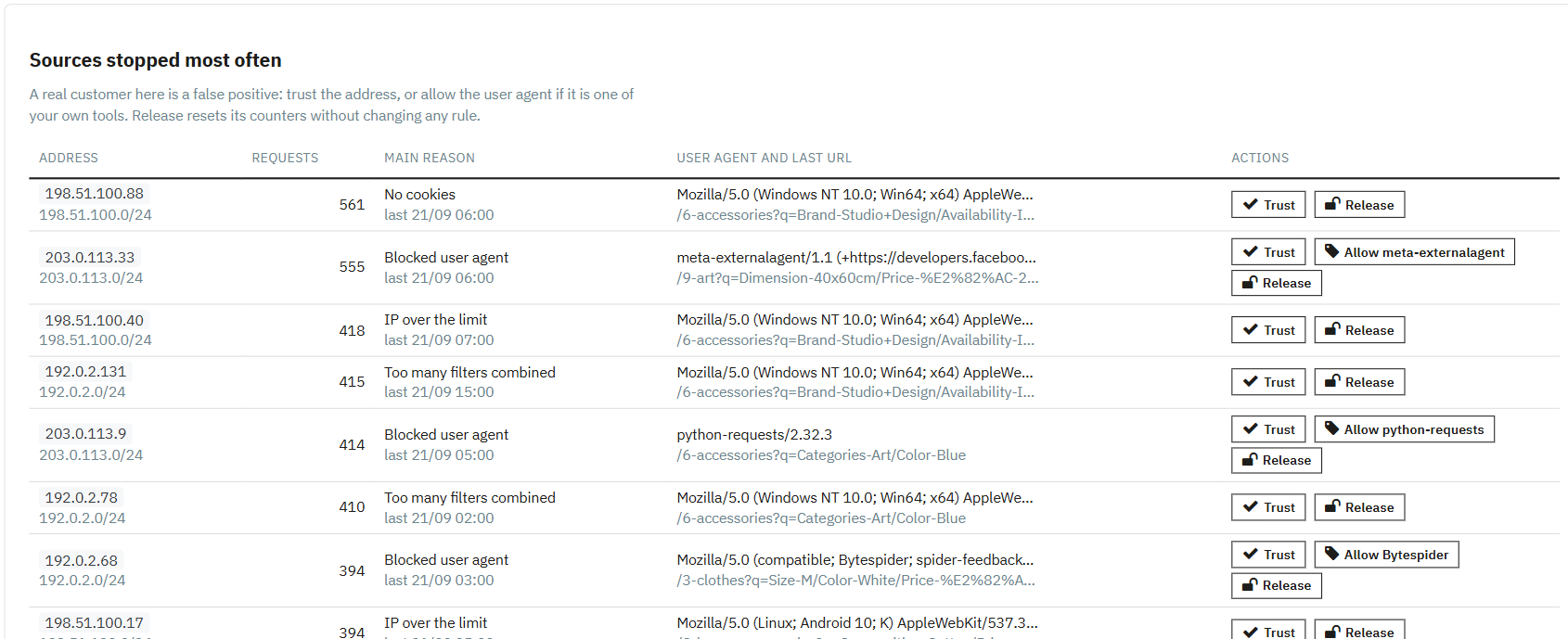
The panel lists the addresses and networks stopped most often, with the main reason, the last crawler they claimed to be and the last URL they requested. If one is a real customer, one click marks it as trusted; if it is a tool of yours, one click allows its identity; and "release" resets its counters without changing any rule.

Origins stopped by the PrestaShop anti-bot module with the trust, allow and release buttons

And a checker for the doubts

Paste the address and browser from your access log — or the ones a complaining customer gives you — and the URL they were opening, and the module tells you exactly what it would do with that request right now and at which step it decides, without counting it.

Request checker of the PrestaShop anti-bot module evaluating a fake Googlebot

The problem it solves

Forty thousand page views, zero orders and the hosting company writing to you.

Every filter combination in your shop is a different URL, and a mid-sized shop has hundreds of thousands of them. The crawlers of social networks, AI services and half a dozen companies you have never heard of have decided to see them all, at once and without pause. None of them is stored anywhere: each is a fresh search against your database, recalculating every filter counter along the way. Caching does not save you, because nothing repeats, and neither does a CDN, for the same reason.

The outcome is always the same: CPU at 100 % on a Saturday afternoon, a back office that crawls and a shop that will not open for the customer who was about to pay. We tell the whole story in the article on bots and faceted search. This module is the solution described there, packaged: decide which combinations exist, answer before the database and keep crawlers away from the resources buyers need.

Is this your case?

Four signs; with two of them together, almost certainly.

What you notice

  • Huge numbers of page views and no carts: visits do not match orders at all.
  • The hosting company warns you consume too much or suspends the account "to protect other customers".
  • It goes down at odd hours: overnight, on a Sunday, with no commercial pattern whatsoever.
  • The back office is slow too while it happens.

What the access log shows

  • Thousands of consecutive lines with ?q= in the URL, all different, requested within seconds.
  • Crawler names that change every week, or ordinary browsers from hundreds of addresses of the same network.
  • Requests for page 200, 300 or 400 of a category that has three.
  • Searches with eight filters combined that no person has ever ticked.

Not sure? We will tell you for free

Send us the access log of a bad day through the contact form and we will tell you how many of those requests are people and how many are noise, no strings attached. If it turns out to be this, you already know what to install.

What installation includes

With the 12-month licence we install it and tune it with your logs.

The default limits suit most shops, but every catalogue has its own shape: how many filters make sense to combine in yours, which tools of your own must never be challenged, whether your server sits behind Cloudflare or another proxy. With the 12-month licence we install it for you, read your access logs, leave limits and exceptions tuned to your real traffic and walk you through the panel with your own data. During the year, any adjustment you need is part of the support.

Installation

In your shop, with the module active and working the same day.

Log analysis

We read your access logs and tell you who was eating your machine.

Fine tuning

Limits, allowed filters and exceptions fitted to your catalogue and your traffic.

Twelve months of support

Updates and adjustments for a year, whenever your catalogue or your server changes.

Before you buy

What to know before installing it.

Works with what you have

PrestaShop 1.7.6 up to 9, with any theme, with the standard faceted search module and with the shop's search box.

Behind Cloudflare

Recognises the visitor's real address behind Cloudflare or your proxy, and keeps the LiteSpeed cache from storing its answers.

No external services

The challenge is solved on your own server, with no keys and no third parties. If you prefer Turnstile or reCAPTCHA, pick them and add your keys.

Privacy

Only stores the addresses it has stopped, for 30 days and in your own database. Nothing leaves your shop.

Observation mode

If you want to watch it before it acts, one switch sets it to look only: it records everything it would stop and lets everything through. After a few days the panel tells you what it would have stopped, and you decide.

Frequently asked questions

Does it block Google?

No. Googlebot is verified by asking Google's network and comes in with its own quota. What the module does is mark filter URLs as not indexable and answer immediately to combinations that make no sense, which is exactly what Google recommends for faceted navigation. Usually it starts crawling the pages you care about better.

How do I block bots in PrestaShop without removing the filters?

By putting the decision before the search: the module counts how many filter requests each origin makes and only holds back whoever goes over. The filters stay there for everyone; what changes is that producing millions of different pages stops being free for whoever asks for them.

Does it work with Cloudflare?

Yes. Behind Cloudflare every request seems to come from its servers; the module reads the real address Cloudflare adds and only trusts it when the request really arrives from Cloudflare's network. It also works with another proxy or load balancer at your hosting.

What if a real customer goes over the limit?

They see a check screen for a second that their browser solves by itself, with no checkboxes or puzzles, and carry on with a one-hour pass. And if they are signed in, not even that: identified customers are never limited.

Why isn't robots.txt or blocking by name enough?

Because the crawlers that bring you down do not read robots.txt and change name and address every week. The module does not depend on knowing who each one is: it measures how many expensive searches each origin makes, and that measure cannot be disguised. How those limits are set is explained in rate-limiting requests per IP in PrestaShop.

Does it store personal data?

It keeps the IP address of the origins it has stopped for 30 days — just enough for you to review them in the panel — and then deletes them. Everything stays in your shop's database; nothing is sent to any service.

Does it work on PrestaShop 8 and 9?

Yes. It is tested from PrestaShop 1.7.6 up to 9, with PHP 7.2 onwards. The licence includes updates.

Getting started

Protecting from the first minute, with nothing to configure.

1. Install and it protects

The default limits — five combined filters, thirty searches per minute and address, cookie bounce and built-in challenge — suit most shops. No keys to request, nothing to switch on.

2. Look at the panel the next day

How many expensive requests arrived, how many stayed at the door and who was sending them. That is when you understand what was going on.

3. Adjust what is yours

If a stopped origin is a customer or a tool of yours, one click puts it on the trusted list. The checker removes any doubt before you touch a limit.

4. Forget about it

Statistics purge themselves, counters live on your own server and the back office lets you know when a new version is out.

Tell us what your store needs

A module, a development, or just a second opinion. The first consultation is free, and a fixed quote comes out of it with a price and a date.