
Your cart
There are no more items in your cart

Odoo PrestaShop Connector
Selected:
$469.00
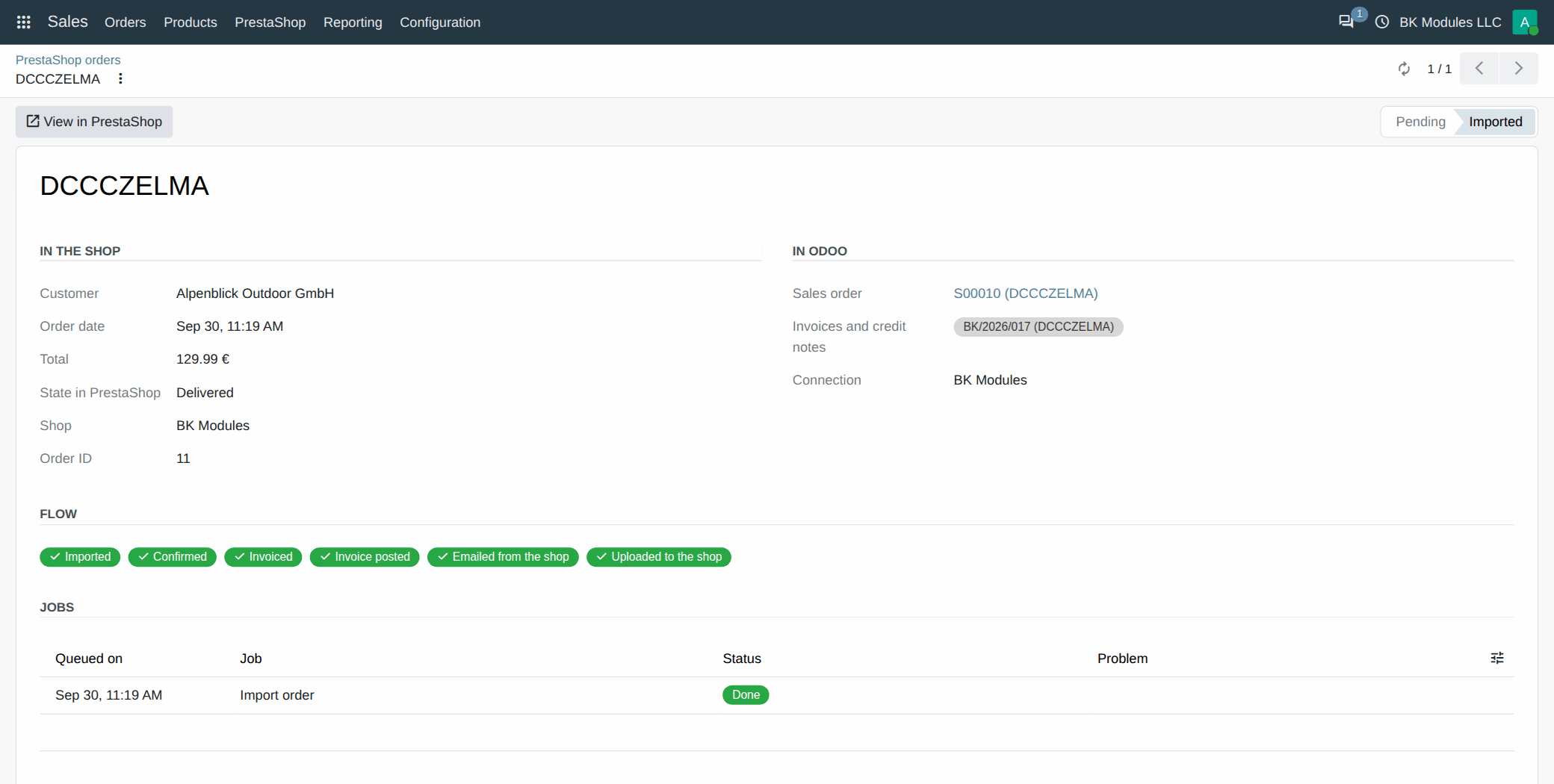
This is how a shop order looks in your Odoo: every step done, without anyone touching it.
What changes when you connect PrestaShop to Odoo
What eats your mornings today, and how it looks with the connector.
Without the connector
- You copy every shop order into Odoo, or leave it for the end of the day and one slips through.
- The PrestaShop invoice and the Odoo invoice carry different numbers, and they never match at quarter end.
- You sell something you no longer have because the shop's stock is a day behind the warehouse.
- A customer asks for their invoice and you have to find it and send it yourself.
With the connector
- Every order shows up in Odoo the moment it is placed, with its customer, shipping and taxes.
- There is one invoice, Odoo's, and it adds up exactly to what the shop charged.
- The shop shows the stock you have in your Odoo warehouses.
- The invoice reaches the customer by email on its own and stays in their shop account.
One order, start to finish
Real screens of the connector: this is how an order travels from the shop to the accounts.
1. A customer buys in your PrestaShop shop, as always. Nothing changes for them.
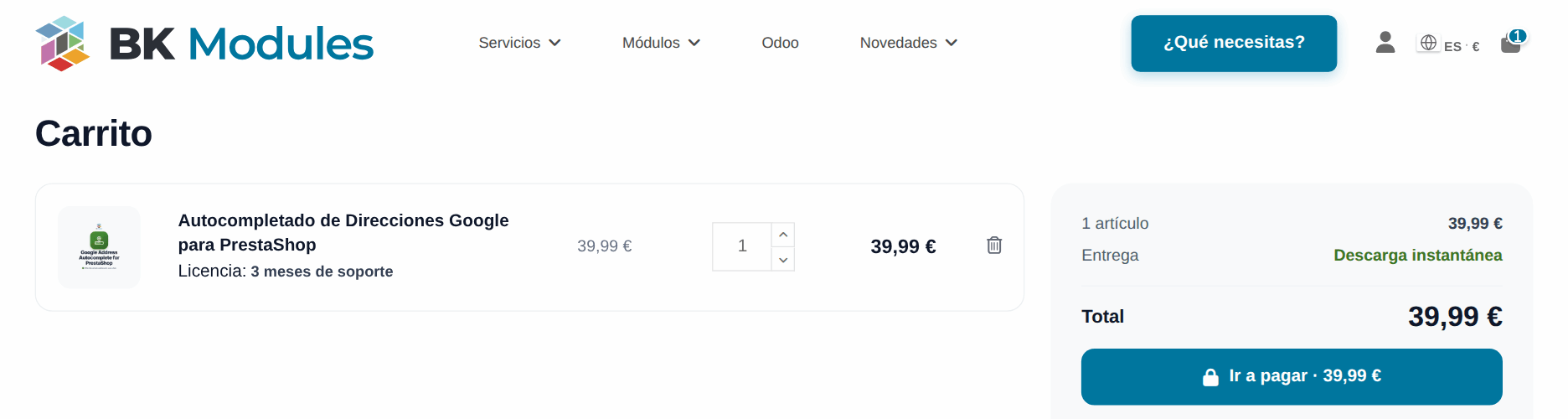
2. Right away, the order is in Odoo as a sales order, with its customer, its lines and the pricelist of its currency.
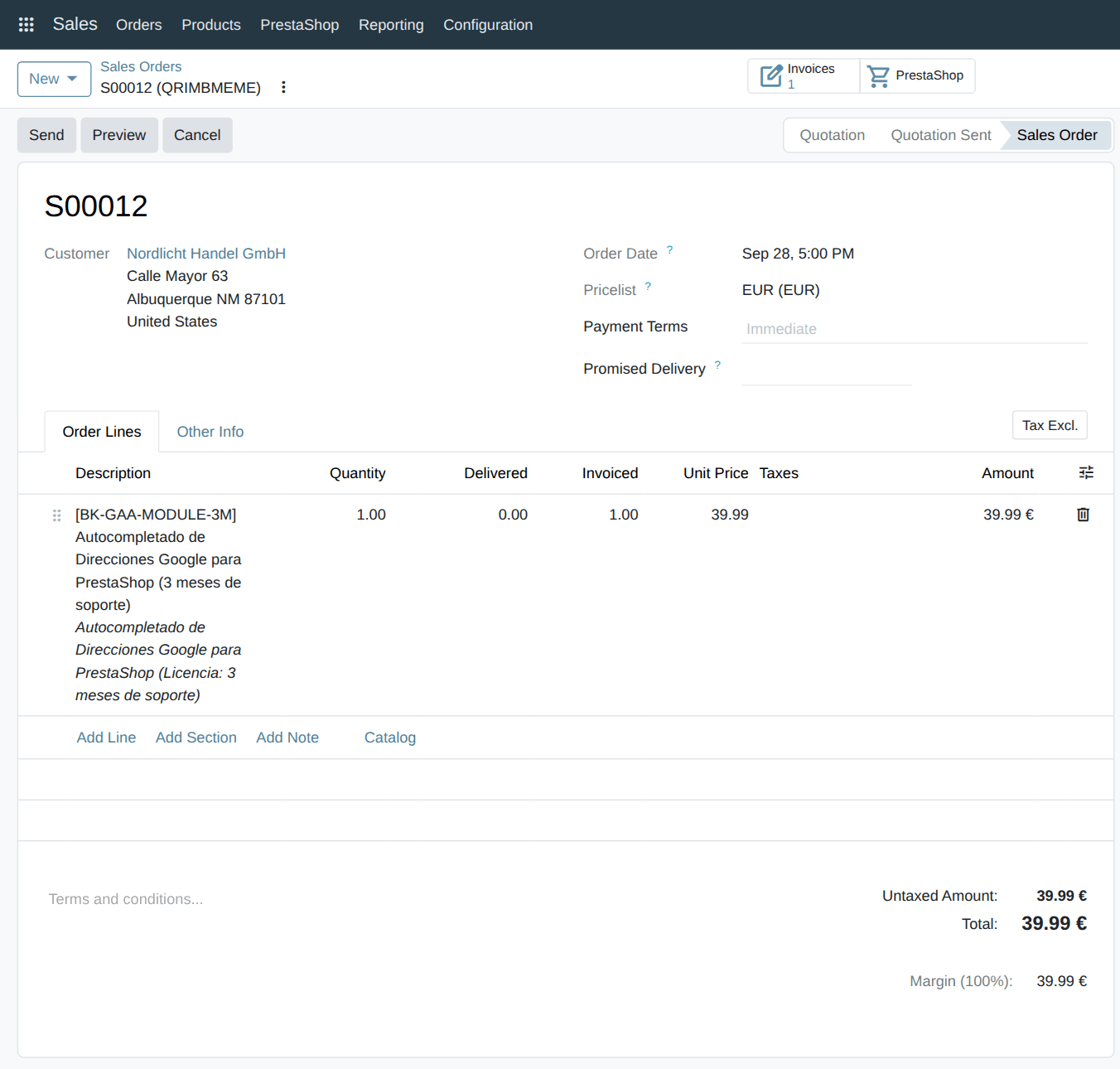
3. Depending on the order's state in the shop, Odoo confirms it, invoices it and registers the payment. Nobody touches a thing.
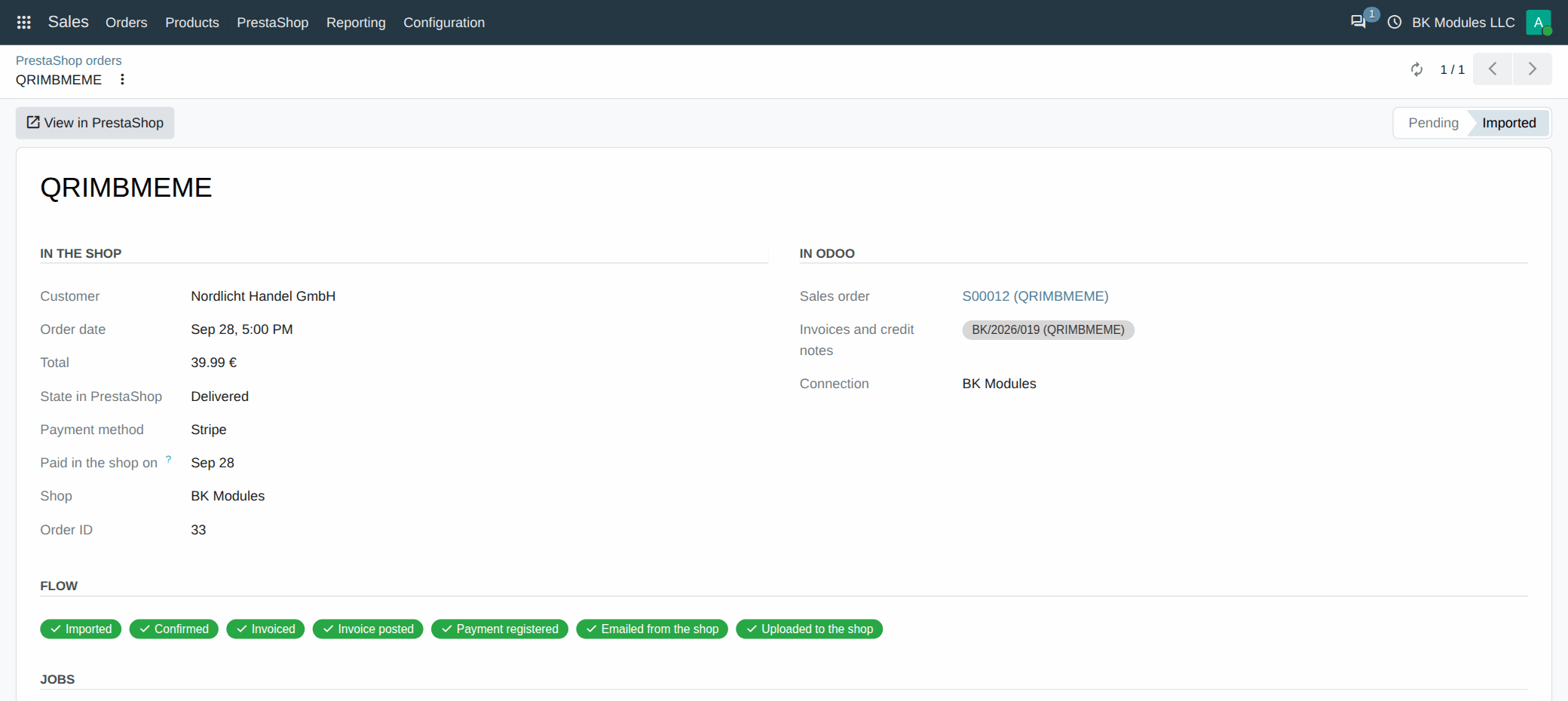
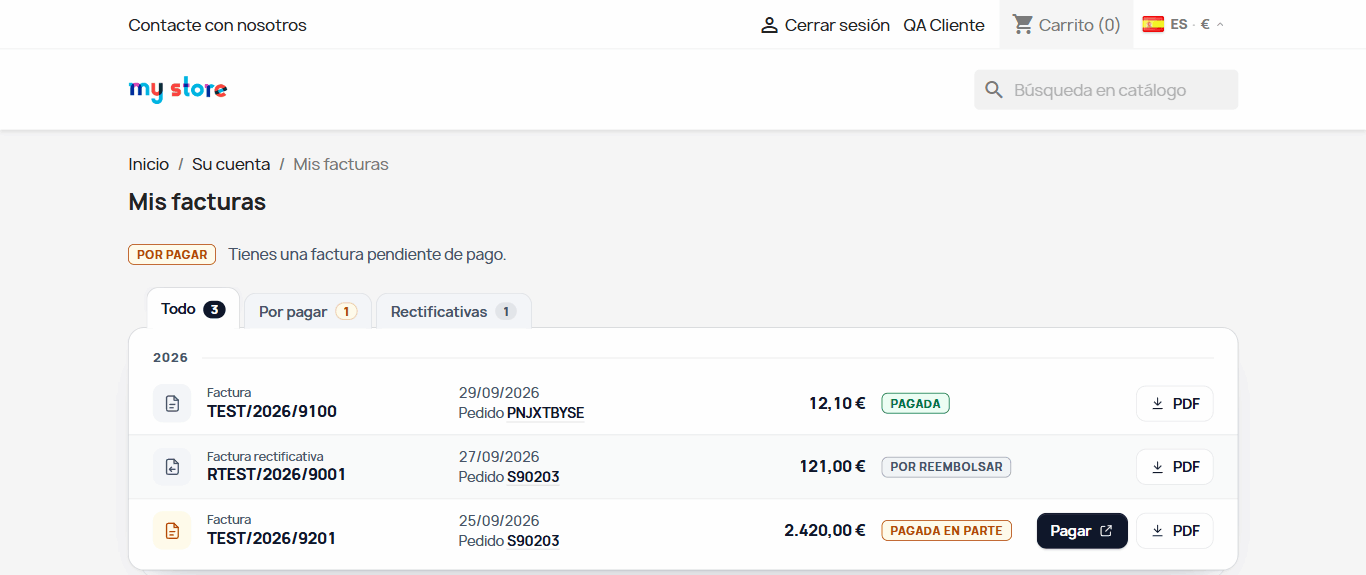
4. Odoo's invoice goes up to the shop: the customer gets it by email and has it in «My invoices», in their account.
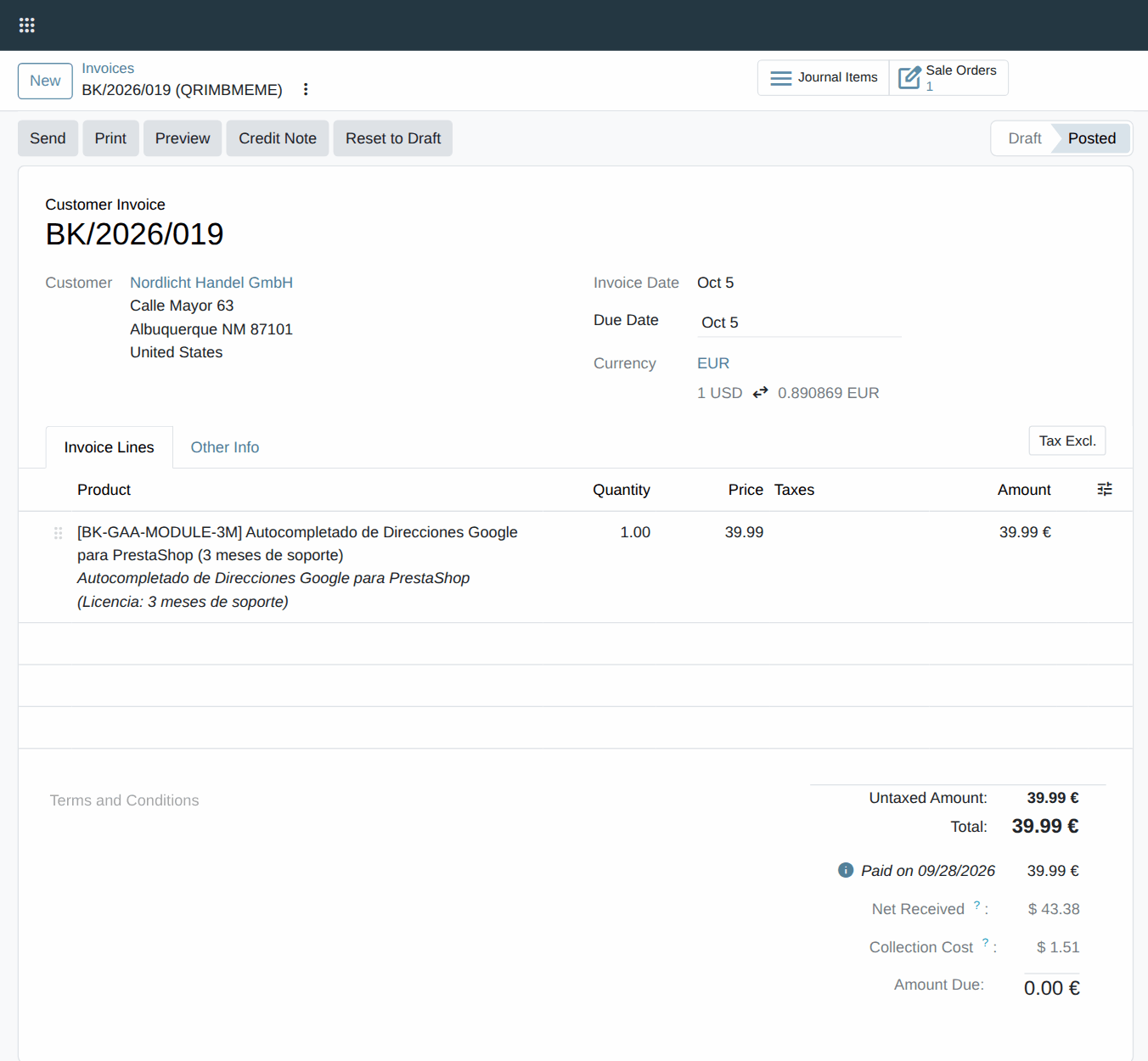
5. The Stripe payment is reconciled with the invoice, and Odoo records what reached the bank and what the gateway kept.
Want to see it live? We'll show you in 15 minutes. Ask for a demo
We use it in our own shop
bkmodules.com sells on PrestaShop and keeps its accounts in Odoo. This same connector joins them, every day, with real orders, invoices and payments.
- The shop's orders land in our Odoo by themselves and are invoiced according to their state.
- The invoice every customer receives is Odoo's, and they also have it in their shop account.
- Card payments reach their journal already net of the Stripe fee.
- Our customers see in the shop the quotations and invoices we make for them in Odoo.
You can check it yourself: buy any module and the invoice you get comes from our Odoo.
What it costs
You pay once and the connector is yours forever. The price is for the Odoo version and the number of shops you chose above.
Just the connector
If you have a developer to install and look after it.
- The connector forever, in today's version.
- For the Odoo version and the shops you choose above.
- We help you until the first order invoices itself.
Recommended
Connector + updates and support
So you can forget about it: we keep it up to date for you.
- Everything above.
- Every new version, also when you move to a new Odoo, PrestaShop or PHP.
- We answer within one business day, with priority.
- Renews every year at the same price. If you stop, the connector keeps working.
We install and set it up for you
So you never touch anything technical.
- Everything above.
- We install the connector in your Odoo and in your shop.
- We set it up with your taxes, payment methods, carriers and order states.
- We test a real order with you until its invoice is in the shop.
Try it first on a test copy of your Odoo, without using up the licence · Even if you stop paying, your orders never stop · Need something only your shop has? Tell us
Questions about the Odoo PrestaShop integration
How do I connect PrestaShop to Odoo?
With two pieces: a module in your Odoo and another in your shop. The shop one gives you a key, you paste it in Odoo and an assistant asks what it needs: taxes, payment methods and what to do with each order. It takes an afternoon, and you do not have to open the PrestaShop webservice or expose Odoo to the Internet. Step by step, in the connector manual.
Does it work with Odoo Community? What about Odoo Online or Enterprise?
It is made for Odoo Community, on your own server or on Odoo.sh, and needs nothing paid from Odoo. Odoo Online does not allow third-party modules, so it does not work there. We do not announce Enterprise until it is fully tested on an Enterprise database.
Which Odoo and PrestaShop versions does it support?
Odoo 17, 18, 19 and 20, and PrestaShop 1.7.6 to 9.2, multistore included. We test it end to end on ten shops, one per version. Odoo 16 or older and PrestaShop 1.6 are not covered.
Does it sync stock between PrestaShop and Odoo in real time?
Yes. When Odoo keeps the stock, every movement reaches the shop as it happens, from the warehouses you choose. And when you validate a delivery in Odoo, the customer sees the tracking number in the shop.
Who makes the invoice, Odoo or PrestaShop?
Odoo. PrestaShop invoicing is switched off so each order has a single number, and Odoo's invoice is uploaded to the shop: the customer gets it by email in their language and downloads it from their account. Returns go out as credit notes.
My products are already in PrestaShop. Do I have to create them in Odoo?
No. An import brings your products and customers into Odoo once, showing you first what it will create and what it will link. If you already have them in both places, they are linked by reference without changing anything.
Can I connect several PrestaShop shops to one Odoo?
Yes, several shops and also each shop of a multistore, each with its own settings. You choose how many when you buy, above.
What happens if I do not renew the updates?
Nothing switches off: the connector keeps working with the version you have. You stop getting new versions and the one-day answer. If you come back later, you pay the missed years, up to two.
Can I try it before connecting it to my shop?
Yes. Install it on a test copy of your Odoo: it does not count as your production database and does not touch the real shop until you connect it. And if you get stuck, we help you until the first order invoices itself.
Technical details: what syncs, compatibility and installation
What syncs each way
Odoo
Sales, invoices, payments and stock
From Odoo to the shop
- Products and prices, per pricelist and currency.
- Stock from your warehouses.
- Shipping: tracking and «Shipped» state.
- Invoice and credit notes as PDF.
From the shop to Odoo
- Orders, with their flow up to the invoice.
- Customers, with the VAT number checked in VIES.
- Payments, already net of the Stripe fee.
- Credit slips, as credit notes.
PrestaShop
Product page, content, SEO and checkout
Compatibility
| Odoo Community | 17.0, 18.0, 19.0 and 20.0 | Own server or Odoo.sh. Only needs Sales; Inventory if Odoo keeps the stock. |
| PrestaShop | 1.7.6 to 9.2 | Multistore included, with the Classic and Hummingbird themes and those based on them. |
| Shop PHP | 7.1 to 8.4 | The shop reachable over HTTPS from Odoo. Odoo does not have to be open to the Internet. |
| Payment gateways | All | With Stripe, the payment lands in Odoo already net of the fee. |
How it is installed
The Odoo module
Copy it into your addons folder (or your Odoo.sh branch) and install «PrestaShop Connector».
The PrestaShop module
Upload it from the module manager; its page gives you the key and switches PrestaShop invoices off.
The assistant
Paste the key in Odoo and it guides you: taxes, payment methods, warehouses and what to do with each order.
Every detail is in the connector manual: installation step by step, every option and what to do with each notice.
Stop copying orders by hand this week.
The connector is yours forever, you can try it first on a copy of your Odoo and we help you get it running.
Tap to zoom
Tell us what your business needs
A module, an app, a server that is giving you trouble or something urgent. We answer within 24 hours, with a fixed quote with a price and a date.