Virtual Products with Combinations for PrestaShop
Sell downloadable products that also have combinations in PrestaShop: every variant keeps its own price and its own…
- PS 1.7+
- PS 8
- PS 9
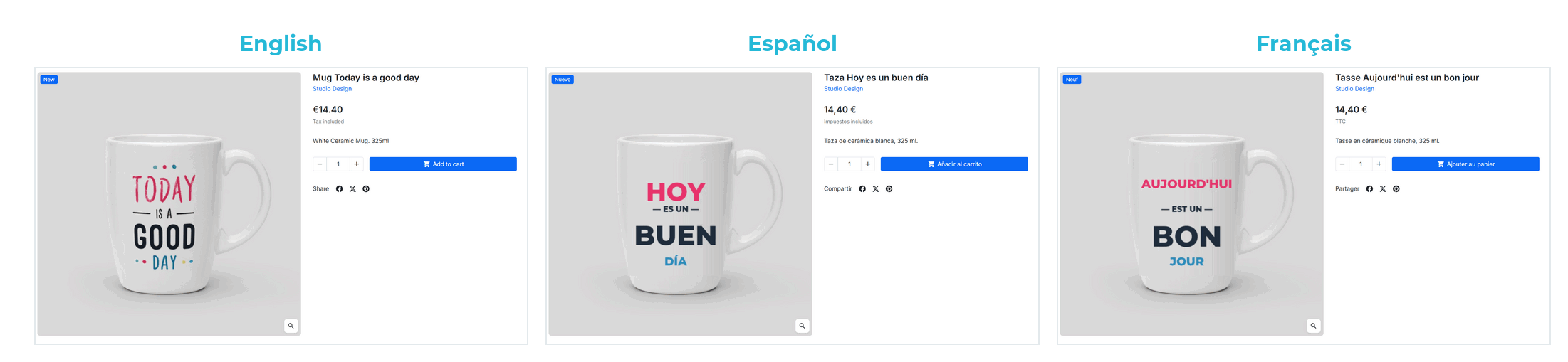
The photo in their language: the Spanish box for Spanish shoppers, the German one for Germany.
If your product's box, label or manual changes with the language, until now you had two options: show everyone the same photo, or show them all at once. With this module each customer only sees the images of their language, and the cover you choose for them, on the product page, in categories, in search and in the cart.
A photo without text —the product in use, a detail, the dimensions— is seen by everybody. You only limit the ones with the language printed on them, and a language you enable later sees the shared images and none of those made for another.
Everywhere PrestaShop shows a product image.
The product gallery, categories, search, quick view and the product blocks on the home page.
The thumbnail in the cart and in the checkout summary is the one for the language the customer shops in.
Each Google Merchant Center PRO feed goes out with the images of its language, without touching the feed module.
The image shown when the page is shared, the structured data and the image sitemap, in the language of the page.
Right below the product images, without leaving the page.
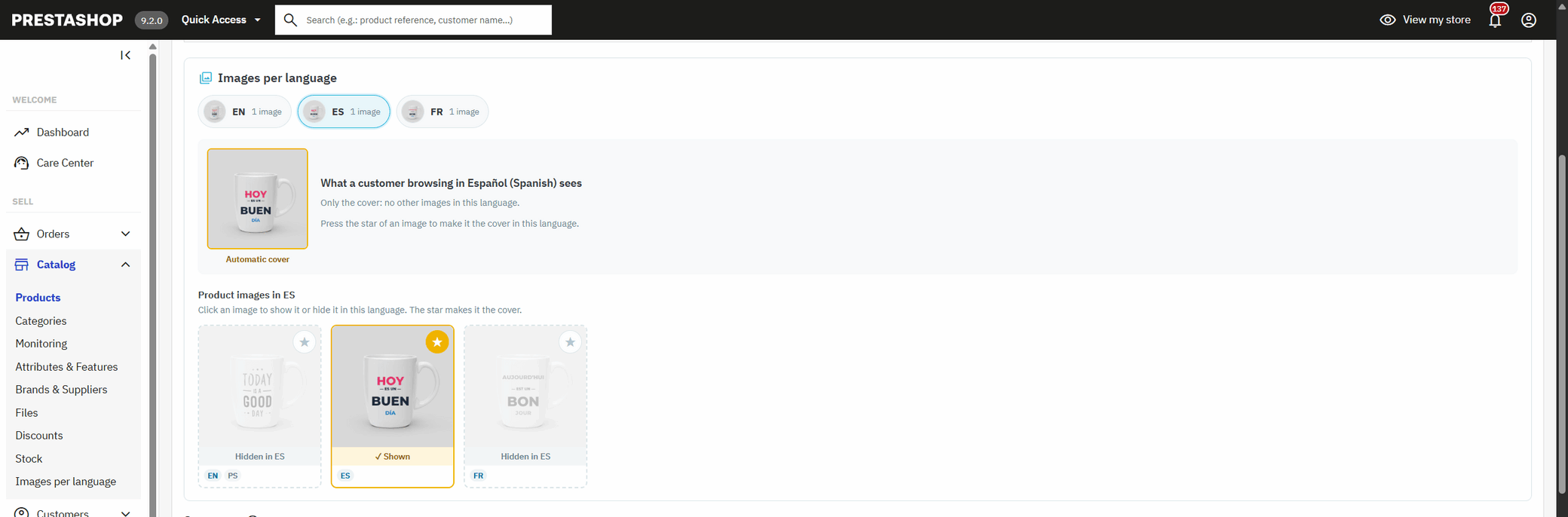
You upload images as usual. Below them there is one tab per language showing what that customer will see: their cover in large and the rest in a row. Click an image to show or hide it in that language, and its star to make it the cover. Every click is saved at once and you see it change in front of you: no need to save the product or open another page.
If you choose none, each language shows the product cover, and if that one isn't theirs, their first image. With the star you set the one you want; the image becomes visible in that language if it wasn't.
The size, colour or format with the photo of its language.
If each combination has its own photos, the editor shows you, language by language, which images will appear when each one is chosen. You tick the version of every language in the combination —the red box in Spanish and the red box in German— and each customer sees theirs when switching combination. A combination left without its own images in a language shows the product ones, just as PrestaShop does.
If your photos carry text, yes.
What to know before installing it.
From PrestaShop 1.7.5 to 9, with the classic and the new product page, and with any theme.
Every active language of your shop, and the same rules in every shop of a multistore.
Works with ETS SEO, which also handles images, and with Google Merchant Center PRO.
If you uninstall it, your images stay where they were and are shown in every language again.
PrestaShop only translates an image's alt text, not the image. With this module you upload each language's version to the same product and, below the images, tick the languages each one is shown in and the cover of each language.
Yes. Click the star on the image in that language's tab and it becomes its cover on the product page, in categories, in the cart and in Google Shopping. The other languages keep theirs.
Each combination shows, in each language, the images associated with it that are visible in that language. Associate each language's version with the combination and each customer sees theirs when choosing it.
With Google Merchant Center PRO, yes: each language feed goes out with its images and its cover, and Merchant Center picks them up on the next feed fetch. Modules that read images on their own, without asking PrestaShop —such as the official Google or Facebook ones— keep receiving the usual ones.
No. It is a single product, with one stock, one price and one URL per language; only the photos each customer sees change.
The module uses a small override of three PrestaShop functions. It works alongside ETS SEO, which overrides one of them, and detects it by itself on install. If another module uses that same slot, the installation tells you which one before changing anything.
Yes, from PrestaShop 1.7.5 to 9, with the classic and the new product page. The licence includes updates.
Install, open a product and choose.
There is nothing to configure: until you limit an image, your shop keeps showing all of them in every language.
On the product page, like any other image.
Below the images, one tab per language: show, hide and set the cover.
The list of products with images per language and the module status, on one screen.
A module, an app, a server that is giving you trouble or something urgent. We answer within 24 hours, with a fixed quote with a price and a date.