Combinations Table for PrestaShop: Quick Order by Size and Color
Every combination of your product in one table, added to the cart at once. Your customer sees every size and colour…
- PS 1.7+
- PS 8
- PS 9
Deleted a product, changed a URL or moved your shop, and Google still sends visitors to the old address? PrestaShop answers with a 404 error: the visitor leaves and the page loses its ranking. With a 301 redirect, whoever arrives lands on the right page and Google passes the ranking on to the new one. This module lets you do it for free, with no limit on rules.

Its address stops existing. Send it to the product that replaces it, to its category or to the home page.
You give it a better name and the old address still leads to the page, ranking included.
Or from another platform: every old URL goes to its new page, and what you had in Google stays.
Links with utm tags from your emails and ads reach the new page with their parameters and keep tracking.
The free edition never expires, has no limit on rules and gets every update. When you want redirects to happen on their own, you add the PRO add-on and everything you already have stays put.
With the free edition you fix your 404s by hand, one rule at a time and with no limit. PRO is for when you don’t want to have to remember: it redirects on its own when you delete or change a URL, imports the redirects you already have and handles hundreds of addresses with one rule.
| What it does | Free | PRO |
|---|---|---|
| Redirects | ||
| Manual rules, no limit301, 302, 307 and 410, to a product, a category, a page or any URL | Included | Included |
| Your campaigns keep trackingutm tags and other parameters reach the new page | Included | Included |
| Rules per shop and per languageIn multistore; a rule for one language only is PRO | Per shop | Included |
| One rule for hundreds of URLs“Starts with”, * wildcard and regular expressions | Not included | Included |
| What to do with parametersIgnore them, or redirect only the URL that arrives without them | Not included | Included |
| 303, 308 and 451For specific cases, on top of the usual ones | Not included | Included |
| 404 errors | ||
| 404 log and visits dashboardPeople and bots, counted separately | Included | Included |
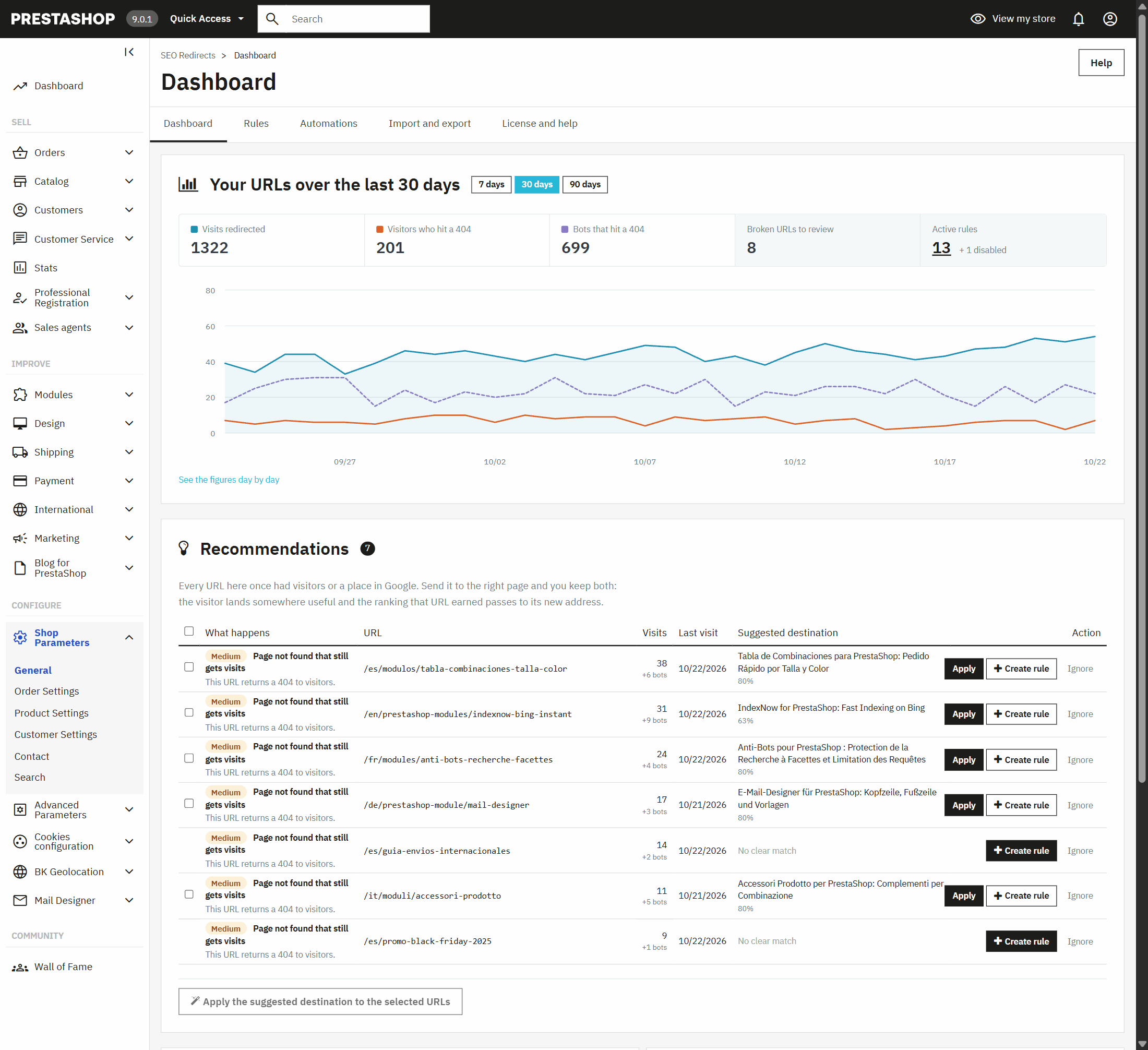
| Recommendations with “Create rule”Broken URLs with real visitors, first | Included | Included |
| Suggested destinationThe module proposes the best-matching page, and you fix several at once | Not included | Included |
| Chains and loopsA rule that leads to another rule, or two that point at each other | Warning | Fixed |
| What happens on its own | ||
| When you deleteProducts, categories, pages, brands and suppliers | Not included | Included |
| When you change a URLThe old address moves to the new one as you save | Not included | Included |
| CSV import and exportWith a preview of every row before saving | Not included | Included |
| Bring your ets_seo rulesAnd switch them off there in the same step | Not included | Included |
| Licence | ||
| UpdatesPRO: 3 months, or the first year and every year after with the Continuity Plan | Always | 3 or 12 months |
PRO is an add-on: you install it next to the free edition, and your rules, your 404 log and your settings stay where they were. In the free edition, PRO features show with their padlock and a line on what they do, so you know what you gain before you decide.
These are the four situations that send almost every shop looking for a redirect module. Here is what you do in each one.
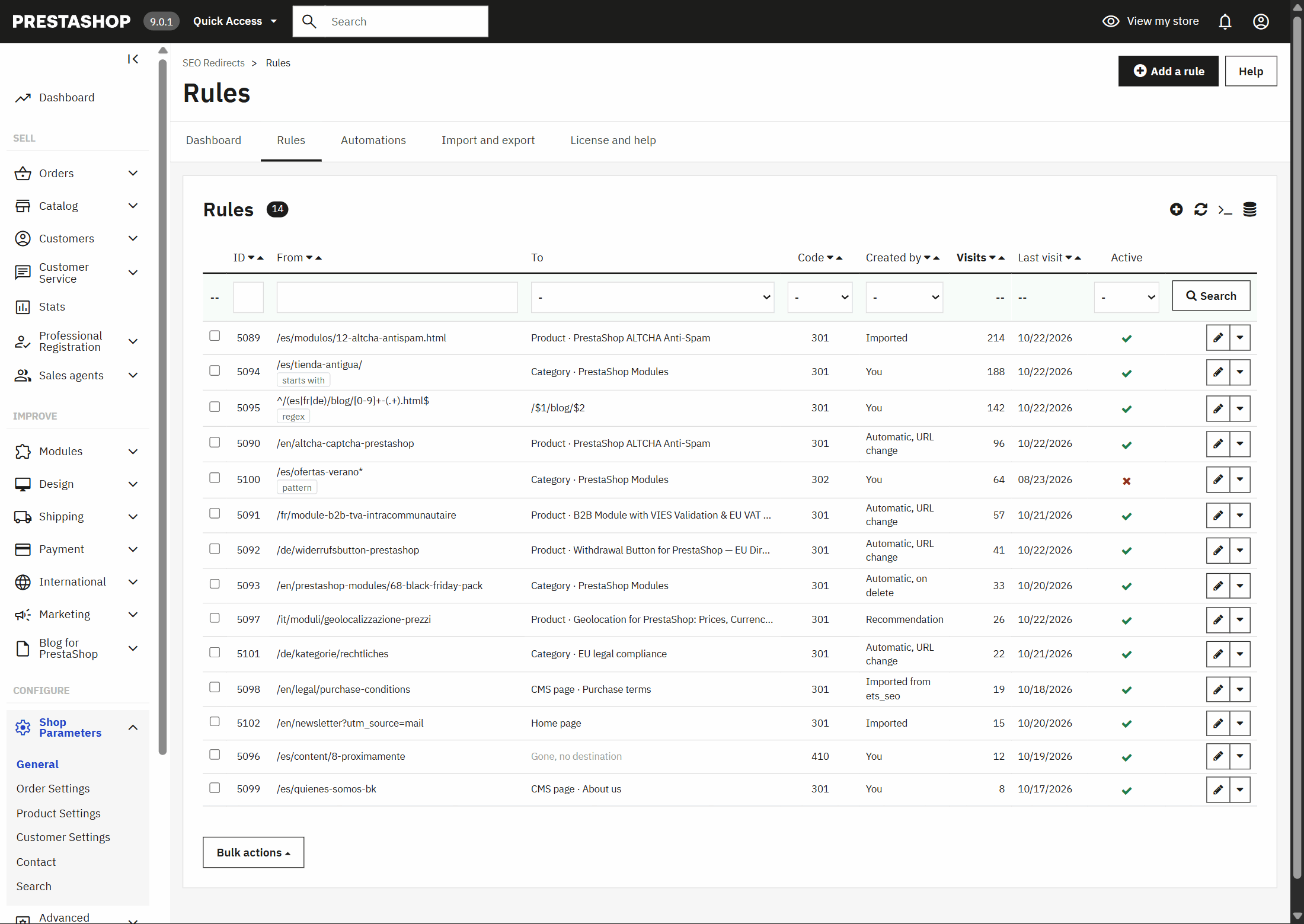
Create a rule with the old URL and choose where it goes: the product that replaces it, its category or the home page. From then on, anyone arriving from Google or from a link lands there and the 404 is gone. With PRO you don’t even have to do that: the rule creates itself when you delete the product.
Change it and redirect the old one to the new one with a 301: Google understands the page has moved and passes its ranking on. If you pick the product as the destination, rather than a typed-in address, the rule keeps working even if you change the URL again. With PRO, the redirect creates itself when you save the new URL.
Moving to PrestaShop 1.7, 8 or 9, or coming from another platform, changes the shape of your addresses. The 404 log shows you which ones get visitors, so you start with those. If there are hundreds, PRO imports them from a CSV or catches them all with a single rule.
No. The rule catches the address with any parameters and passes them on to the new page, so Google Analytics still knows which email or ad each visit came from. It’s part of the free edition.
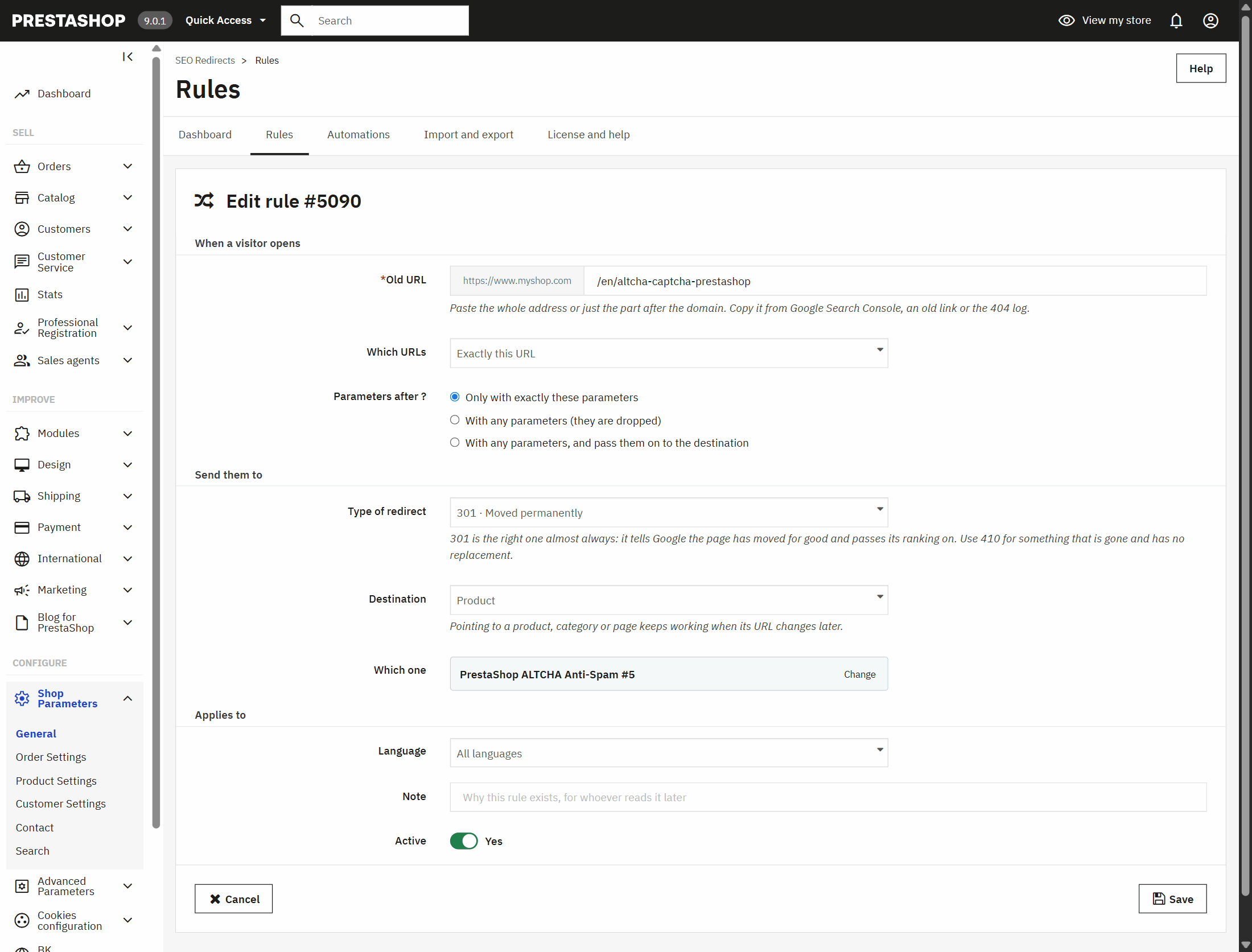
Almost every redirect module stores the destination address as it is. The day that page changes its URL, the redirect ends in another redirect or in another 404. Here you choose the product, the category or the page, and the module works out its address on every visit, in the visitor’s language. Change the destination’s URL as often as you like: the rule keeps working.

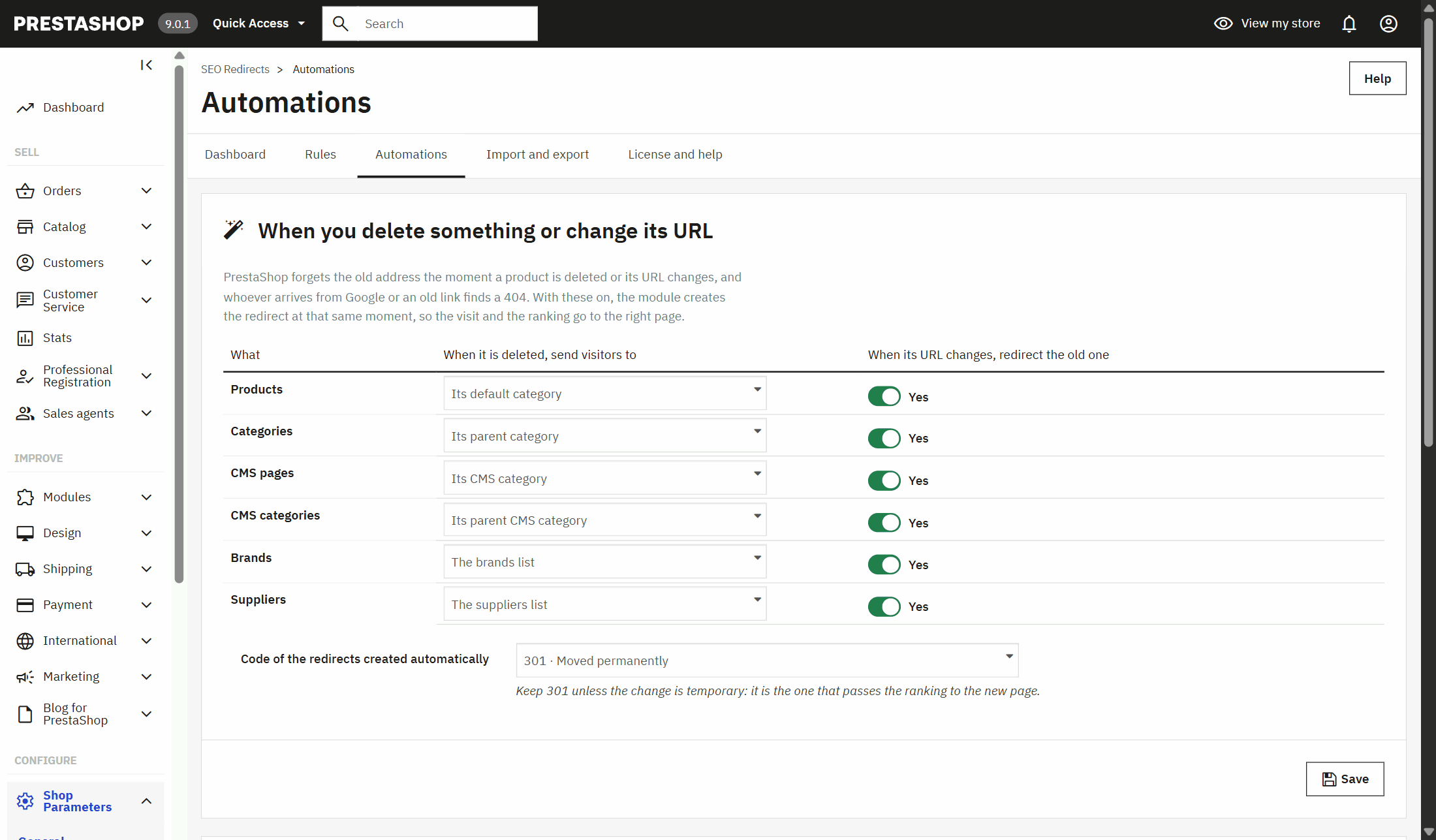
With PRO you don’t have to remember. When you delete a product, a category, a page, a brand or a supplier, the module redirects its address at that very moment to wherever you decided. When you change its URL, the old one goes to the new one. In all your languages and shops, without opening the module.

PrestaShop can redirect a disabled product, but a deleted one always returns a 404. And when you delete it, it also resets to “no redirect” the disabled products that pointed to it. The module covers exactly that: what you delete goes to its category, to the parent category, to the home page or to a 410, whatever you choose for each type. And the rules that pointed to it are re-pointed on their own.
For every URL that returns a 404, the dashboard suggests the page that fits best by its name and path, with how sure it is. Apply one, or tick several and solve them at once.
A rule that leads to another rule makes Google take two hops, and two rules pointing at each other lead nowhere. The free edition warns you; PRO turns it into a single hop.
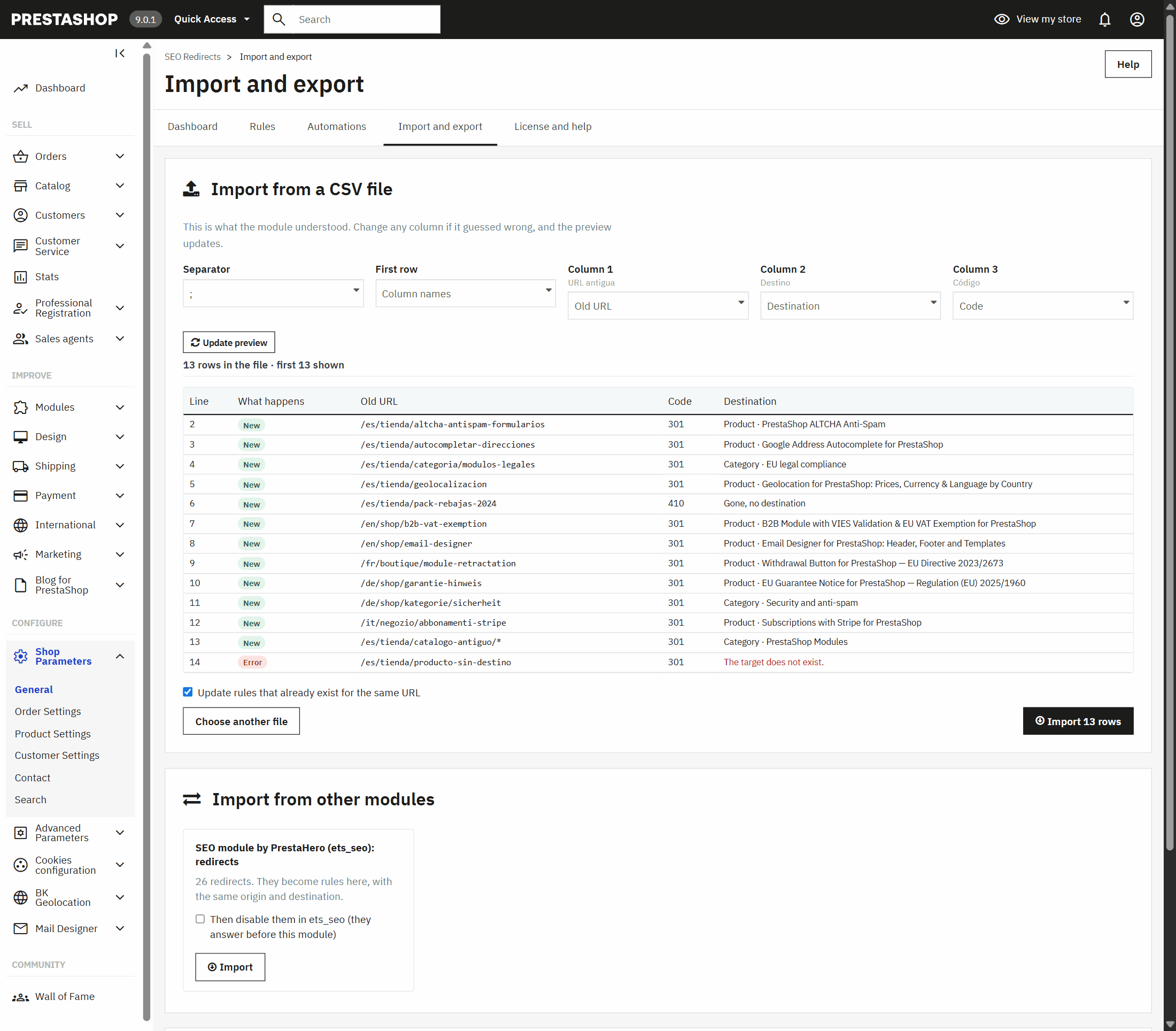
If you already have redirects in another module or in a spreadsheet, you don’t type them again. Upload the CSV and the module shows you what it understood before saving anything: which column is which, which rules are new, which it updates and which row has an error and why.

When you change a whole structure —the blog, a catalogue section, your previous shop— you are not going to write one rule per page. With PRO, a single rule picks up every address that starts with a path, those that match a wildcard or those that match a regular expression, and carries the variable part to the destination.

Any redirect module sends one URL to another. What separates one that saves you work from one that makes work for you lies in these questions: ask them of any module before you install it.
| Question | This module | Why it matters |
|---|---|---|
| If the destination’s URL changes, does the rule keep working? | Yes | A rule with the destination URL written as it is breaks the day you change that page. |
| Does it cover what I delete, not only what I disable? | Yes | PrestaShop already handles disabled products. Deleted ones return a 404 unless something catches them. |
| Does it support regular expressions? | Yes, with groups | Without them, changing the structure of the blog or a section means one rule per page. |
| Can I see what I’m about to import before saving it? | Yes, row by row | A misread CSV creates hundreds of wrong rules in one go. |
| Does it separate bots from people in the 404s? | Yes | Bots probing random addresses fill the list with noise and hide what matters. |
| Does it touch .htaccess or add overrides? | No | What gets written there can break the shop when you update PrestaShop or move servers. |
| Can I use it without paying? | Yes, forever | No rule limit and no trial that expires: you only pay if you want it to run on its own. |
Published features of the redirect modules for PrestaShop on Addons and on their makers’ websites, and PrestaShop 1.7 to 9 behaviour with disabled and deleted products, October 2026.
PrestaShop only lets you choose the redirect of a disabled product and, since PrestaShop 9, of a disabled category. For any other URL —a deleted product, a CMS page, an old address from another website— you need a module. With this one, you paste the old address, choose which page it goes to and save. It’s free.
Yes, this one. The free edition never expires and has no limit on rules: you create 301, 302, 307 and 410 redirects by hand, see which URLs return a 404 and get every update. You only pay, with PRO, if you want it to happen on its own.
If you’ll sell it again, disable it and keep PrestaShop’s native redirect. If you delete it, redirect its URL with a 301 to the product that replaces it or to its category. With PRO that happens on its own the moment you delete it.
On the module’s dashboard, from the moment you install it: every URL that returns a 404, how many people and how many bots reach it, where they come from and when the last visit was. Those with visits from people come first, as recommendations.
301 almost always: it tells Google the page has moved for good and passes its ranking to the new one. 302 or 307 only for a temporary change, like a campaign. And 410 for something that no longer exists and has no replacement.
No. You can create as many rules as you want and use it forever, with every update. PRO adds automation, importing, patterns and suggestions.
No. PRO is an add-on you install next to the free edition: your rules, your 404 log and your settings stay, and the PRO features switch on straight away.
Yes, with PRO: you import them in one click and can disable them in ets_seo at the same time. You should, because ets_seo answers before any other module and a rule still active there wins over the one here.
No. A visit without a rule makes a single, indexed database query. Pattern rules are read from a file cache. On the front it adds no scripts and no cookies.
Yes. It works from PrestaShop 1.7.5 to 9.x, with PHP 7.1 to 8.4, in multistore and in several languages.

Once installed it starts logging 404s and applies the rules you create. You’ll find it in Shop Parameters › SEO Redirects, next to Traffic & SEO.
Turn every rule off at once without deleting any, for example while you test a migration.
How many days a URL that doesn’t come back is remembered, which bots are counted apart and which paths are never logged.
Buy PRO, download the add-on from your BK Modules account and install it next to the free edition. Nothing to reinstall, no rule lost.
A module, an app, a server that is giving you trouble or something urgent. We answer within 24 hours, with a fixed quote with a price and a date.