Google Address Autocomplete for PrestaShop
Autocomplete addresses at checkout with Google Places API. Fills street, city, zip code, state and country in one…
- PS 1.7+
- PS 8
- PS 9
You add a new product, change a price or drop a category, and Bing can take days or weeks to come back to your store and see it. With this module, Bing gets a notification a few minutes after you save. That notification is IndexNow: the way a website tells search engines “this page is new, has changed or is gone” instead of waiting for them to find out. Bing, Yandex, Seznam, Naver and Yep use it. You do nothing: you keep working in your back office as usual.
Bing isn't just Bing: its results feed Copilot, DuckDuckGo, Ecosia and Yahoo. And ChatGPT searches the web with providers like Bing: a Seer Interactive study found that 87 % of the sources its search cited matched Bing's top results. If Bing doesn't have your product page, ChatGPT is unlikely to recommend it. In our own store, Bing had indexed 31 of 75 product pages: the rest were “discovered, not crawled”.
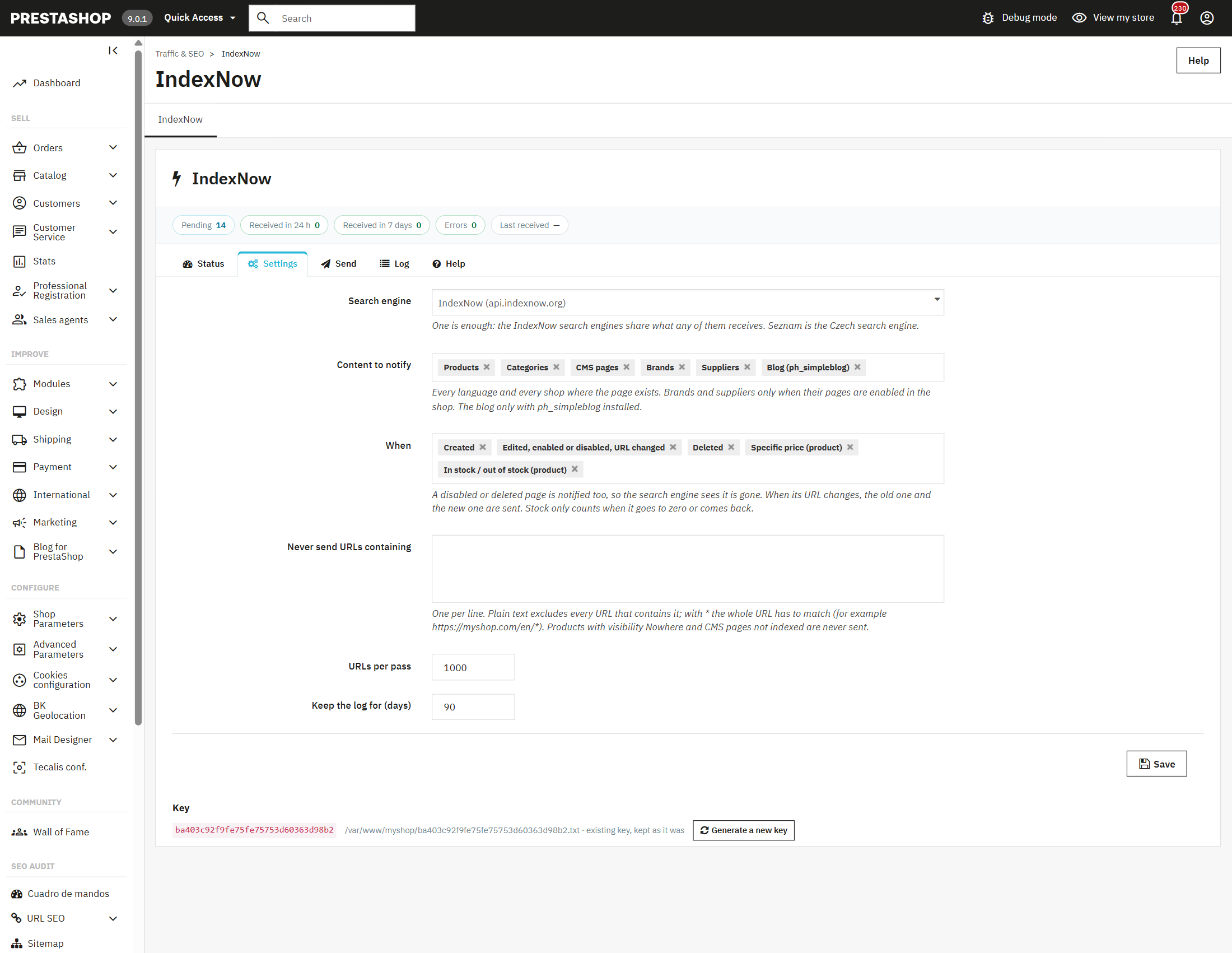
When you create, edit, enable or remove them. And when the price changes, or a product sells out or comes back in stock.
Your listings and your content pages: shipping, about us, buying guides.
Their pages get indexed too, if they're enabled in your store.
Every post and every blog category, if you use PrestaHome's blog (ph_simpleblog).
If you sell in three languages, each product has three pages, and all three need to reach Bing. The module submits the page in every active language and every store where that product exists. Your German product page doesn't wait for Bing to stumble on it.
A product you remove stays in Bing until Bing comes back and sees it's gone. Meanwhile, your customers land on an empty page. The module also reports what you disable or delete, so the search engine checks it as soon as possible.
Both the old and the new address go out, so the search engine checks both: it finds the new one sooner and stops sending visitors to the old one.
It's reported all the same, so Bing stops sending visitors to something you no longer sell.
Only when stock crosses zero, which is when what the shopper sees changes. Never on every order: you don't waste submissions on nothing.
When you save a product, your back office never waits for Bing. The change goes into a queue and is sent later, in batches. Edit the same page ten times in five minutes, and it goes out once. If Bing is slow or doesn't answer, your screen never notices.
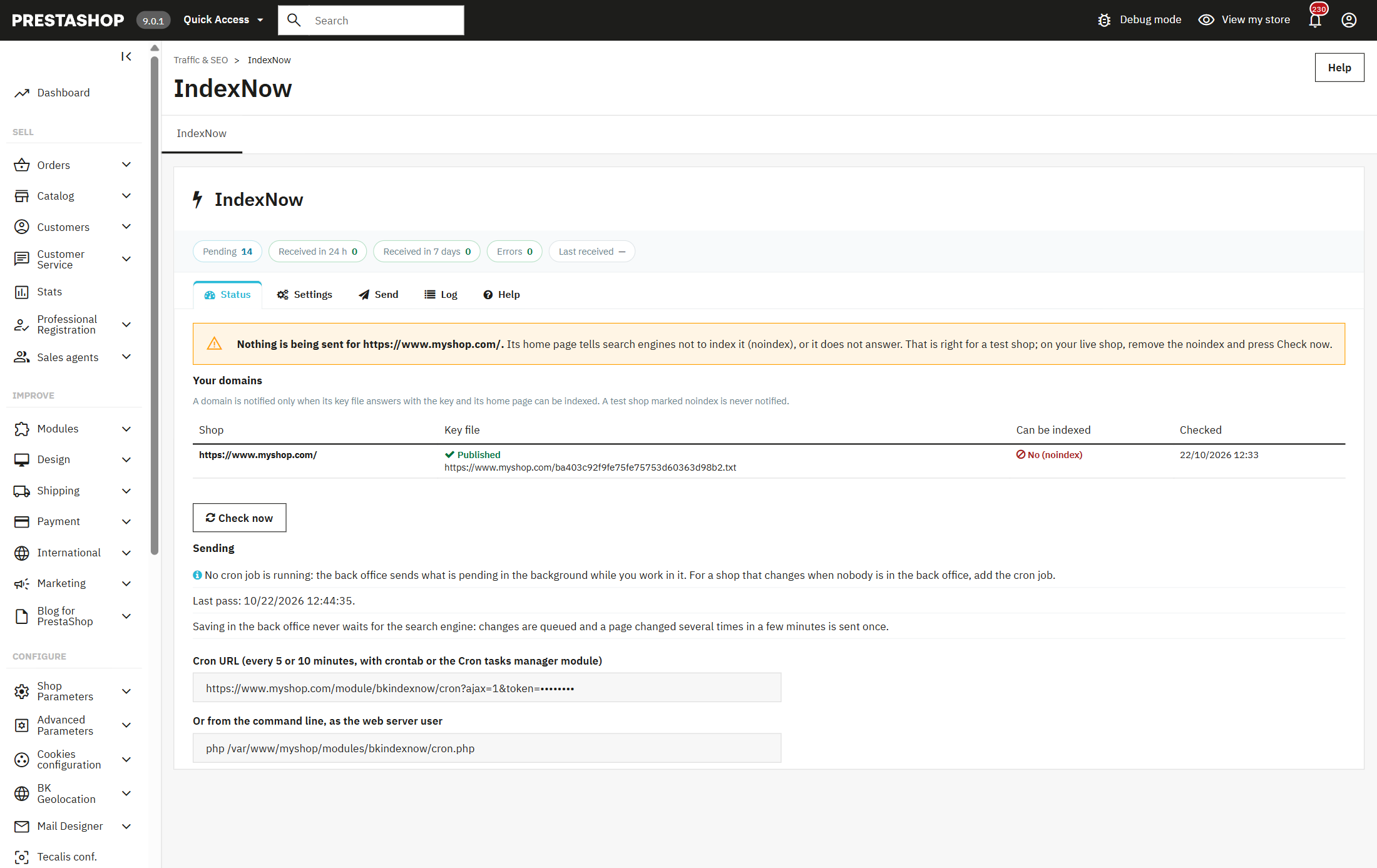
You import your catalog by CSV, your ERP updates a thousand prices, or you tweak the catalog with Store Commander. Whatever goes through PrestaShop enters the queue like any other change. And whatever is written straight to the database, bypassing PrestaShop, the cron job finds it: every ten minutes it checks the products, categories, brands, suppliers and blog posts that have changed since last time.
Submissions go out in batches, at a pace the search engine accepts. If Bing asks you to slow down, the queue pauses on its own, waits as long as needed and then carries on, without losing a single URL.
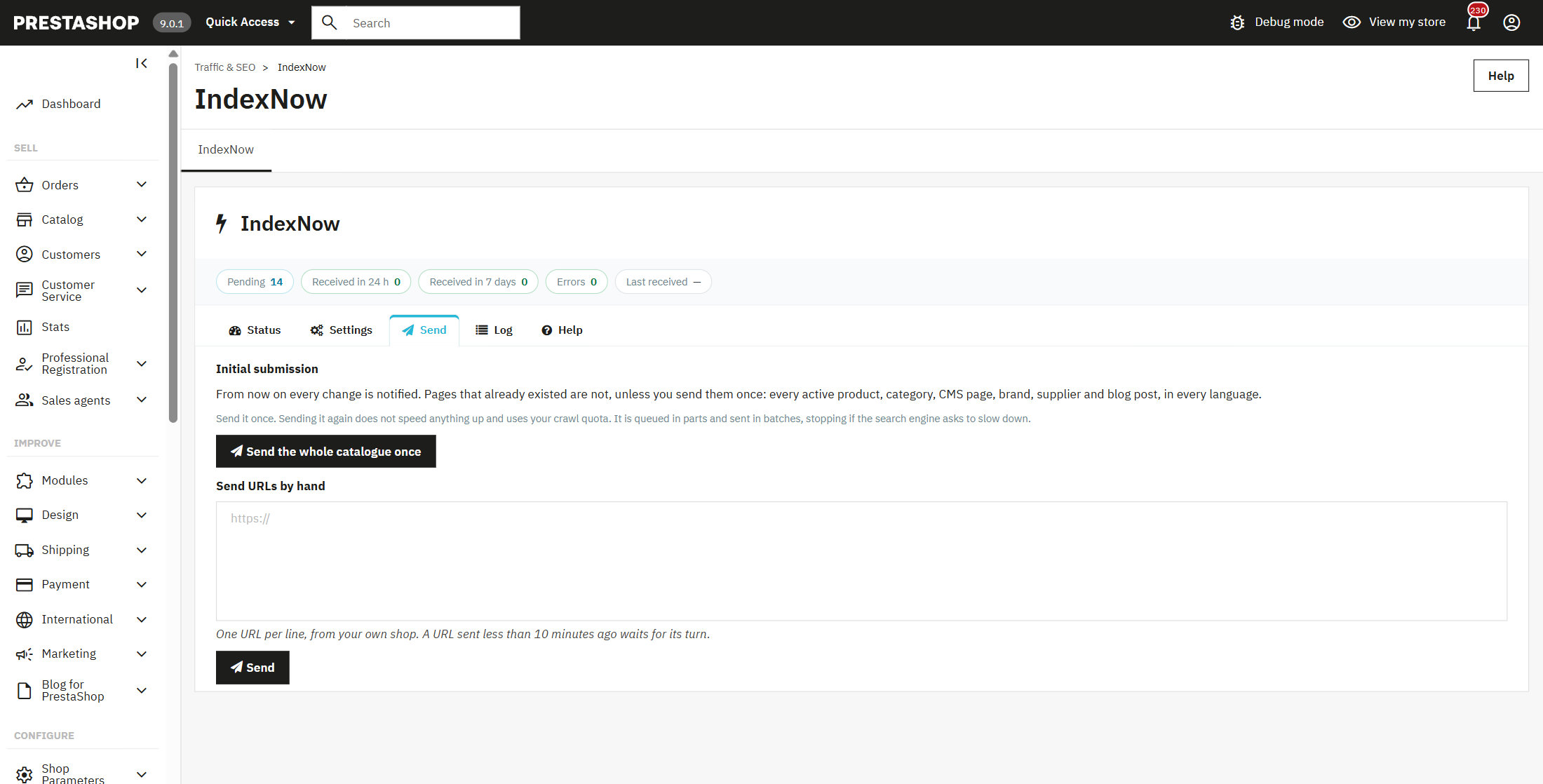
IndexNow is for reporting what changes from today on. But if Bing has half your catalog uncrawled, what you need is to catch it up. With one button, the module submits just once your whole active catalog —products, categories, pages, brands, suppliers and blog, in every language—, split into chunks and at a sensible pace.

Sending it again speeds nothing up and uses up the allowance Bing gives your store. The module reminds you before you start and shows you how far along it is.
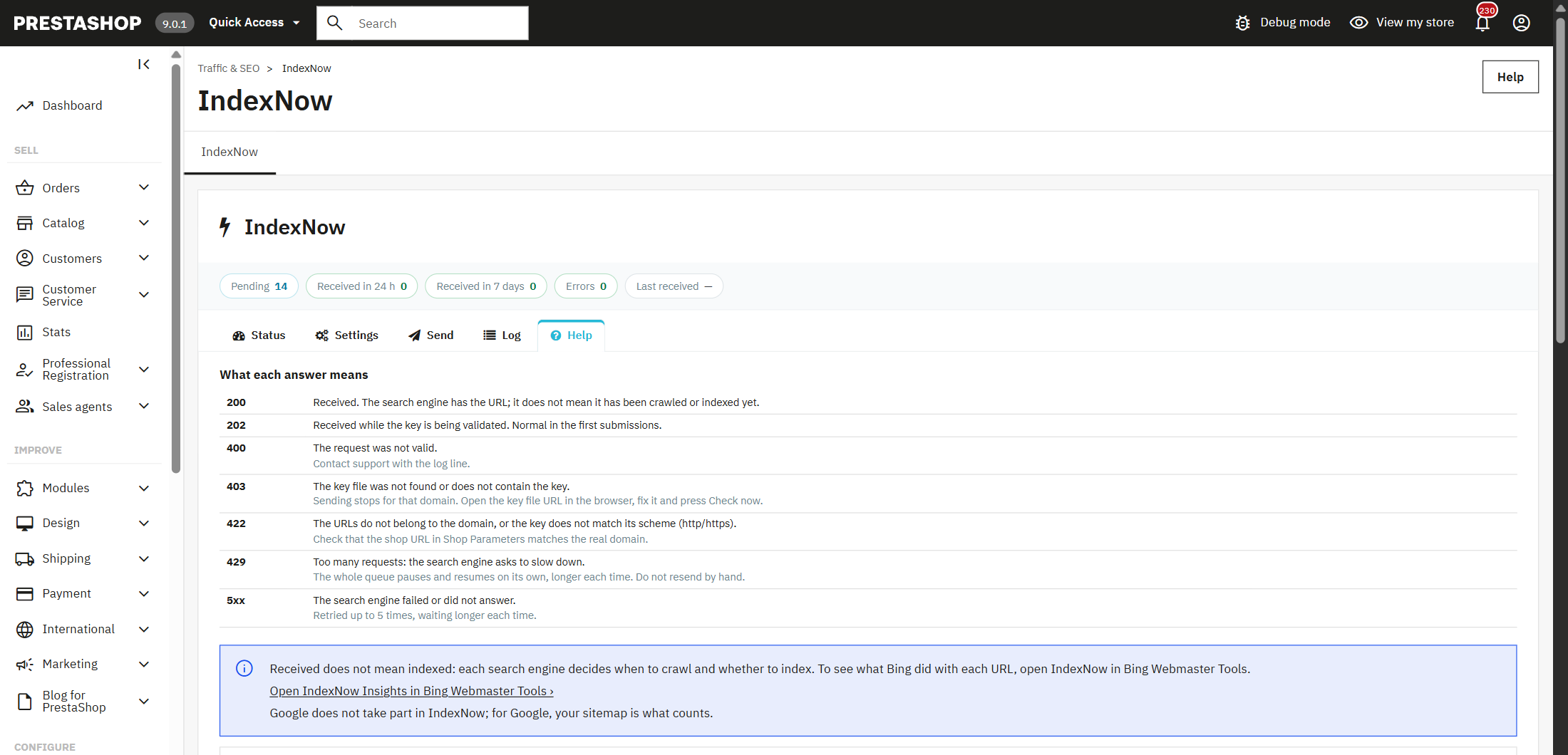
An “error 403” means nothing to anyone. The module's panel tells you what happened and what to do: that the search engine can't find your key file and where it needs to be, that it asked to slow down and when it resumes, or that it received the submission and is validating your key.

An accepted submission tells Bing to look at that page; it doesn't force it to index it. The module says it just like that, with no counters promising what's out of its hands, and takes you to Bing Webmaster Tools to see what it did with each URL.
Reporting a page you don't want in Bing is worse than not reporting it at all. The module never sends anything that shouldn't be in a search engine.

Almost every IndexNow module reports the product you create or edit. What separates a good one from one that makes work for you comes down to these questions: ask them of any module before you buy.
| Question | This module | Why it matters |
|---|---|---|
| Does it submit all my languages and stores? | Yes | It's the most common failure: the URL in just one language, or one store's URL sent with another store's key, which Bing rejects. |
| Does it report what I delete, and the old URL? | Yes | If not, Bing keeps sending visitors to pages that no longer exist. |
| Does it see changes made outside PrestaShop? | Yes | Store Commander, scripts and some ERPs write straight to the database and tell no one. |
| What does it do if Bing asks to slow down or can't find the key? | Pauses and explains | Sending on when Bing rejects the key or asks to slow down just wastes submissions; an error code with no explanation leaves you none the wiser. |
| How much history does it keep? | As much as you choose | The official WordPress plugin keeps the last 20 successful and 20 failed. |
| Does it leave my staging copy out? | Yes | A copy you don't want in search engines should never report to any of them. |
| Does it promise indexing on Google? | No | Google doesn't take part in IndexNow, and its Indexing API is only allowed for job postings and livestreams. |
Public complaints from users of the official IndexNow plugin for WordPress and published changelogs of IndexNow modules for PrestaShop, October 2026.
Google doesn't take part in IndexNow: it doesn't receive these submissions. For Google, what counts is your sitemap with the date of each change. Some modules promise Google indexing through its Indexing API, but Google limits it to job postings and livestreams, and warns that using it for anything else can cost you access. This module doesn't use it, and we're telling you before you buy.
It's an open protocol your store uses to tell search engines that a page is new, has changed or is gone, instead of waiting for them to come back. Bing, Yandex, Seznam, Naver and Yep use it, and what one receives is shared with all of them. PrestaShop doesn't include it: the module adds it and submits on its own.
By telling Bing about every new or changed product a few minutes after you save it, which is what IndexNow does. For the pages Bing has already discovered but not crawled, submit your catalog once from the module. Then, in Bing Webmaster Tools, you'll see what it crawled and indexed.
The notification goes out a few minutes after you save. When Bing crawls the page, and whether it indexes it, is Bing's call, not any module's: the notification means it doesn't have to discover the page on its own. Bing Webmaster Tools shows you the date it indexed each URL.
It helps with the part that's up to you. ChatGPT searches the web with providers like Bing, and is unlikely to recommend a product page Bing doesn't have. The module keeps your pages up to date in Bing; whether ChatGPT picks you also depends on your content and on what other sites say about you.
No, because Google doesn't take part in IndexNow. For Google, keep your sitemap up to date. The module doesn't use Google's Indexing API, which Google only allows for job postings and livestreams.
To submit, no: the module generates the key, publishes it on your domain and submits without any account. To see what Bing indexed from what you sent, we do recommend signing up: it's free and the module's panel takes you there.
The module only sends what changes, merges repeated changes and, if Bing asks to slow down, pauses the queue and waits as long as it's told. The full catalog submission happens only once, in chunks.
No. It adds nothing to your store: no scripts, no cookies. In the back office, saving just records the change in a queue; sending happens separately, through the cron job or in the background.
Yes. It works from PrestaShop 1.7.6 to 9.x, with both the legacy and the new product page, and with PHP 7.1 to 8.4.

To accept your notifications, Bing asks for a small file with a key on your domain: that's how it knows the store is yours. On install, the module generates your key and publishes that file in your store's root. If your hosting won't let it write there, it gives you the exact content so you can upload it yourself.
One switch per content type and another per reason: new, edited, removed, price and stock. Plus the list of URLs you never want sent.
By default, the shared IndexNow endpoint, which passes it on to all of them. If you prefer, straight to Bing, Seznam, Yandex, Naver or Yep: one is enough.
Paste the URLs you want to submit now, one per line. The module checks they belong to your store.

A module, an app, a server that is giving you trouble or something urgent. We answer within 24 hours, with a fixed quote with a price and a date.