Sales Agents for PrestaShop

Your sales agents place their customers’ orders in your shop, with the customers’ prices and their own commission.

Each sales agent signs in with their own account, picks one of their customers and shops as them: they see that customer’s prices, addresses and payment methods. They give the discount and free shipping you allow them, offer payment terms to the customers who have them agreed, and every order carries its commission.

  • PrestaShop 1.7.5 to 9.x
  • PHP 7.1 to 8.4
  • No overrides
  • Works with Odoo
  1. They pick their customer
  2. They shop as them
  3. They apply their discount
  4. They earn their commission
$119.00
Option

Try it before you buy Live demo with the module installed

PS 1.7+, 8.x, 9.x
SSL Secure
Instant Download
Official Support
Licensed
Sales agents module for PrestaShop: the sales agent shops on behalf of their customer, with discount and commission
Sales Agents for PrestaShop
Selected:
$119.00
Sales agent shopping on behalf of a customer in a PrestaShop shop: the “You are shopping as” bar and the quick switcher to change customer

Your sales agent, inside their customer’s shop: they see the customer’s prices, order for them and move on to the next one without logging out.

What changes when your sales agents order in your shop

What gets lost today between phone calls, notes and orders typed in by hand, and how it works with the module.

Without the module

  • Your sales agent writes the order down in a notebook or a spreadsheet, and someone at the office types it into the back office later.
  • To order for a customer they ask for the customer’s password, or you give them back office access and they see all your customers.
  • Every discount is a conversation: how much they can give, whether shipping is free, who signs it off.
  • At the end of the month you work out by hand which orders each agent placed and how much commission they’re owed.

With the module

  • Your sales agent signs in to the shop with their own account and, from “My customers”, shops as any of their customers, without the customer’s password.
  • They see exactly what the customer sees: their prices, addresses, carriers and payment methods.
  • They give the discount and free shipping you allow them, and not a point more.
  • Every order is linked to its sales agent and their commission, and you see at a glance how much you owe each one.

An order by your sales agent, start to finish

Real screens of the module in a PrestaShop 9 shop: from their customer list to the commission they earn.

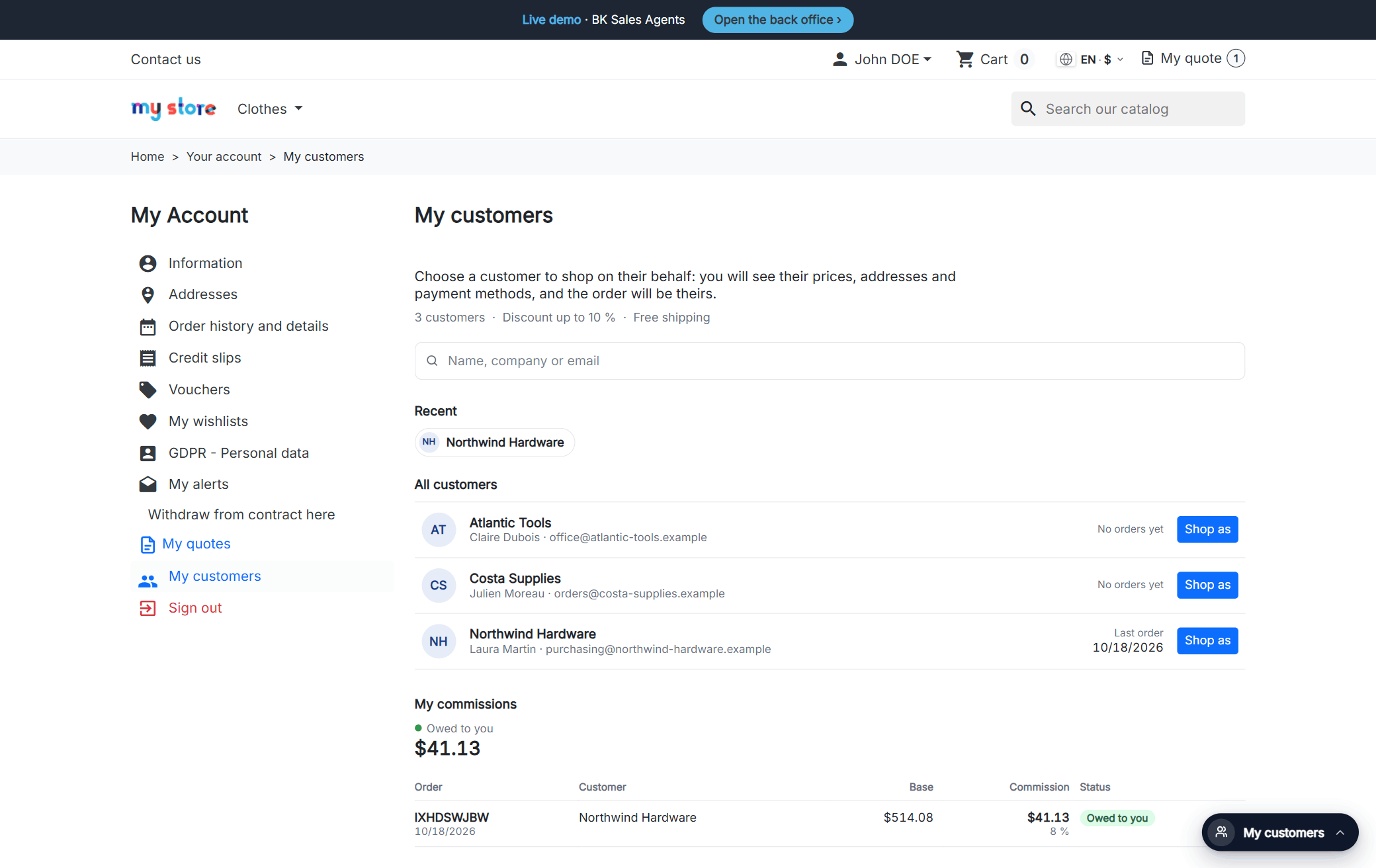
1. In “My account” your sales agent has “My customers”: their portfolio with a search box, the customers they worked with most recently and what they’ve earned so far. They pick one and click “Shop as”.

A sales agent’s My customers page in PrestaShop: their portfolio with a search box, recent customers, the Shop as button and their commissions

Next: Shopping as them

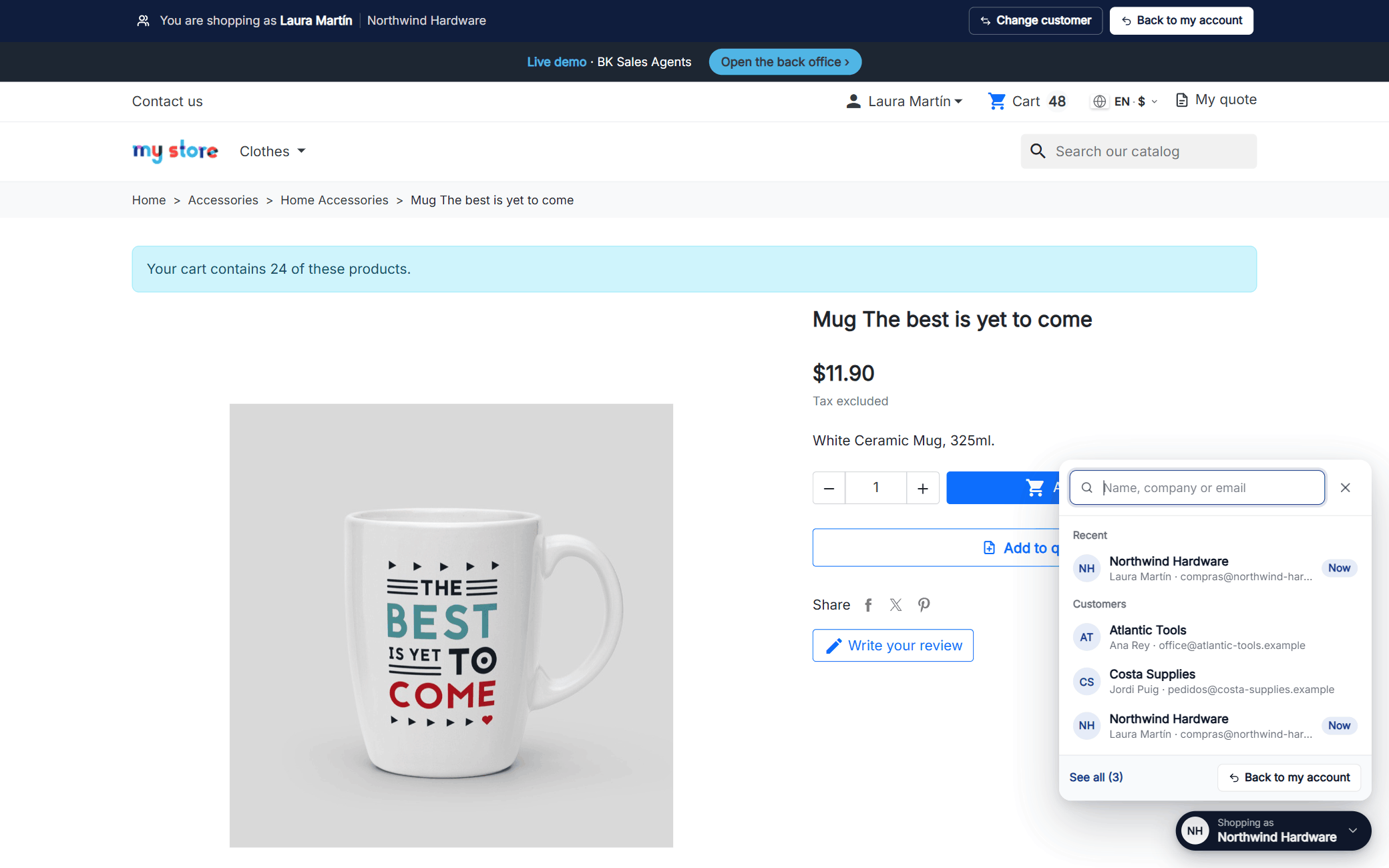
2. Now they’re inside their customer’s account. A bar at the top reminds them who they’re shopping for, and the quick switcher in the corner lets them jump to another customer from any page, without going back to their own account.

PrestaShop product page with the sales agent bar and the quick switcher open to change customer

Next: The cart

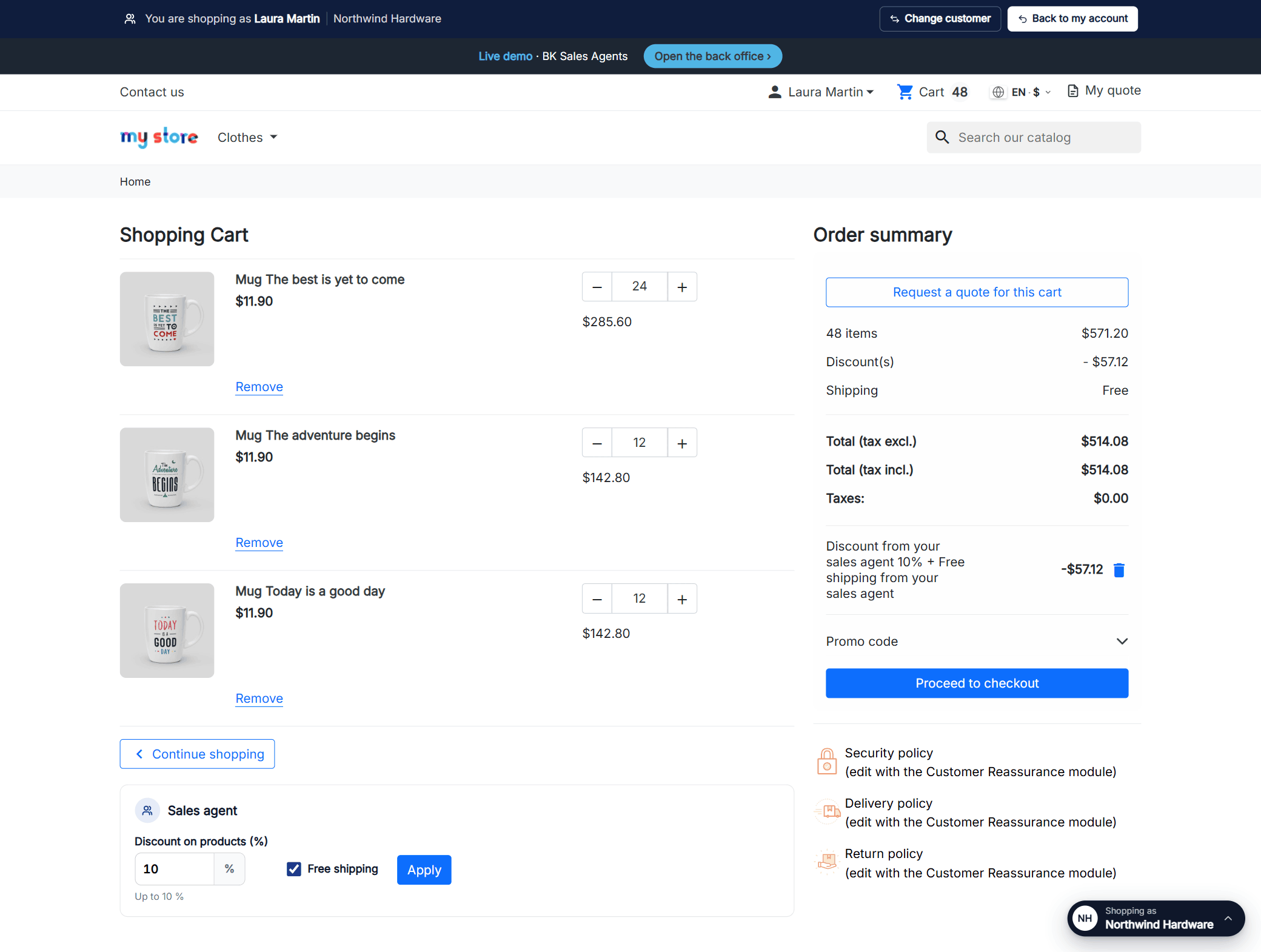
3. In the cart they get their own panel: a discount on the products up to the cap you set and, if you allow it, free shipping. The customer sees it on their order and their invoice like any other discount.

PrestaShop cart with the sales agent panel: a 10% discount and free shipping applied to the customer’s order

Next: The payment

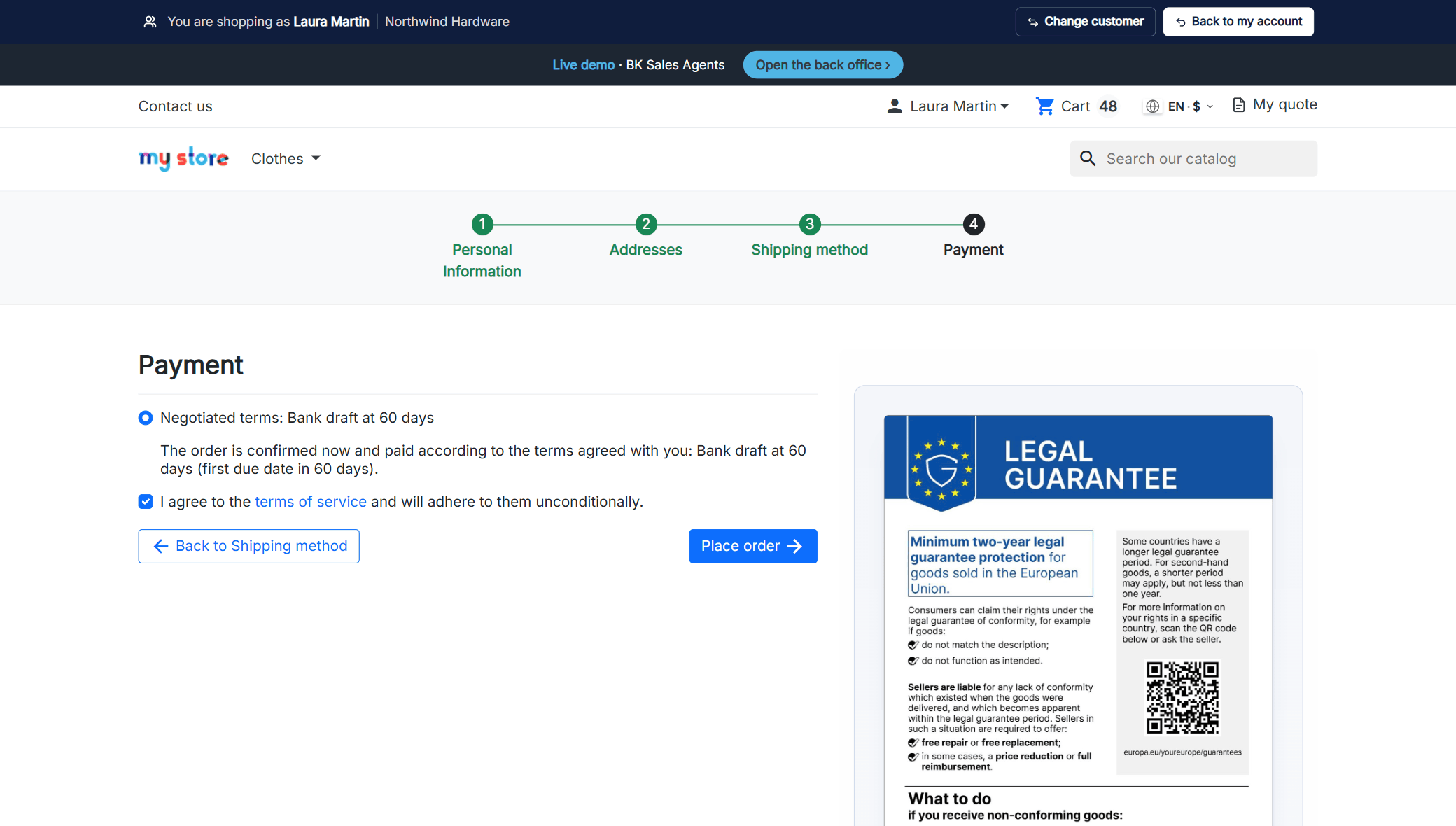
4. They pay with any of your payment methods or, if that customer has agreed terms, with “Negotiated terms”: the order is confirmed and paid at 30, 60 or 90 days, however you’ve agreed it.

PrestaShop payment step with the Negotiated terms payment method: Bank draft at 60 days

Next: Their commission

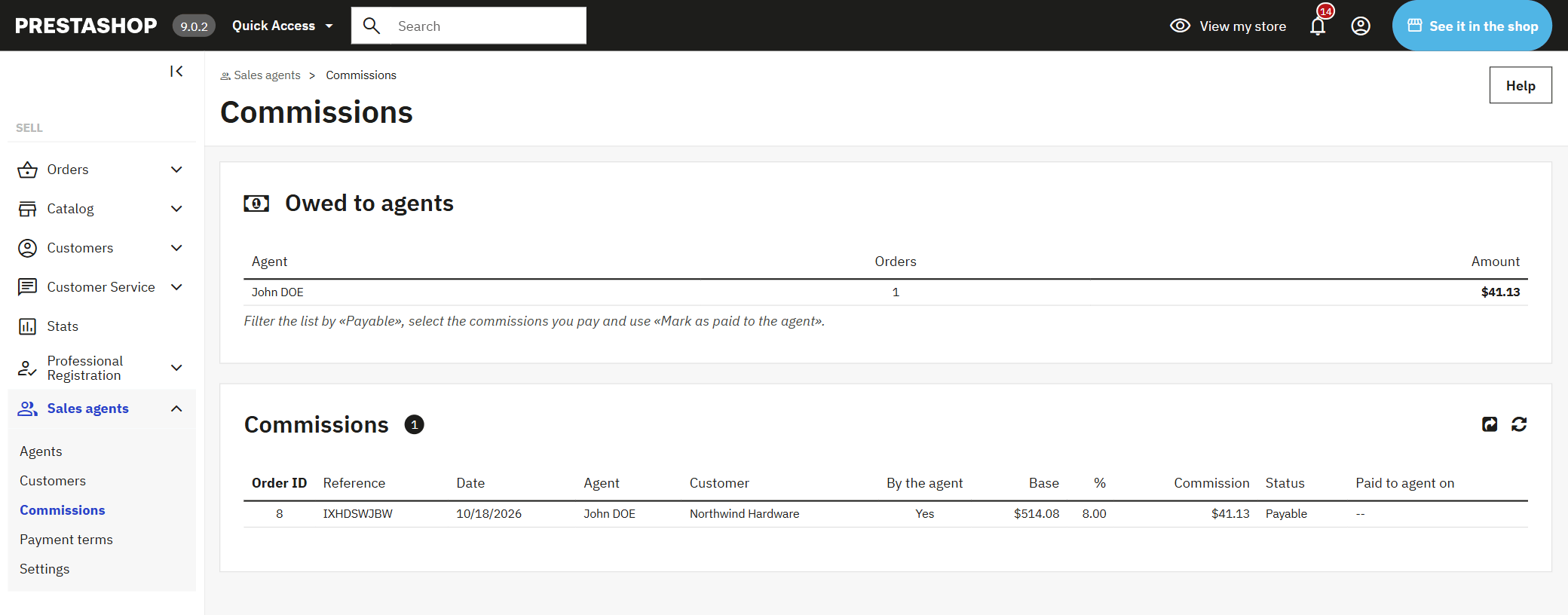
5. The order is recorded under their name with their commission, which becomes “payable” as soon as the customer pays. You see what you owe each sales agent and mark the ones you settle as paid.

Sales agent commissions in the PrestaShop back office: what is still owed to each sales agent and the breakdown per order

Want to see how it fits your sales team? Tell us how you work and we’ll show you.

Right there with the customer, on a phone

Your sales agent is at the customer’s office and places the order on the spot, in your shop, with exactly what that customer sees and pays. No more jotting it down and typing it in later.

  • No passwords to ask for: they get into the customer’s account from their own.
  • They only see their own customers; other agents’ customers simply don’t exist for them.
  • They switch from one customer to the next with the quick switcher, on any page.
  • A fixed bar always tells them who they’re shopping for, and one button takes them back to their account.
  • If you take a customer away from them, they lose access that very moment.
A sales agent’s customer list in a PrestaShop shop with a search box and the Shop as button

You decide how far each sales agent can go

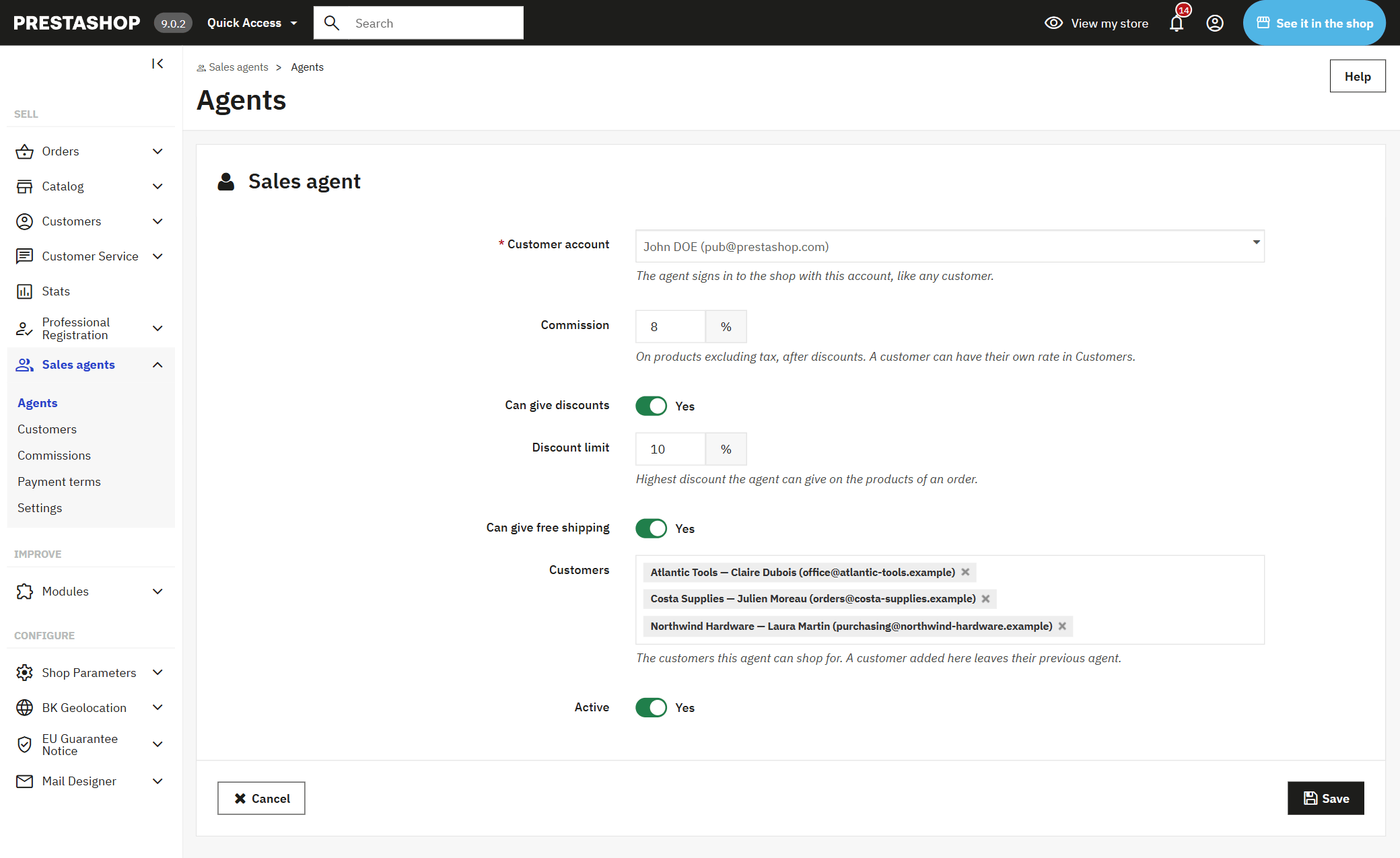
Every sales agent has their own profile: their commission, what they can grant and the customers they look after. Whatever you don’t allow, they never see.

  • Their default commission and, if you like, a different one for a specific customer.
  • Whether they can give a discount and how much, as a percentage of the products in the order.
  • Whether they can offer free shipping.
  • Their portfolio: the customers they can shop on behalf of.
  • Commission only on the orders they place, or on everything their portfolio buys.
Sales agent profile in the PrestaShop back office: commission, discount cap, free shipping and assigned customers

Payment terms for the customers who have them

Many of your trade customers don’t pay by card: they pay at 60 days, by bank draft or however you’ve signed it. The module adds that payment method just for them.

  • You create your terms (“Bank draft at 60 days”, “30/60/90”) and assign them to each customer.
  • They only show up for the customers who have them; everyone else never sees them.
  • You choose whether only their sales agent can use them, or the customer too when they order themselves.
  • The order is confirmed, with its invoice, in its own awaiting payment status.
Negotiated terms payment method in the PrestaShop checkout

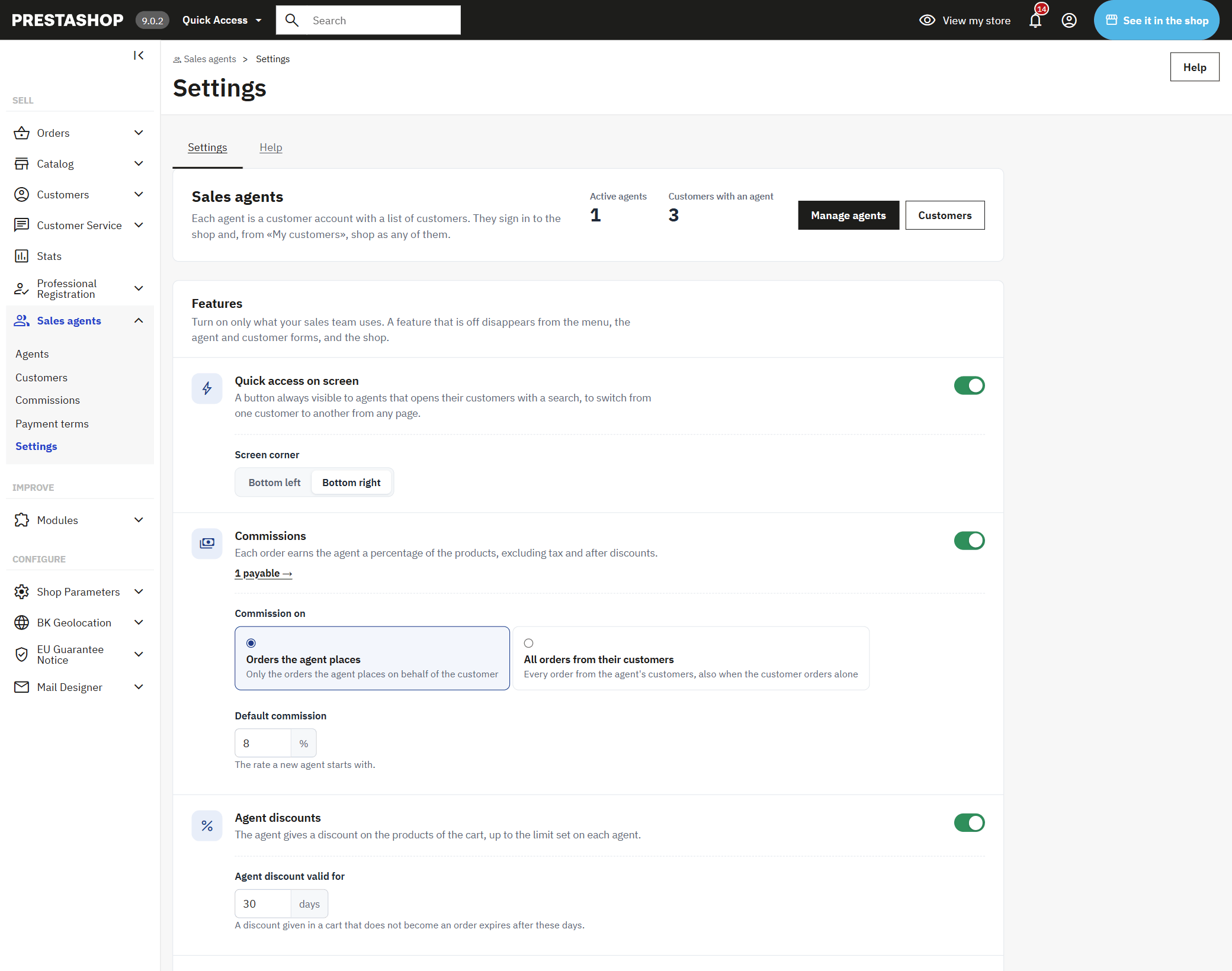
Turn on only what your team uses

Commissions, discounts, free shipping, negotiated terms and the quick switcher: each one turns on and off as a whole. Whatever you turn off disappears from the menu, the profiles and the shop, and you don’t have to set up anything you don’t use.

  • Just want them to order for their customers? Turn everything else off.
  • Don’t pay commissions? The commissions tab doesn’t even show up.
  • The quick switcher, in whichever corner of the screen you choose.
Sales agents module settings in PrestaShop: each feature with its own switch

And if you work with Odoo

With our Odoo PrestaShop connector, your sales agents come over from Odoo with what you already have there: each contact’s salesperson and their payment terms.

  • You mark which Odoo salespeople are also sales agents in the shop, with their commission and permissions.
  • Their portfolio is the contacts they’re already the salesperson for in Odoo.
  • Each contact’s payment terms become their negotiated terms in the shop.
  • Every order reaches Odoo with its sales agent, their commission and the payment terms.
Sales agent commission list in the PrestaShop back office

It adds to your shop, it doesn’t change it

Your checkout, your payment methods and your theme stay as they are. Your sales agent shops in the very same shop as their customer.

  • No overrides: it rewrites no PrestaShop class, so it doesn’t clash with other modules or break on updates.
  • A sales agent is a customer account: you don’t give them access to the back office or your data.
  • Every time they enter a customer’s account, every discount and every order is logged with its sales agent.
  • The discount is a regular PrestaShop discount, single use and only for that customer.
  • Commissions with filters and CSV export, and what you owe each sales agent at a glance.
  • Multistore and multicurrency; the “My customers” URL in all 24 EU languages.

Questions about sales agents in PrestaShop

How does my sales agent place an order on behalf of a customer in PrestaShop?

They sign in to the shop with their own account, open “My customers” and click “Shop as” next to the customer. From then on they shop as that customer, with their prices and addresses, and the order belongs to the customer. When they’re done, one button takes them back to their account.

Do they need their customer’s password?

No. They get in from their own account, and only into the customers you’ve assigned to them. If you take a customer away from them, they lose access right away.

Does it work on PrestaShop 8 and 9? And 1.7?

Yes: from PrestaShop 1.7.5 to 9.x, with PHP 7.1 to 8.4, multistore included, with the Classic and Hummingbird themes and those based on them.

Can a sales agent give any discount they like?

No. You decide in their profile whether they can give a discount and up to what percentage. If they try to go over it, the shop doesn’t apply it. Free shipping is a separate permission too.

How is the commission calculated?

It’s a percentage of the products in the order, excluding tax and after discounts; shipping doesn’t count. Each sales agent has their own rate, and a customer can have a different one. It becomes “payable” when the customer pays and is voided if the order is canceled.

Do they earn commission when the customer orders on their own?

You choose: only on the orders the sales agent places, or on everything their portfolio buys, including when the customer orders by themselves.

Can I let only some customers pay at 60 days?

Yes. You create your payment terms and assign them to each customer. The “Negotiated terms” payment method only shows up for the customers who have them, and the order is confirmed and left awaiting payment.

Do my sales agents need back office access?

No. A sales agent is a customer account in your shop with permission to shop for their customers. They do everything from the shop, on a phone too.

Does it integrate with Odoo?

Yes, with our Odoo PrestaShop connector: sales agents, their customers and payment terms come over from Odoo, and every order reaches Odoo with its sales agent and commission. Without the connector, everything is done from the shop’s back office.

How many shops can I use the licence on?

On one shop, plus its separate test copy. The licence is yours forever and comes with three months of updates and support; with the Continuity Plan you get the installation, the first year and a yearly renewal.

Technical details: compatibility, installation and developers

Compatibility

PrestaShop1.7.5 to 9.xMultistore included.
PHP7.1 to 8.4No overrides and no core changes.
ThemesClassic, Hummingbird and child themesThe “My customers” page sits inside the theme’s “My account”.
Payment methodsAll the ones in your shopPlus “Negotiated terms” for the customers who have them.
CurrenciesAll the ones in your shopEach commission is in the currency of its order.
Languagesen, es, fr, it, de, pl, csIn the shop and the back office.

How to install it

Upload the module

From the PrestaShop module manager, like any other. It appears under Sell › Sales agents.

Add your sales agents

Choose each one’s customer account, their commission, what they can grant and their customers.

Let them place their first order

They sign in to the shop with their account and find “My customers” in “My account”.

For developers

The module offers a public API so another system (an ERP, a CRM) can manage the sales agents, their customers and payment terms, and read each order’s sales agent, commission and terms. It is the same API the Odoo connector uses.

Your next order, placed by your sales agent in your shop.

The licence is yours forever, it is up and running in an afternoon and we help you set it up for your team.

See prices

Tell us what your business needs

A module, an app, a server that is giving you trouble or something urgent. We answer within 24 hours, with a fixed quote with a price and a date.