Il tuo carrello
Non ci sono più articoli nel tuo carrello


Modulo B2B con Validazione VIES e...
274,99 $


Scrive le prime lettere della via e sceglie il suo indirizzo dall'elenco.
Il tuo cliente arriva al passaggio degli indirizzi dell'ordine e, appena inizia a digitare nel campo «Indirizzo», Google gli propone indirizzi reali subito sotto, nella sua lingua. Un clic sul suo e il modulo si compila da solo: via e numero civico, CAP, città, provincia e paese. Gli restano solo scala e interno, se li ha. È l'autocompletamento degli indirizzi che conosce già dai grandi negozi online, ora nel tuo PrestaShop.
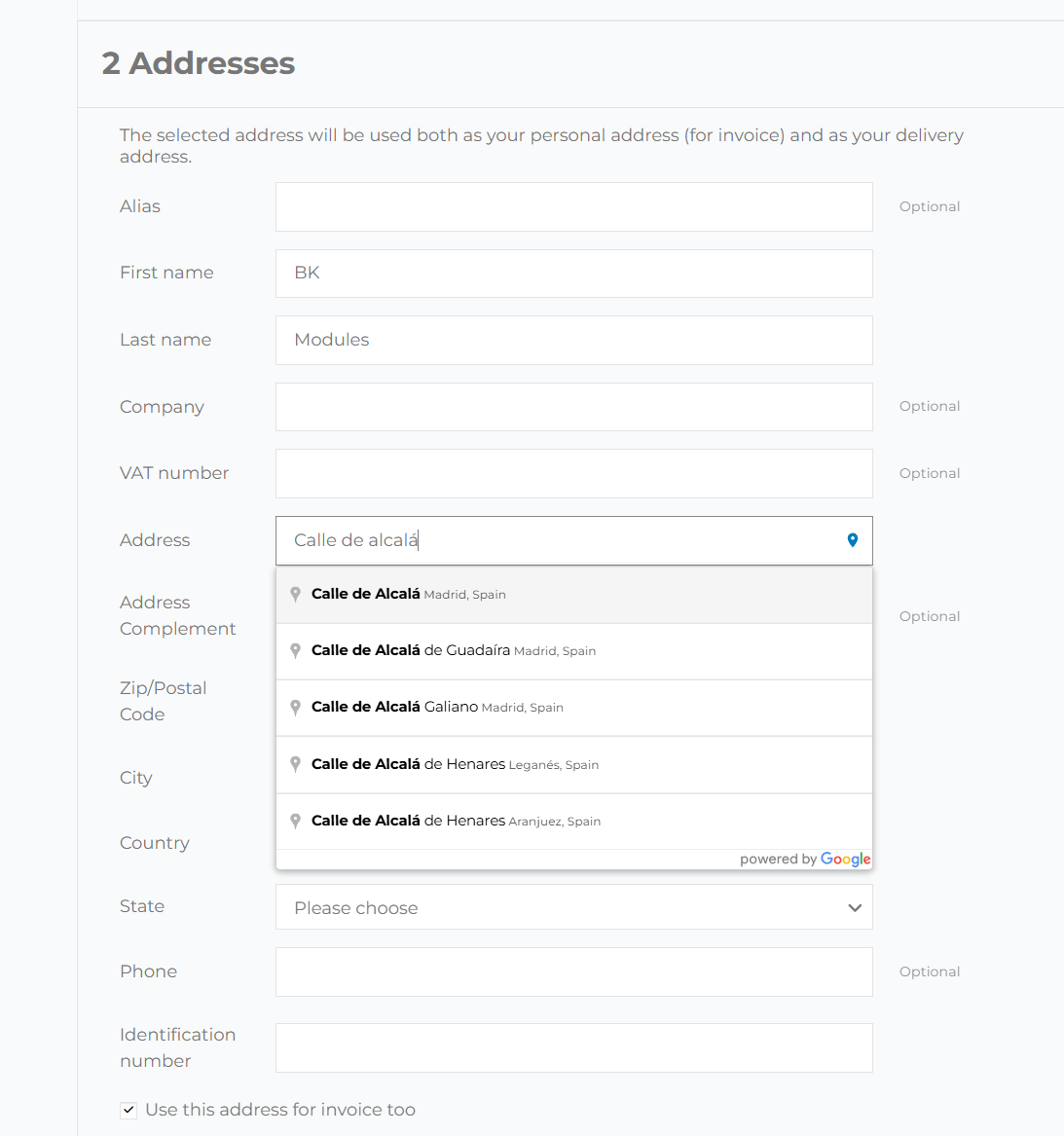
Scrivere un indirizzo intero sul telefono è la parte più faticosa di un ordine. Con l'autocompletamento bastano poche lettere e un tocco, e il tuo cliente arriva prima al pulsante di pagamento.
In ogni modulo indirizzo del tuo negozio, senza doverlo posizionare.
Nel passaggio degli indirizzi del checkout di PrestaShop, sia per l'indirizzo di consegna sia per quello di fatturazione, anche quando il cliente compra come ospite.
Quando il tuo cliente aggiunge o corregge un indirizzo dal suo account, il campo gli suggerisce gli stessi indirizzi dell'ordine.
Se l'indirizzo scelto è in un altro paese, PrestaShop ricarica il modulo per chiedere i campi di quel paese. Appena ha finito, il modulo rimette via, CAP, città e provincia, così il tuo cliente non deve riscriverli.
Si aggancia al solito campo indirizzo: niente template, nessuna modifica al core.
Il modulo trova il campo indirizzo standard di PrestaShop e gli aggiunge i suggerimenti di Google, quindi funziona con classic, con Hummingbird e con i temi costruiti su di essi. Non sostituisce il tuo modulo e non ne cambia il design: aggiunge solo una piccola icona di posizione dentro il campo.
La compilazione automatica di Chrome e i gestori di password come LastPass o 1Password si fanno da parte, così l'elenco di Google è l'unico che vede il cliente.
Chi preme Invio per scegliere un suggerimento lo sceglie; il modulo non parte compilato a metà.
Quando la pagina scorre, il menu dei suggerimenti resta attaccato al campo indirizzo.
Lo script di Google Maps si carica in modo asincrono e solo nelle pagine con un modulo indirizzo. Il resto del negozio non se ne accorge.
Il tuo team scrive gli indirizzi con lo stesso autocompletamento dei clienti.
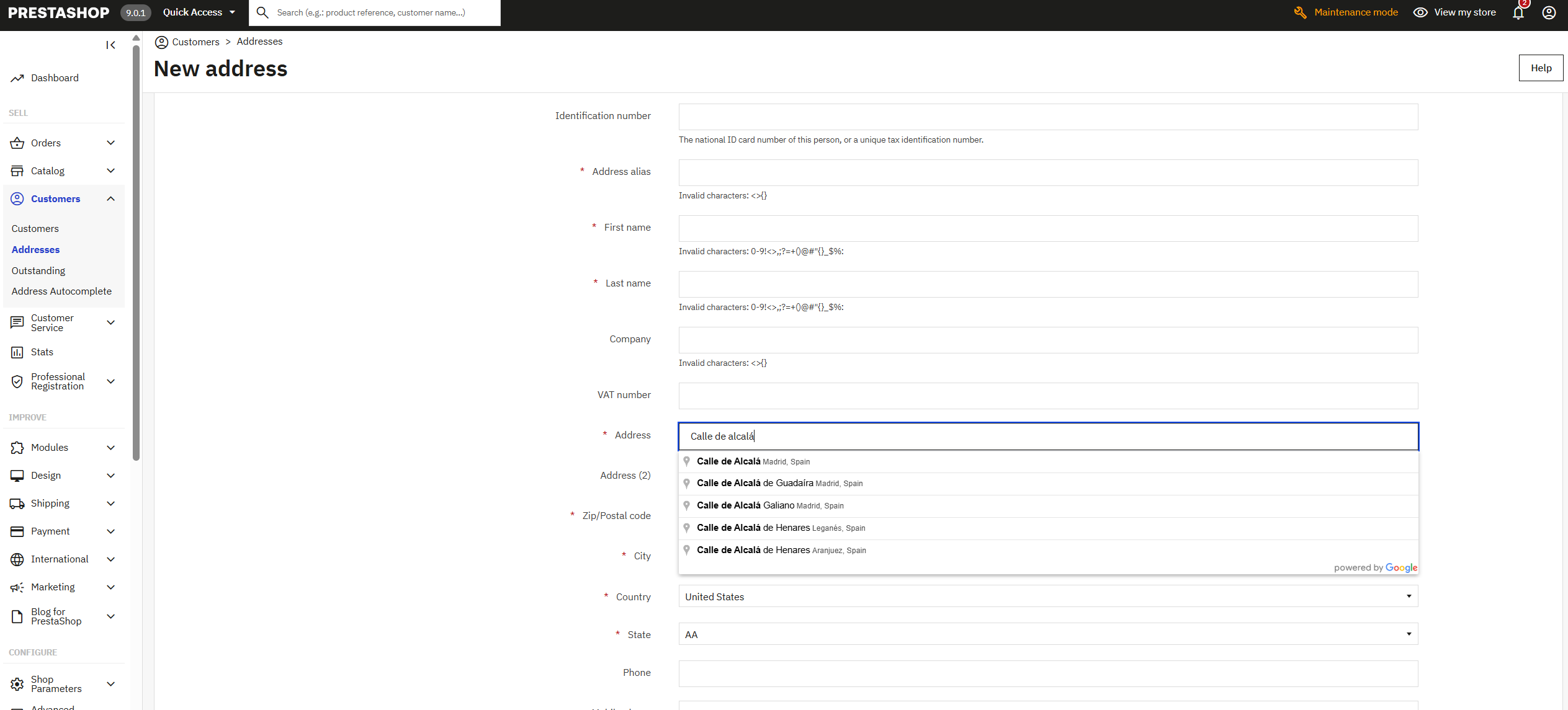
Quando tu o qualcuno del tuo team crea o modifica l'indirizzo di un cliente in Clienti › Indirizzi, anche lì il campo suggerisce gli indirizzi di Google e compila il resto: CAP, città, provincia e paese. È un bel risparmio di tempo quando prendi un ordine al telefono o correggi un indirizzo di un pacco tornato indietro.
Un indirizzo scelto da un elenco non ha errori di battitura.
Ogni pacco che torna indietro per una via scritta male o un CAP sbagliato ti costa due spedizioni e un cliente che aspetta. Con l'autocompletamento il cliente non digita l'indirizzo: lo sceglie tra gli indirizzi di Google, che esistono già e sono scritti bene, e i campi si compilano con i dati che li accompagnano. È la forma più semplice di validazione degli indirizzi, proprio mentre vengono inseriti.
In paesi come il Regno Unito, dove Google a volte restituisce solo la prima metà del codice postale, il modulo cerca quello intero per quell'indirizzo.
I dati di Google vengono abbinati alle province o agli stati configurati nel tuo PrestaShop, e viene selezionata quella giusta nel menu.
I suggerimenti compaiono nella lingua in cui naviga: chi compra in francese vede gli indirizzi in francese.
Un modulo lungo è uno dei punti in cui si abbandona più spesso un acquisto. Uno che si compila da solo si finisce prima.
A qualsiasi negozio che spedisce qualcosa a un indirizzo.
Se spedisci molti pacchi al giorno, ogni indirizzo sbagliato che eviti è un reso e una telefonata in meno.
Se la maggior parte dei tuoi clienti compra dal telefono, è lì che si nota di più: poche lettere e un tocco invece di cinque campi.
Ogni paese scrive gli indirizzi a modo suo. Google li porta in ordine e il modulo li mette nei campi che PrestaShop chiede per quel paese.
I clienti professionali registrano più indirizzi di consegna. Con l'autocompletamento ognuno si aggiunge in pochi secondi da «I miei indirizzi».
Se consegni tu nella tua zona, limita i suggerimenti al tuo paese e gli indirizzi ti arrivano esatti per il giro.
Se il tuo team crea ordini dal back office, inserisce gli indirizzi dei clienti altrettanto in fretta e senza errori.
Installi il modulo, incolli la tua chiave API di Google nella sua pagina di configurazione e lo attivi. Da quel momento il campo «Indirizzo» dell'ordine, di «I miei indirizzi» e del back office suggerisce gli indirizzi di Google Maps. Non serve toccare il tema né il codice.
Sì: l'autocompletamento lo fornisce Google Maps Platform, e la chiave si crea gratis nel tuo account Google Cloud, che chiede una carta per la fatturazione. Google fa pagare a consumo e ogni mese include una quota gratuita; un negozio piccolo o medio di solito resta al di sotto. L'eventuale fattura arriva da Google al tuo account, senza intermediari, e puoi fissare un tetto giornaliero nella console per evitare sorprese.
Sì. Nel negozio funziona su PrestaShop 1.7, 8 e 9, per l'indirizzo di consegna e di fatturazione del checkout standard; nel back office, su PrestaShop 8 e 9.
Funziona con quelli che mantengono la pagina dell'ordine di PrestaShop e il suo campo indirizzo standard. Se il tuo checkout è costruito da un modulo con una pagina propria, scrivici prima di acquistare indicando il modulo e ti diciamo se è compatibile.
Serve perché l'indirizzo arrivi scritto bene: il cliente lo sceglie tra gli indirizzi che Google conosce, con CAP, città e provincia, invece di digitarlo. Non controlla scala e interno, che restano a carico suo, ma elimina gli errori di via e di CAP che fanno tornare indietro più pacchi.
Google ha indirizzi di praticamente tutto il mondo. Se vendi solo in alcuni paesi, puoi limitare i suggerimenti fino a cinque, il massimo che Google consente; senza limite, gli indirizzi arrivano da ovunque. Perché il paese si selezioni da solo, deve essere attivo nel tuo negozio.
In «I miei indirizzi» sì: quando si aggiunge o si modifica un indirizzo dall'account. PrestaShop non chiede l'indirizzo alla registrazione ma al primo ordine o in «I miei indirizzi», ed è lì che lavora l'autocompletamento.
Non nelle pagine che non ne hanno bisogno: lo script di Google si carica, in modo asincrono, solo dove c'è un modulo indirizzo. Home, categorie e schede prodotto non caricano nulla di nuovo.
La licenza è tua per sempre e include tre mesi di aggiornamenti e assistenza; con il Piano Continuità hai l’installazione, il primo anno e il rinnovo annuale.
Una schermata, quattro impostazioni e in un paio di minuti è pronto.
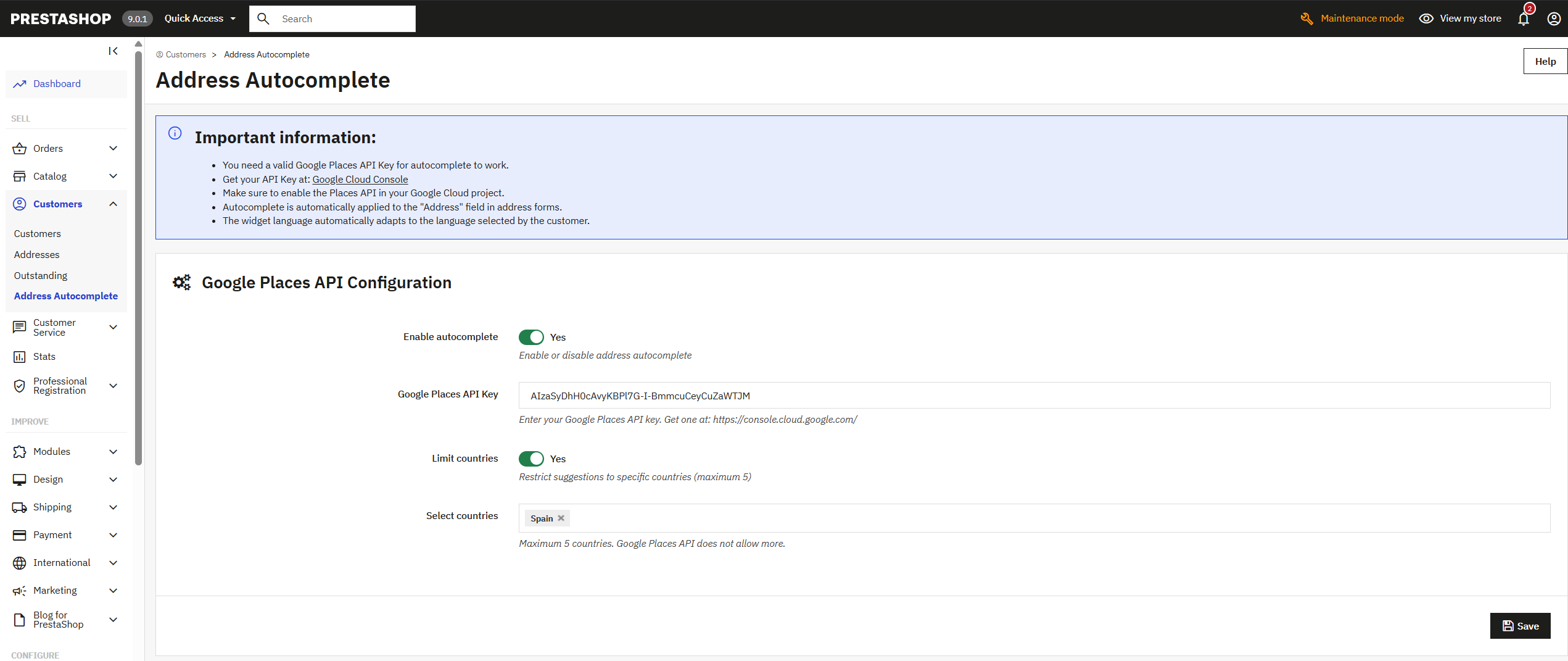
I suggerimenti includono indirizzi di tutto il mondo. Per i negozi che spediscono ovunque.
Compaiono solo indirizzi dei paesi scelti, e i suggerimenti sono più precisi. Google ne accetta al massimo cinque alla volta.
1. Entra in Google Cloud Console e crea un progetto. 2. Attiva Maps JavaScript API e Places API; se spedisci nel Regno Unito, anche Geocoding API, che completa i codici postali. 3. Crea una chiave API e limitala al tuo dominio. 4. Incollala nella configurazione del modulo e attivalo.

Trasforma il tuo PrestaShop in una piattaforma B2B completa: registrazione aziendale validata, controllo VIES…

Proteggi i tuoi moduli PrestaShop da spam e bot con ALTCHA. Un’alternativa a reCAPTCHA senza dipendere da Google e…

Il pulsante e il modulo di recesso che la Direttiva (UE) 2023/2673 e l'art. 54-bis del Codice del Consumo impongono a…
Trasforma il tuo PrestaShop in una piattaforma B2B completa: registrazione aziendale validata, controllo VIES…

Metti il tuo logo, i tuoi colori e il tuo testo in tutte le email del negozio: conferma d’ordine, account creato,…

Ogni visitatore entra nella lingua, nella valuta e nel prezzo del suo paese, in automatico. Regole per paese, selettore…
Il pulsante e il modulo di recesso che la Direttiva (UE) 2023/2673 e l'art. 54-bis del Codice del Consumo impongono a…

Rispondi a ogni richiesta di preventivo con i tuoi prezzi e incassa l’ordine nel tuo negozio. Il tuo cliente compone il…

Hai eliminato un prodotto o cambiato un URL e Google continua a mandare visite al vecchio indirizzo? Con questo modulo…

Rispetta la direttiva EmpCo: l’avviso ufficiale di garanzia UE e l’etichetta GARAN del produttore nel tuo negozio,…
Proteggi i tuoi moduli PrestaShop da spam e bot con ALTCHA. Un’alternativa a reCAPTCHA senza dipendere da Google e…

Vendi su PrestaShop prodotti scaricabili che hanno anche combinazioni: ogni variante mantiene il suo prezzo e il suo…

Vendi in abbonamento e lascia che ogni rinnovo arrivi da solo come un ordine. Box mensili, ricariche, servizi o…

I tuoi agenti fanno gli ordini dei loro clienti nel tuo negozio, con i loro prezzi e la loro provvigione. Ogni agente…

Carichi un prodotto, cambi un prezzo o togli una pagina, e Bing può metterci giorni o settimane ad accorgersene. Questo…

Per i negozi che vendono cose che si comprano in coppia: la custodia con il telefono, l’inchiostro con la stampante, il…

Tutte le combinazioni del tuo prodotto in una tabella, nel carrello in una volta. Il tuo cliente vede ogni taglia e…

Per i negozi dove i bot percorrono tutte le combinazioni di filtri e l’hosting avvisa di CPU al 100 %. Risponde prima…

Per i prodotti la cui scatola, etichetta o manuale cambia con la lingua. Ogni cliente vede solo le immagini della sua…

Un modulo, un’app, un server che dà problemi o qualcosa di urgente. Ti rispondiamo entro 24 ore, con un preventivo chiuso con prezzo e data.