
Tu carrito
No hay más artículos en su carrito


Botón de Desistimiento para...
79,00 $



Escribe las primeras letras de su calle y elige su dirección de la lista.
Tu cliente llega al paso de direcciones del pedido y, en cuanto empieza a teclear en el campo «Dirección», Google le propone direcciones reales debajo, en su idioma. Elige la suya con un clic y el formulario se rellena solo: calle y número, código postal, ciudad, provincia y país. Le quedan el piso y la puerta, si los tiene. Es el autocompletado de direcciones online que ya conoce de las grandes tiendas, ahora en tu PrestaShop.
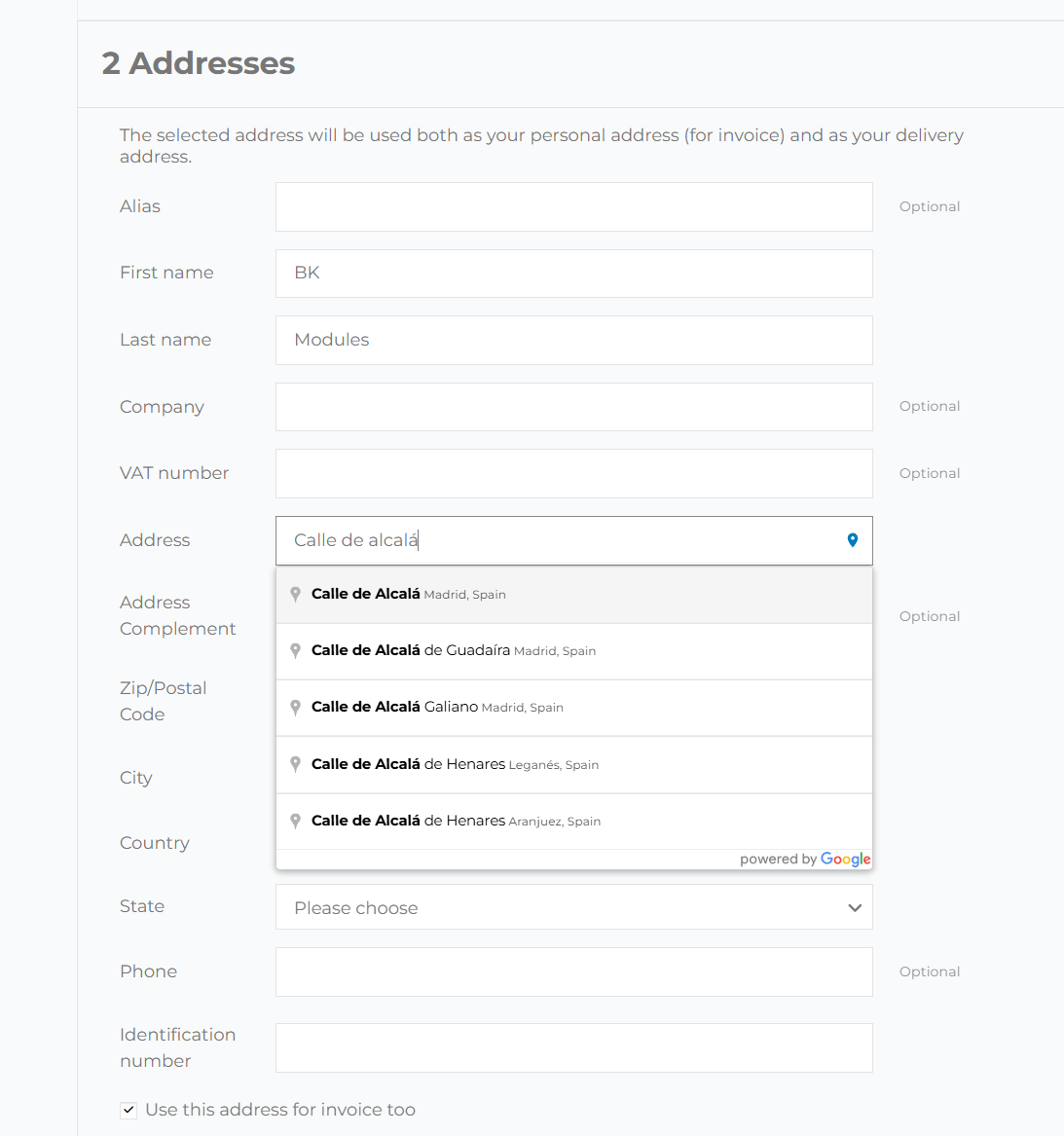
Teclear una dirección entera en el móvil es lo que más cansa de un pedido. Con el autocompletado basta con unas letras y un toque, y tu cliente llega antes al botón de pagar.
En cada formulario de dirección de tu tienda, sin que tengas que colocarlo.
En el paso de direcciones del checkout de PrestaShop, tanto en la dirección de envío como en la de facturación, y también cuando compra como invitado.
Cuando tu cliente añade o corrige una dirección desde su cuenta, el campo le sugiere las mismas direcciones que en el pedido.
Si la dirección elegida es de otro país, PrestaShop recarga el formulario para pedir los campos de ese país. El módulo vuelve a poner calle, código postal, ciudad y provincia en cuanto termina, para que tu cliente no tenga que escribirlos otra vez.
Se engancha al campo de dirección de siempre: ni plantillas ni cambios en el núcleo.
El módulo busca el campo de dirección estándar de PrestaShop y le añade las sugerencias de Google, así que funciona con classic, con Hummingbird y con los temas que se construyen sobre ellos. No sustituye tu formulario ni cambia su diseño: solo añade un pequeño icono de ubicación dentro del campo.
El autorrelleno de Chrome y los gestores de contraseñas como LastPass o 1Password se apartan del campo, para que la lista de Google sea la única que ve tu cliente.
Quien pulsa Intro para elegir una sugerencia la elige; el formulario no se envía a medias.
Al desplazarse por la página, el desplegable de sugerencias se queda pegado al campo de dirección.
El script de Google Maps se carga de forma asíncrona y solo en las páginas con formulario de dirección. El resto de la tienda no lo nota.
Tu equipo escribe direcciones con el mismo autocompletado que tus clientes.
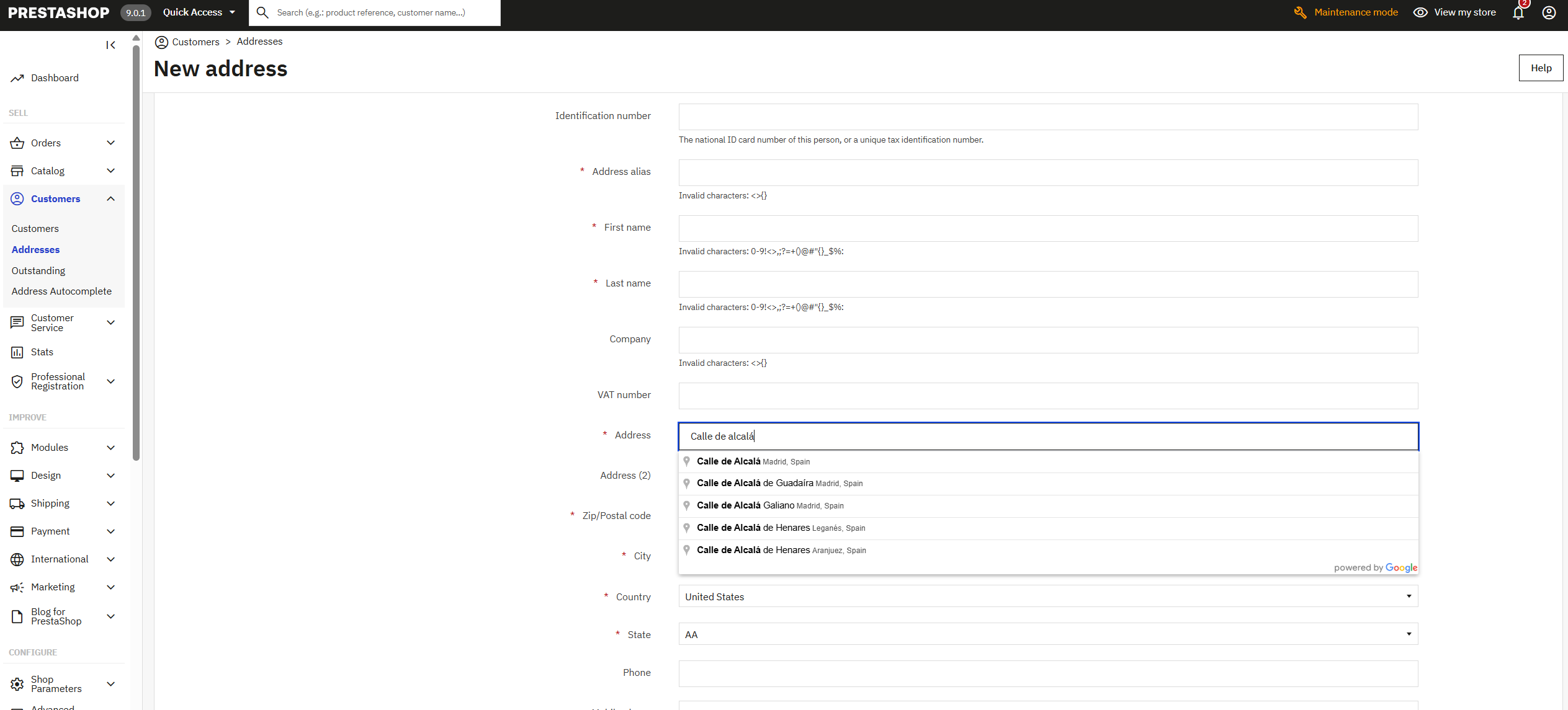
Cuando tú o alguien de tu equipo crea o edita la dirección de un cliente en Clientes › Direcciones, el campo de dirección también sugiere direcciones de Google y rellena el resto: código postal, ciudad, provincia y país. Es lo que más se agradece al tomar un pedido por teléfono o corregir una dirección que ha vuelto.
Una dirección elegida de una lista no lleva erratas.
Cada paquete que vuelve por una calle mal escrita o un código postal equivocado te cuesta dos envíos y un cliente que espera. Con el autocompletado, la dirección no la teclea tu cliente: la elige del catálogo de direcciones de Google, que ya existe y está bien escrita, y los campos se rellenan con los datos que la acompañan. Es la forma más sencilla de validación de direcciones en el momento en que se escriben.
En países como Reino Unido, donde Google a veces devuelve solo la primera mitad del código postal, el módulo busca el código entero para esa dirección.
Los datos de Google se traducen a las provincias o estados que tiene dados de alta tu PrestaShop, y se elige la buena en el desplegable.
Las sugerencias salen en el idioma en que navega: quien compra en francés ve las direcciones en francés.
Un formulario largo es uno de los sitios donde más se abandona una compra. Uno que se rellena solo se termina antes.
A cualquier tienda que envía cosas a una dirección.
Si envías muchos paquetes al día, cada dirección mal escrita que te ahorras es una devolución y una llamada menos.
Si la mayoría de tus clientes compra desde el teléfono, es donde más se nota: unas letras y un toque en vez de cinco campos.
Cada país escribe sus direcciones a su manera. Google las trae ordenadas y el módulo las coloca en los campos que pide PrestaShop para ese país.
Los clientes profesionales dan de alta varias direcciones de entrega. Con el autocompletado, cada una se añade en segundos desde «Mis direcciones».
Si repartes tú en tu zona, limitas las sugerencias a tu país y las direcciones te llegan exactas para la ruta.
Si tu equipo crea pedidos desde el back office, escribe las direcciones de los clientes igual de rápido y sin erratas.
Instalas el módulo, pegas tu clave de API de Google en su pantalla y lo activas. Desde ese momento, el campo «Dirección» del pedido, de «Mis direcciones» y del back office sugiere direcciones de Google. No hay que tocar el tema ni el código.
Sí: el autocompletado lo sirve Google Maps Platform, y la clave se crea gratis en tu cuenta de Google Cloud, que pide una tarjeta para la facturación. Google cobra por uso y cada mes trae un tramo gratuito; una tienda pequeña o mediana normalmente no sale de él. La factura, si llega, es de Google a tu cuenta, sin intermediarios, y puedes fijar un tope diario en la consola para no llevarte sustos.
Sí. En la tienda funciona en PrestaShop 1.7, 8 y 9, en la dirección de envío y en la de facturación del checkout estándar; en el back office, en PrestaShop 8 y 9.
Funciona con los que mantienen la página de pedido de PrestaShop y su campo de dirección estándar. Si tu checkout lo monta un módulo con su propia página, escríbenos antes de comprar con el nombre del módulo y te decimos si encaja.
Sirve para que la dirección llegue bien escrita: tu cliente la elige de las direcciones que Google conoce, con su código postal, ciudad y provincia, en lugar de teclearla. No comprueba el piso ni la puerta, que siguen siendo cosa suya, pero quita las erratas de calle y código postal que más paquetes devuelven.
Google tiene direcciones de prácticamente todo el mundo. Si solo vendes en algunos países, puedes limitar las sugerencias a hasta cinco, que es el máximo que admite Google; sin límite, salen direcciones de todas partes. Para que el país se elija solo, tiene que estar activo en tu tienda.
En «Mis direcciones», sí: al añadir o editar una dirección desde la cuenta. PrestaShop no pide la dirección al registrarse, sino en el primer pedido o en «Mis direcciones», y ahí es donde trabaja el autocompletado.
No en las páginas que no lo necesitan: el script de Google solo se carga, y de forma asíncrona, donde hay un formulario de dirección. La portada, las categorías y las fichas no cargan nada nuevo.
La licencia es tuya para siempre e incluye tres meses de actualizaciones y soporte; con el Plan Continuidad tienes la instalación, el primer año y la renovación anual.
Una pantalla, cuatro ajustes y listo en un par de minutos.
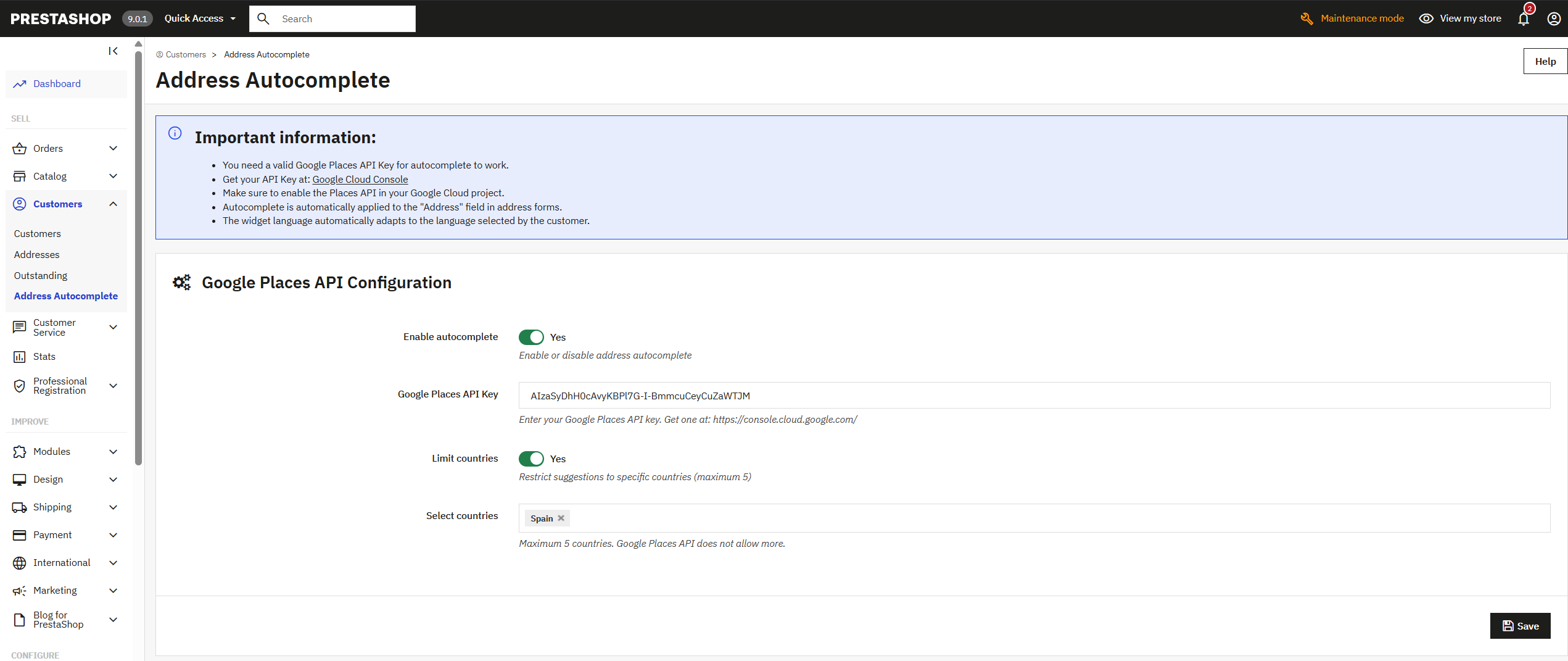
Las sugerencias incluyen direcciones de todo el mundo. Para tiendas que envían a cualquier parte.
Solo salen direcciones de los países elegidos, y las sugerencias son más precisas. Google admite como máximo cinco a la vez.
1. Entra en Google Cloud Console y crea un proyecto. 2. Activa Maps JavaScript API y Places API; si envías a Reino Unido, también Geocoding API, que es la que completa los códigos postales. 3. Crea una clave de API y restríngela a tu dominio. 4. Pégala en la configuración del módulo y actívalo.

El botón y el formulario de desistimiento que la Directiva (UE) 2023/2673 exige a toda tienda PrestaShop desde el…

Transforma tu tienda PrestaShop en un portal B2B profesional: registro validado, verificación automática VIES, tienda…

Protege tus formularios de PrestaShop contra spam y bots con ALTCHA. Alternativa a reCAPTCHA sin depender de Google y…

Vende por suscripción y deja que cada renovación llegue sola como un pedido. Cajas mensuales, recambios, servicios o…

Subes un producto, cambias un precio o retiras una página, y Bing puede tardar días o semanas en enterarse. Este módulo…

¿Has borrado un producto o cambiado una URL y Google sigue mandando visitas a la dirección vieja? Con este módulo…

Vende en PrestaShop productos descargables que además tienen combinaciones: cada variante conserva su precio y su…

Todas las combinaciones de tu producto en una tabla, y al carrito de una vez. Tu cliente ve cada talla y cada color con…

Para tiendas que venden cosas que se compran en pareja: la funda con el móvil, la tinta con la impresora, el kit de…

Cumple la directiva EmpCo: el aviso oficial de garantía de la UE y la etiqueta GARAN del fabricante en tu tienda, en el…

Cada visitante entra en el idioma, la moneda y el precio de su país, de forma automática. Reglas por país, selector con…

Tus comerciales hacen los pedidos de sus clientes en tu tienda, con sus precios y su comisión. Cada comercial entra con…
El botón y el formulario de desistimiento que la Directiva (UE) 2023/2673 exige a toda tienda PrestaShop desde el…

Para productos cuya caja, etiqueta o manual cambia con el idioma. Cada cliente ve solo las imágenes de su idioma y la…

Responde cada petición de presupuesto con tus precios y cobra el pedido en tu propia tienda. Tu cliente arma su…

Pon tu logo, tus colores y tu texto en todos los correos que envía tu tienda: confirmación de pedido, cuenta creada,…
Transforma tu tienda PrestaShop en un portal B2B profesional: registro validado, verificación automática VIES, tienda…
Protege tus formularios de PrestaShop contra spam y bots con ALTCHA. Alternativa a reCAPTCHA sin depender de Google y…

Para tiendas donde los bots recorren todas las combinaciones de filtros y el hosting avisa de CPU al 100 %. Responde…
Un módulo, una app, un servidor que da guerra o algo urgente. Te respondemos en menos de 24 horas, con un presupuesto cerrado con precio y fecha.