Someone has just bought from your shop. They saw a careful home page, product pages with good photos and a checkout that works. Thirty seconds later they get the confirmation email, open it on their phone and find a grey table with five cramped columns and a line at the bottom saying «powered by PrestaShop».
That email is the page of your shop most people open. An order confirmation is opened almost always, and often twice: once when it arrives and once when the courier turns up. No page on your site has that rate. And it is the only one that still looks the way it did the day you installed PrestaShop.
Why they look like that
Your shop sends a lot of different emails: the confirmation, the new account, the password, the shipment, the return, the warehouse alert, plus the ones every module you install adds. Exactly how many depends on what you have installed, but it is rather more than most people think. Each is an HTML file inside the mails folder, one per language, written more than a decade ago with tables and <font> tags.
Changing your shop theme does not touch them. Changing the theme colours does not either. They are separate files, and they live outside everything you have customised.
One detail makes it worse: every PrestaShop update replaces them. If somebody edited them by hand in 2022, that work disappeared at the next version bump without anyone noticing, and the shop went back to sending the factory email.
The table nobody can read on a phone
The most expensive problem is in the most important email. The product list of the confirmation is a five-column table: reference, product, unit price, quantity and total.
On a computer it reads. On a 360-pixel phone, the four columns of numbers take about two hundred and fifty, and the product name is left with eighty. «Long-sleeve technical T-shirt» breaks into five lines of two words, or the whole email overflows the screen and has to be dragged sideways.
Buy something in your own shop and open the confirmation on your phone. It is the quickest test, and the most uncomfortable one.
And there is a second thing you notice once you look: the totals block always shows its five lines, even when there is nothing to say. An order with no discount displays «Discounts 0.00 €». A catalogue with tax included displays «Taxes 0.00 €». And free shipping —which is a selling point— shows up as «Shipping 0.00 €» instead of saying «Free».
The other problem: sending the confirmation again
It happens in every shop. A customer writes saying the order email never arrived, or that they deleted it by mistake, or that they mistyped their address. You open the order in the back office to send it again… and there is no button for it.
There is one for status emails. In the status history of every order, each line has its own resend icon: «Payment accepted», «Processing in progress», «Shipped». It works because a status change is stored as a row, and that row can be used again.
The order confirmation is not a status change. PrestaShop sends it once, from inside the process that validates the order, and it keeps neither the row nor the variables it built the email from. The information is still there —the products, the amounts, the addresses, the carrier— but the email has to be rebuilt from scratch before it can go out again.
What people do instead has a cost: pasting the data into an email written by hand, which arrives without the shop's design and with a real chance of getting an amount wrong; or changing the order status to force a send, which pollutes the history and delivers an email the customer never asked for.
And it is worth knowing what exactly gets resent, because it is not a stored copy of the first email: the module composes it again from the order as it stands now. If you have since corrected the address, removed a line or the carrier changed, the email that arrives carries that data, not the data from the day of the purchase. The only thing that does not change is the order date. For the normal case —"it never arrived"— that is exactly what you want: the customer gets the good information, not the old one.
The three ways to fix it
1. The back-office email theme
Since version 1.7.6 PrestaShop ships an email theme generator. You pick one, press «Generate» and it rewrites the files in mails with a different design.
It is the quickest route and has two limits worth knowing before you start. The first is that it still writes files: a PrestaShop update can overwrite them again and you have to regenerate. The second is that there are few themes available and the room for your brand is narrow: you change the logo and little else.
2. Editing the files by hand
It works and gives full control. It is also one file per email and per language: the count runs away with two languages, and you repeat it every time you install a module that brings its own emails.
This is the route for someone with one language who does not mind email HTML and is going to touch three or four templates, not all of them.
3. Stepping into the send
PrestaShop announces through a few hooks right before it sends each email. There you can change the content on the fly, without touching a single file in mails.
It has an advantage the other two do not: since no files are written, there is nothing an update can take away. And because the change happens at send time, it also reaches the emails of the modules you install tomorrow.
What to check before touching anything
Whichever route you choose, there are five things worth checking in your shop this afternoon:
Open a real email on your phone. Not the back-office preview: place a test order and open it on your own handset.
Check that your emails go out in HTML. Under Advanced Parameters → Email, if it is set to «text only», no design will ever be seen.
Check whether your theme overrides templates. If there is a mails folder inside your theme, those files win over the PrestaShop ones.
Count your languages. That is the number every bit of the work gets multiplied by.
Try to resend a confirmation. Open an order from last week and look for the button. Not finding it is the answer.
How we built ours
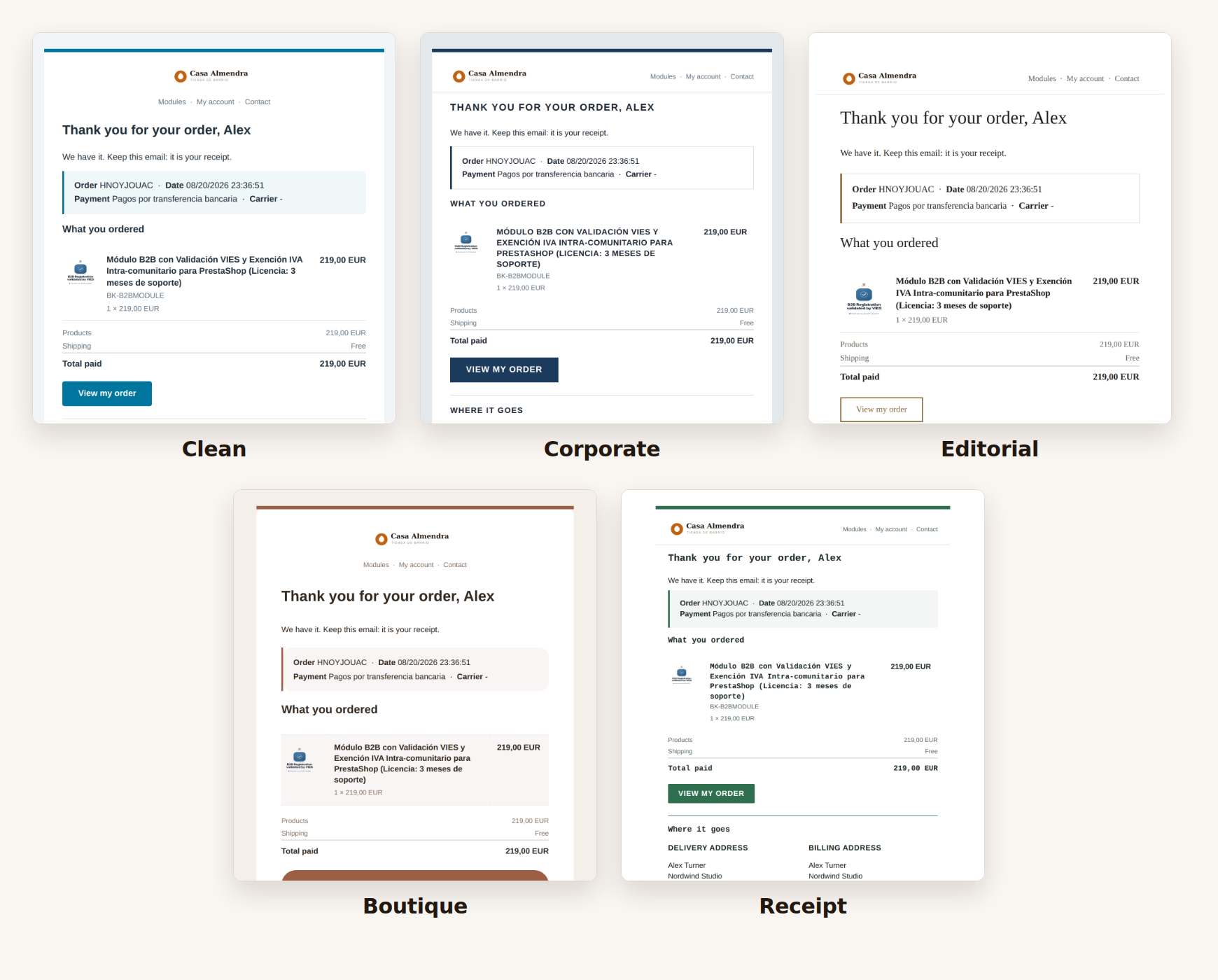
The five designs the module ships with. It is the same order rendered with each one.
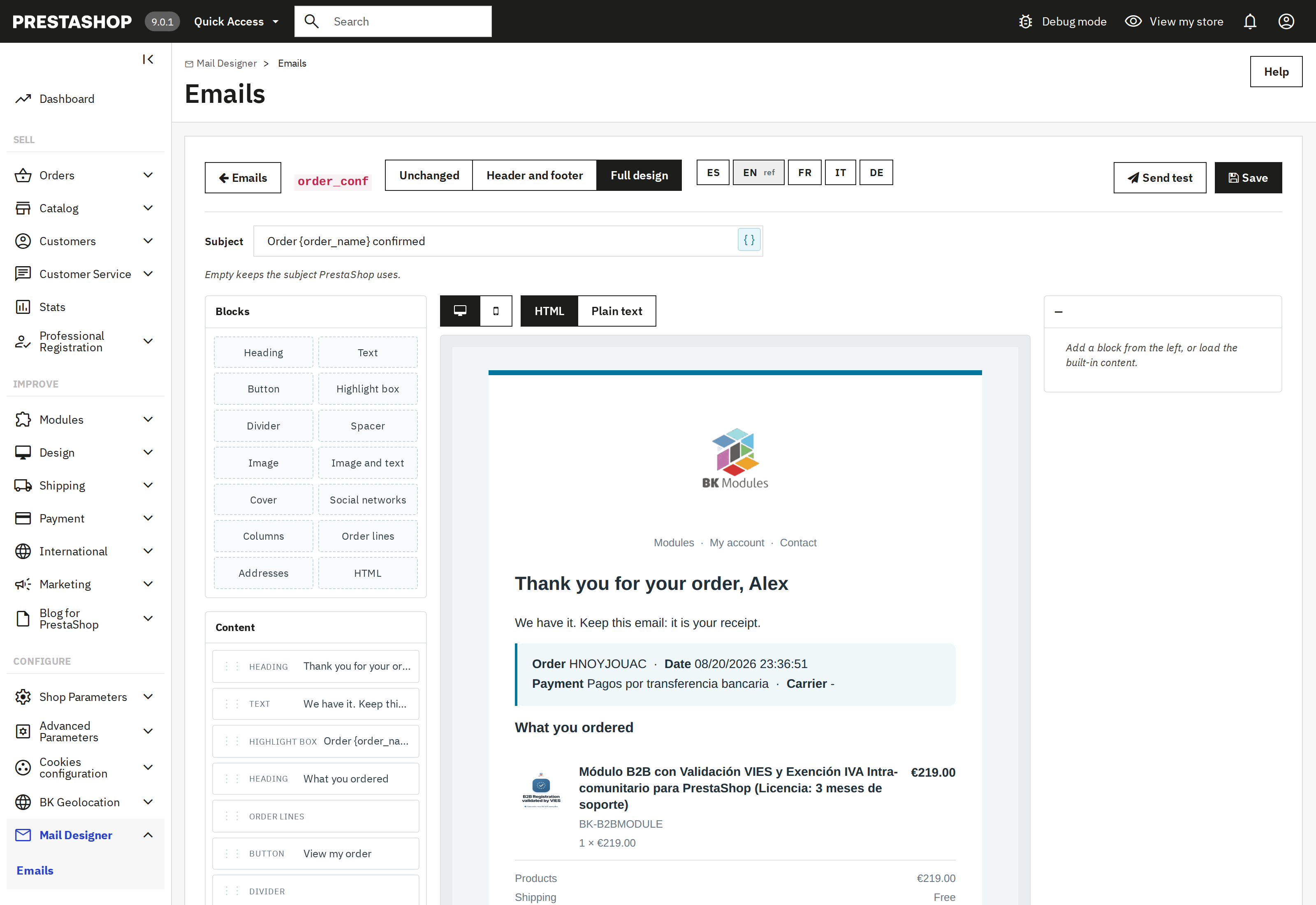
The editor is what stops this being just another template: you add blocks —headings, buttons, images, columns, the product list—, click inside the email to change them, and the result appears beside you as you write. It is not an approximate preview: it is drawn by the same engine that sends the email, so what you see is exactly what reaches the customer.
The editor: blocks on the left, the real email on the right. What you see while you write is what gets sent.
We asked ourselves the question for our own shops and ended up on the third route. The result is the Email Designer for PrestaShop: it hooks into the send, never writes in mails and brings your shop’s emails already written in five languages, so the work is adjusting rather than starting from nothing.
The product list is laid out again as one line per product —photo, name, combination and «2 × 49.99 €» on the left, amount on the right—, which is what makes it read at 320 pixels without dragging anything. And totals that come to zero disappear, with one deliberate exception: free shipping says so in words.
And every order page has a button that sends the confirmation to the customer again, in the order's language and with its real data: the module rebuilds the variables from the stored order and the email goes out the same way the original did, so it arrives exactly as it would have arrived on day one.
Inside there is a block editor with a live preview, five themes with different typefaces and a button that sends any email to your inbox before you leave it running. It is below, with what it costs and what it does.
Put your logo, your colours and your text on every email your shop sends: order confirmation, new account, shipping, password and the ones each module adds. Visual editor, five ready…