Virtual Products with Combinations for PrestaShop

Sell downloadable products that also have combinations in PrestaShop: every variant keeps its own price and its own file, and the order skips the shipping step. Without changing the product type or losing the combinations tab.

$39.99
License
Try Live Demo Test all features now
Instant download after purchase Secure checkout
Virtual Products with Combinations module for PrestaShop

Virtual Products with Combinations for PrestaShop

Selected:
$39.99
PS 1.7+, 8.x, 9.x
SSL Secure
Instant Download
Official Support
14-Day Refund
Licensed

Virtual Products with Combinations for PrestaShop

Sell modules, licences, courses or any downloadable product that has variants. The product keeps its combinations and the order stops asking for a shipping address. For PrestaShop 1.7.6 up to 9.x, classic and modern product page.

PrestaShop makes you choose. This module does not.

Virtual product or product with combinations

As soon as you mark a product as virtual, PrestaShop changes its type and hides the combinations tab: you lose the variants. Keep the combinations and your customer has to walk through the shipping step for a product that is downloaded. bkvirtualcombinations separates the two ideas: how the product is edited and whether it ships.

One switch on the product page

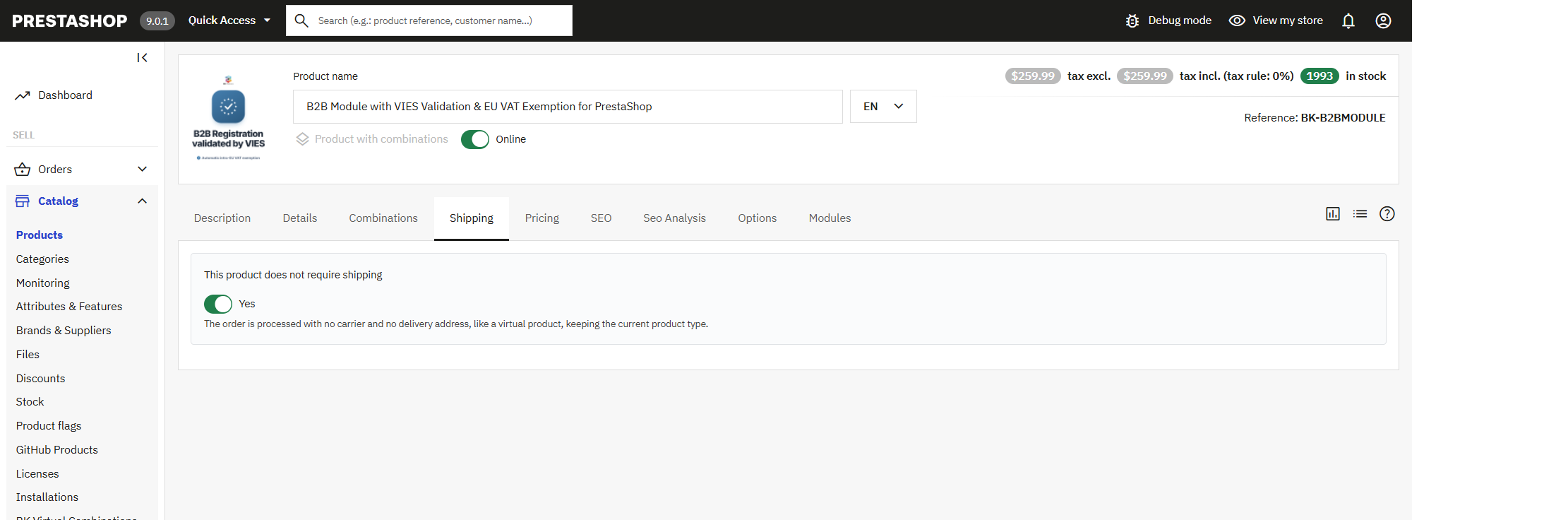
The switch lives in the Shipping tab of the product page and it is the only thing you touch. The product is still a product with combinations, the Combinations tab stays where it was, and the order is processed with no carrier and no delivery address.

Switch “this product does not require shipping” in the Shipping tab of a PrestaShop product with combinations

Main features

A shipping switch of its own

One switch on the product page: “this product does not require shipping”. The product type does not change and the combinations stay where they were.

Combinations untouched

Licence duration, format, level, number of domains: every variant keeps its price, its reference and its stock.

Checkout without the shipping step

The cart is recognised as virtual: no carriers, no delivery address, no shipping costs. One step less before payment.

One file per combination

Upload the file that belongs to each variant. The customer downloads exactly the one they bought, from their order detail.

Downloads under control

Validity in days and a maximum number of downloads per order. Leave both at zero and the download never expires.

A notice on the page, in every language

An optional label on the product page states that there are no shipping costs. The text is edited per language.

A checkout with no shipping step

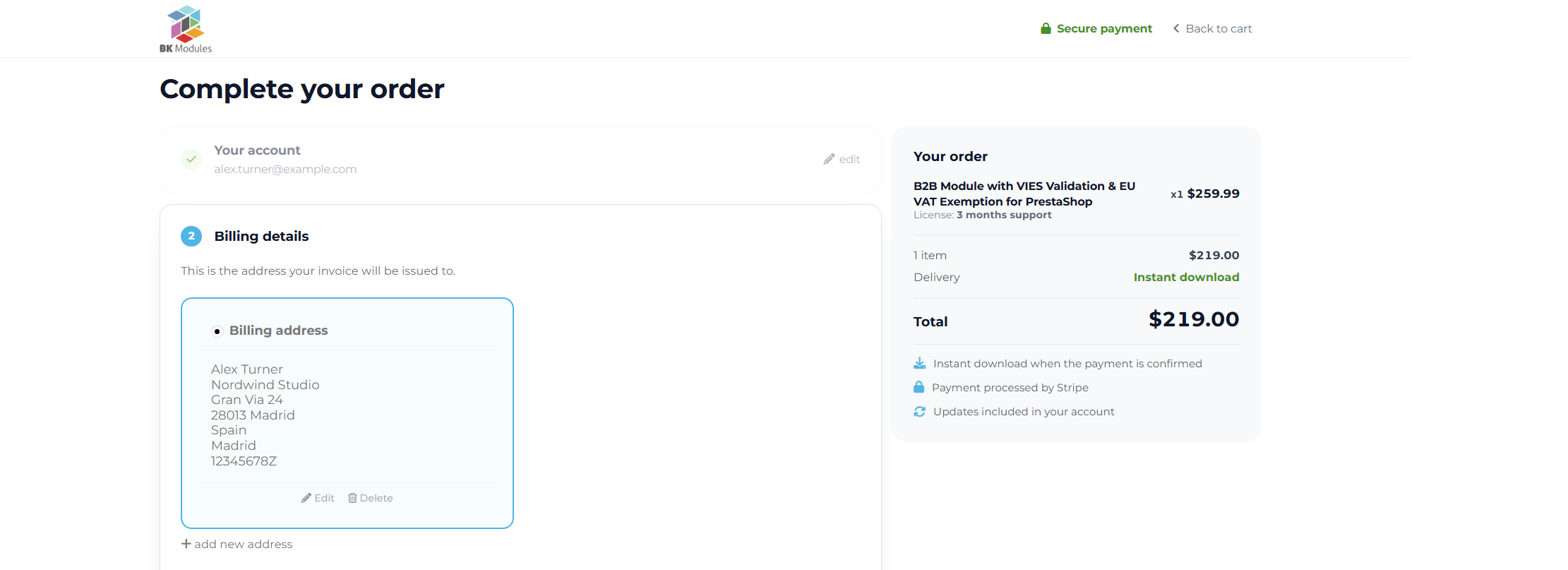
The cart is recognised as virtual, so PrestaShop skips carriers, delivery address and shipping costs. The customer goes from the cart to payment one step sooner, and the order summary reads “instant download” instead of a carrier name.

PrestaShop checkout of a downloadable product with combinations: account, billing details and payment, with no shipping step

How it works

Mark the product

On the product page, turn on “this product does not require shipping”. The module takes care of the rest: no need to touch the type or the combinations.

Attach the files

With digital delivery enabled, each combination shows its own file field in the Modules tab of the product page.

Sell

The customer picks a variant, pays with no shipping step and downloads the file from the order.

Shipping fields disappear from the product page

Weight, dimensions and carriers are hidden on marked products, so nobody fills in data that will never be used. It is optional and can be switched off in the module settings.

One file per combination, delivered from the order

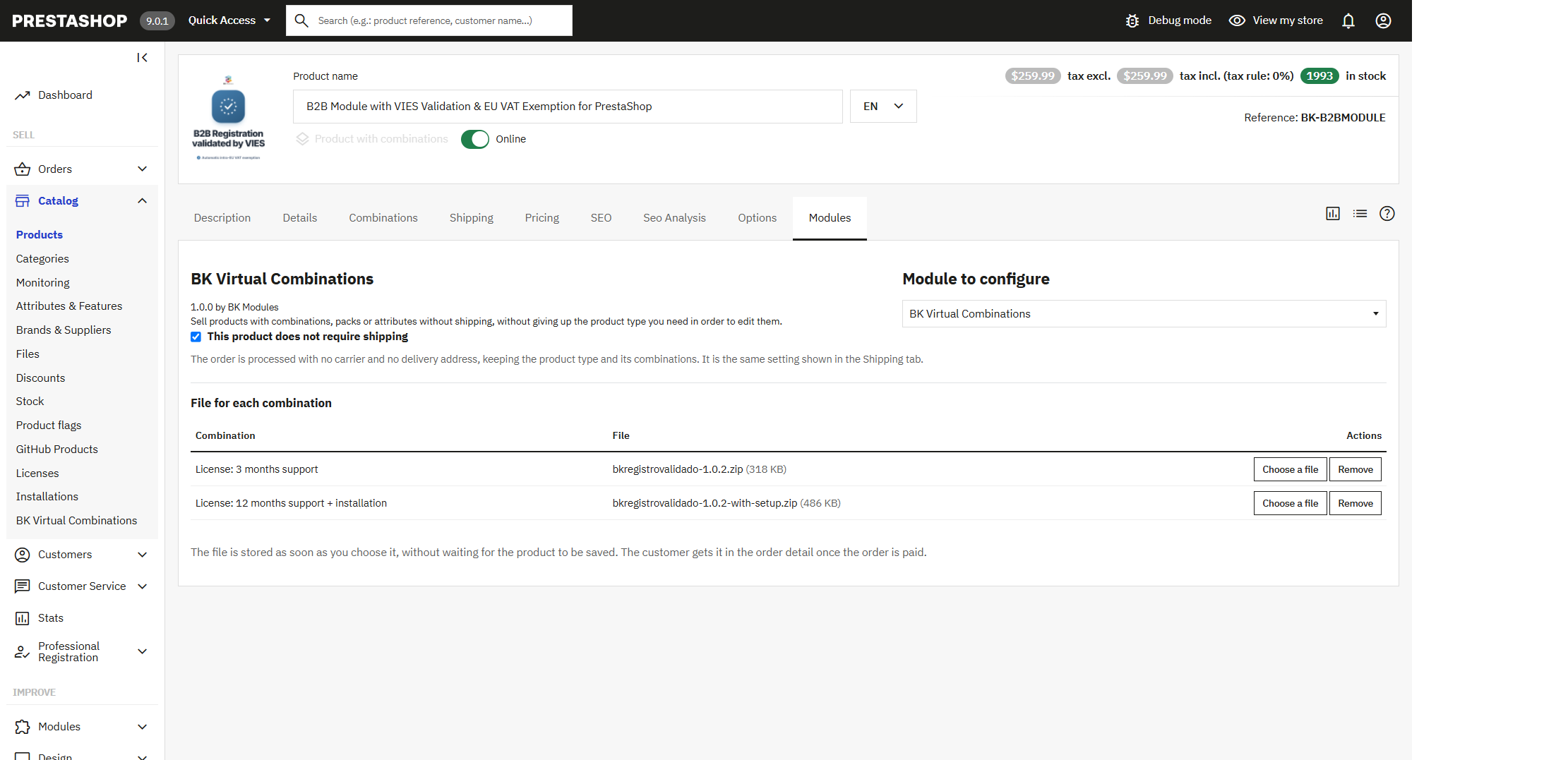
PrestaShop allows a single file per product. With the optional delivery enabled, each combination carries its own: the customer downloads exactly the variant they paid for, from the order detail, within the days and the number of downloads you allow.

File for each combination in the Modules tab of a PrestaShop product page

What it is for

Software and module licences

One combination per support duration or number of domains, each with its price and its ZIP file.

Courses and training

Basic, advanced or full pack: variants of the same course, each with its own material.

Ebooks and digital content

The same title in EPUB, PDF or MOBI, without splitting the page — and the SEO — across three products.

Bundles and services

Bundles mixing downloadable content with services sold by duration.

Everything under control from one panel

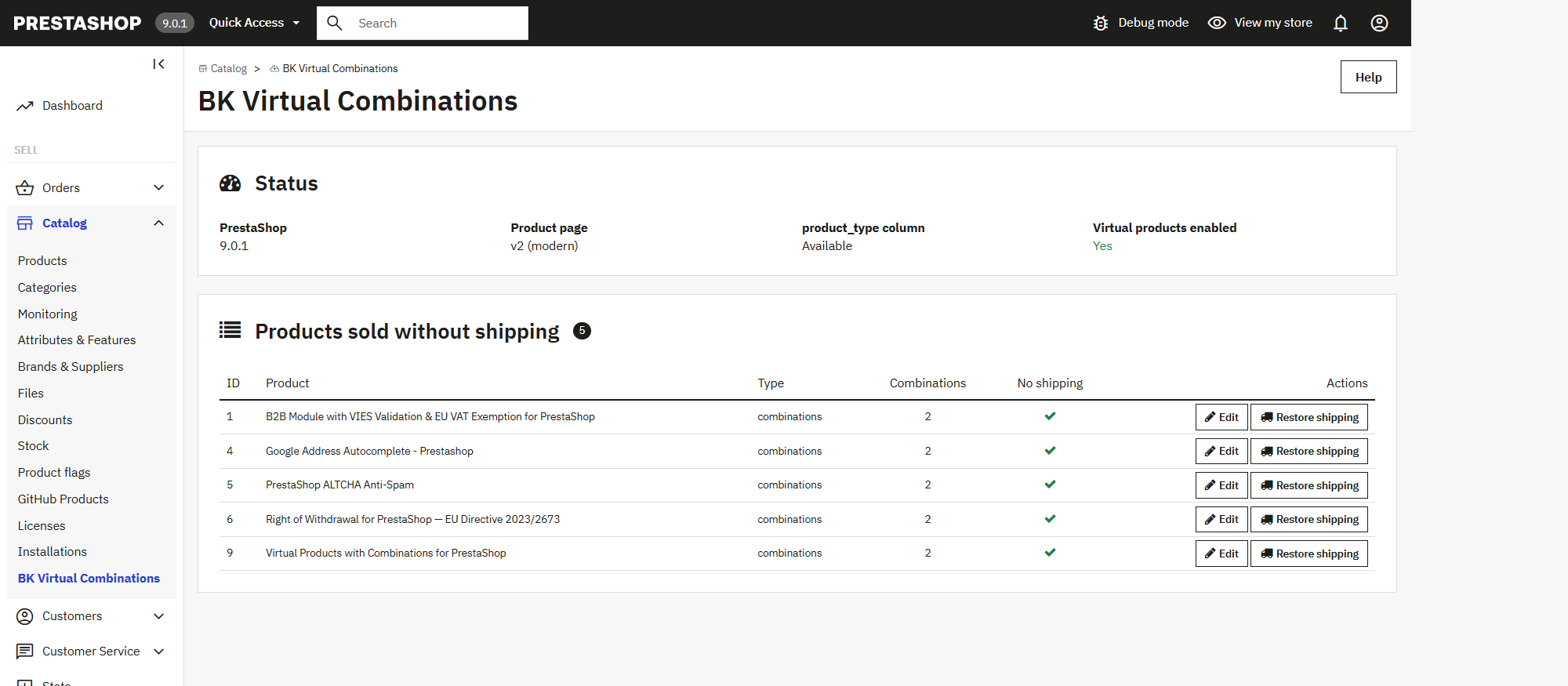
Under Catalog → BK Virtual Combinations the panel tells you what your PrestaShop supports, lists every product sold without shipping and lets you put any of them back to shipping with one click.

BK Virtual Combinations panel in the PrestaShop back office listing the products sold without shipping

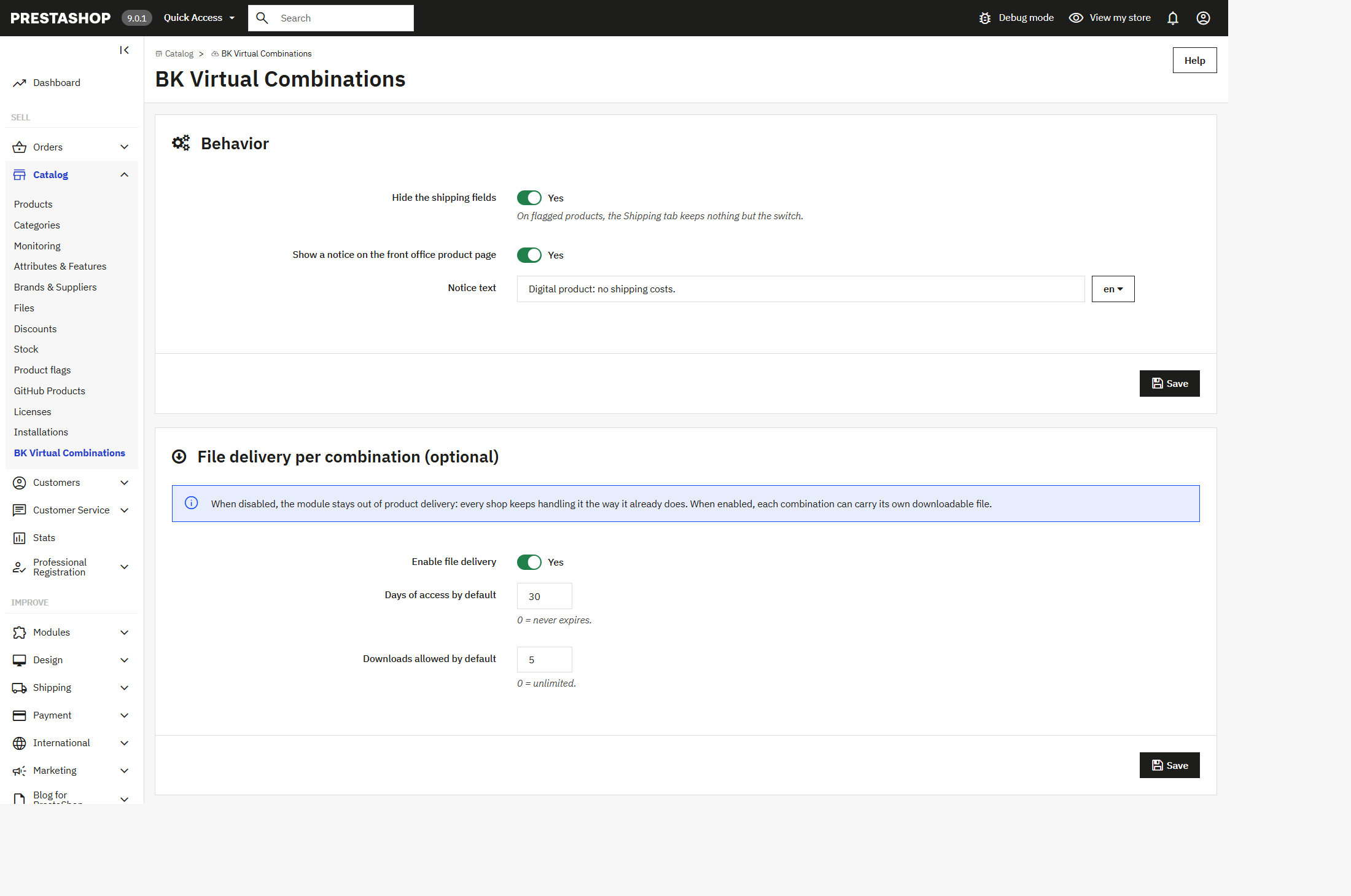
From the same screen you decide whether the shipping fields are hidden, write the notice the customer reads in each language and set the validity in days and the maximum number of downloads of the digital delivery.

BK Virtual Combinations module settings: hide the shipping fields, front office notice and download limits

Fits your shop

Versions and product pages
  • PrestaShop 1.7.6 up to 9.x
  • Classic and modern product page, same switch on both
  • Multistore compatible
  • No core file is overridden
What the module leaves alone
  • The stock policy of each product
  • Any product you have not marked
  • The product type you chose
  • Orders that were already placed

Frequently asked questions

Can a virtual product have combinations in PrestaShop?

Not on its own: choosing the virtual type hides the Combinations tab. With this module the product keeps the type you need — standard, pack or combinations — and only its shipping behaviour changes.

Does it work on PrestaShop 8 and PrestaShop 9?

Yes. It covers PrestaShop 1.7.6 to 9.x and serves both the classic product page and the modern one with the same switch.

Does it override any core file?

No. The module works through hooks on the product page and on saving: no core file and no template of your theme is overridden.

What happens to existing orders if I uninstall the module?

Nothing. Products keep their “no shipping” state and the checkout behaves the same: uninstalling does not change a running shop.

Can I sell bundles without shipping?

Yes. Besides combinations, it works with packs and with standard products: any product can be sold without shipping while keeping its type.

Do I need the module to deliver the files?

Per-combination digital delivery is included. If you prefer your own download system, leave that option off and use only the shipping switch.

What if one variant is downloadable and another one ships?

Shipping is a property of the product, not of the combination: mark only the products that are delivered entirely by download.

Turn your ecommerce into your best salesperson

Ready to boost your PrestaShop store? Let's discuss your project and create something amazing together.

Contact us now